> For the complete documentation index, see [llms.txt](https://guides.clickatell.com/flow/llms.txt). Markdown versions of documentation pages are available by appending `.md` to page URLs; this page is available as [Markdown](https://guides.clickatell.com/flow/action-nodes/action-nodes-number-format.md).
# Number Format
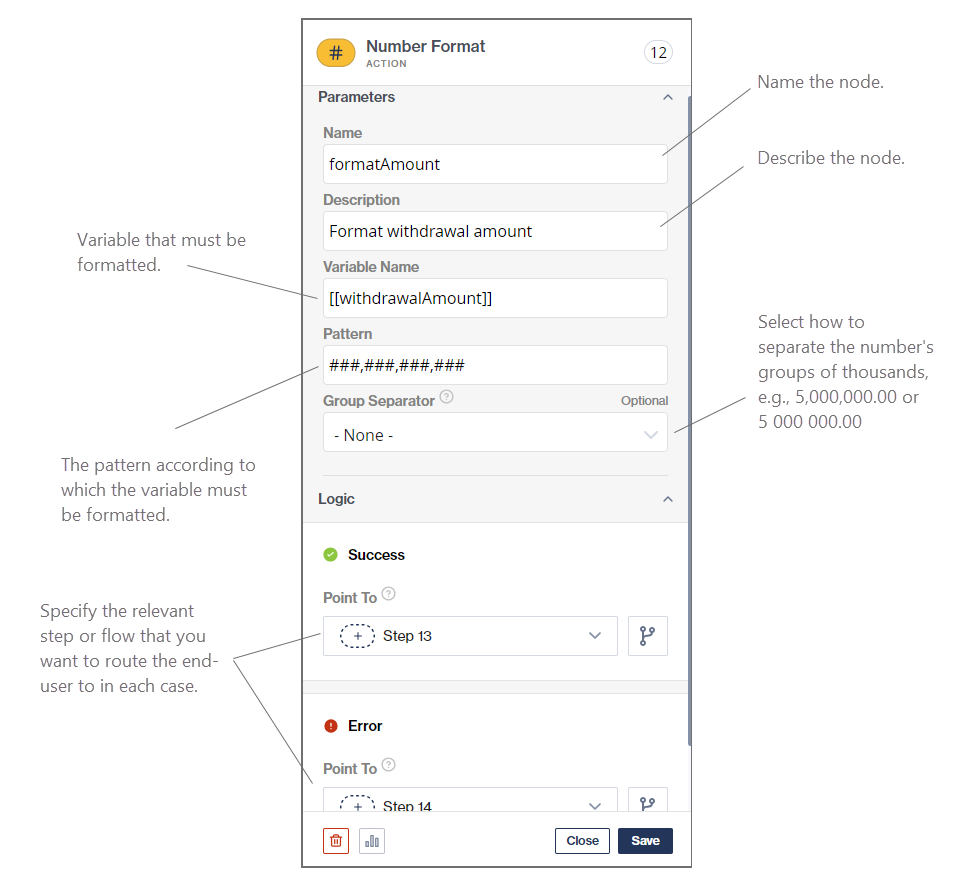
The *Number Format* action node reformats a number input into another specified format.
This node is typically used after a [*Request Input* ](/flow/user-facing-nodes/input-nodes/menu-nodes-ask-for-input.md)node where a customer is required to provide a number or an API call where a number is returned.
Setup of a Number Format node

### Examples:
This table describes some common number formatting patterns you can make use of in Chat Flow.
| Pattern | Description | Example input | Example formatting |
| -------- | ----------------------------------------------------------------------------------------------------------------------------------------- | ------------- | ------------------------------------------------- |
| # | Used to indicate groupings; used with either "," or "." to specify groupings | 123123.1 | ###,###.## = 123,123.1 or ######,## = 123123,1 |
| 0 |
Used to indicate groupings and the exact number of digits to be displayed;
used with either "," or "." to specify groupings
| 1234.5 | ###,###.00 = 1,234.50 or 000,000.00 = 001,234.50 |
| Currency | Currency indicators can be set as a prefix to patterns | 1234.5 | $###,###.00 = $1,234.50 |