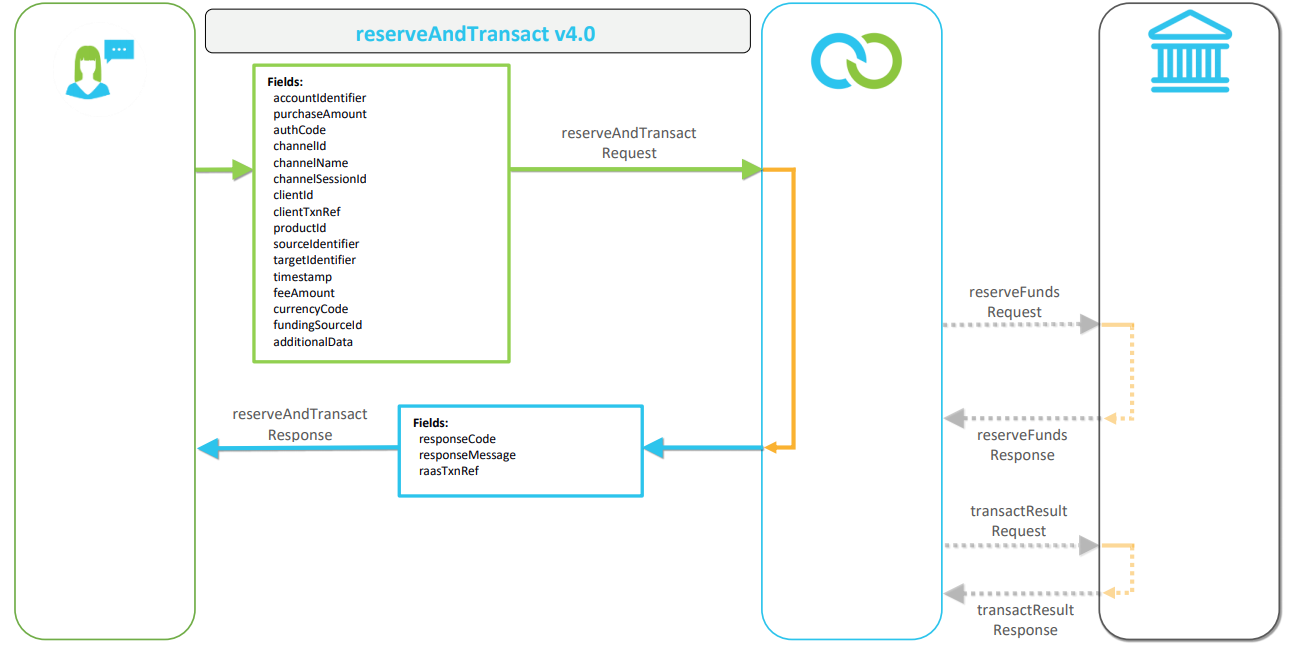
Reserve & Transact API
Why use this API?
The Reserve and Transact API initiates a purchase and fund reservation request to Clickatell.
This API is used when you require Clickatell to do the fund reservations before a purchase request. If you want to reserve funds yourself before sending Clickatell the purchase request, use the Transact API instead.
❗IMPORTANT❗
This API will initiate a reserveFunds Request as discussed in the Bank Interfaces quick-start guide before dispensing the selected product. Therefore, the Bank Interfaces (that includes the reserveFunds request) and the Transact Result API need to be implemented with this API.
Participating parties
See here for definitions.
Buyer
Clickatell
Client
Bank
Supplier
Recipient
Getting started with the Reserve and Transact API
To interface with Clickatell, the following needs to be set up, configured, and tested.
Implement the Bank Interfaces APIs
Please follow the instructions in the Bank Interfaces quick-start guide.
Integrate with Security Service API
Follow the instructions in the Security Service API quick-start guide to request a token with your client_secret and client_id.
Use the API_key and access_token in the following request (Step 3).
Call Financial Terms Lookup API
Follow the instructions in the Financial Terms Lookup API quick-start guide.
Add the API_key and access_token to the request header.
Use the client_id supplied during integration.
Call Reserve and Transact API (this API)
Add the API_key and access_token to the request header.
Use the client_id supplied during integration.
The following API calls are not discussed in this document as they form part of the respective API’s documentation as indicated below:
Security Service API quick-start guide
token Request
token Response
Financial Terms Lookup API quick-start guide
financial terms lookup Request
financial terms lookup Response
Bank Interfaces quick-start guide
reserveFunds Request
reserveFunds Response
transactResult Request
transactResult Response