> For the complete documentation index, see [llms.txt](https://guides.clickatell.com/release-notes/llms.txt). Markdown versions of documentation pages are available by appending `.md` to page URLs; this page is available as [Markdown](https://guides.clickatell.com/release-notes/release-notes-archive/2024-release-notes/q1-2024/self-service-chatbot/support-for-location-templates-and-location-request-messages.md).
# Support for location templates and location request messages
Release date: 15 February 2024
This release focused on adding support for the following WhatsApp features in Chat Flow:
* [*Location*-type message template](https://guides.clickatell.com/release-notes/q1-jan-mar-2024/self-service-chatbot/support-for-location-templates-and-location-request-messages#business-triggered-messages)
* [Location request interactive message type](https://guides.clickatell.com/release-notes/q1-jan-mar-2024/self-service-chatbot/support-for-location-templates-and-location-request-messages#whatsapp-template-node)
This enables businesses to easily share a location with their customers via WhatsApp as part of a workflow. Businesses can also request customers to send their location with the tap of a button.
We also addressed some **bugs**, continually enhancing our applications and making our customers' experience smoother.
We'll describe some of the highlights of this release in more detail below.
### Location template
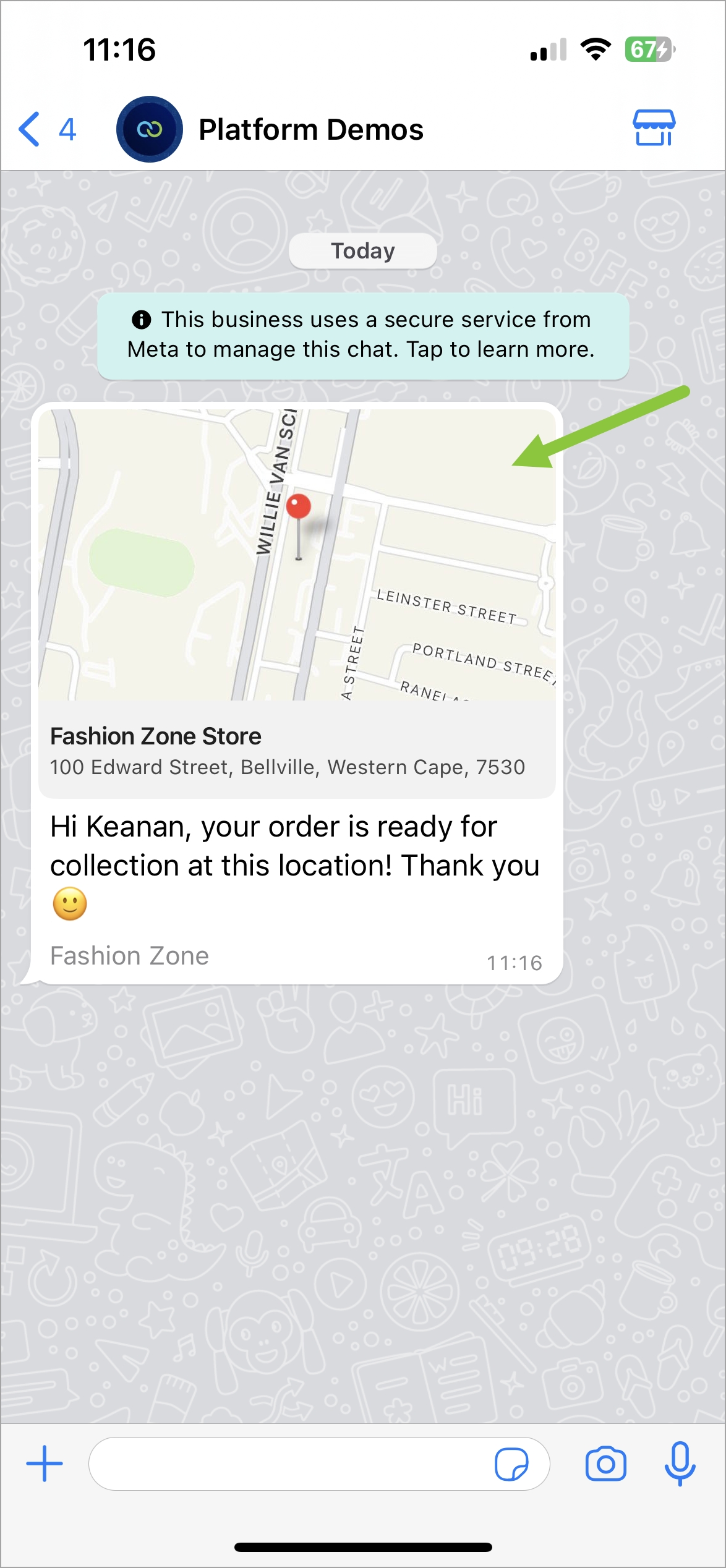
The location template is now supported on the [*Send Template*](https://guides.clickatell.com/flow/action-nodes/send-template) node in Chat Flow and can be sent as part of workflows. This is especially useful for order tracking, delivery updates, ride-hailing pickup/dropoff, locating physical stores, etc.
The [location message template](https://guides.clickatell.com/whatsapp-channel/channel-capabilities/whatsapp-message-templates/use-location-in-message-templates) lets businesses share a specific location with their customers by including the location in the header of a message template. When tapped, the user's default map app will open and load the specified location.
Note that location headers can only be used in Utility and Marketing templates, and on the Cloud environment. Real-time (live) locations are not supported.
{% hint style="success" %}
**Learn more:**
* [WhatsApp User Guide](https://guides.clickatell.com/whatsapp-channel/channel-capabilities/whatsapp-message-templates/use-location-in-message-templates)
* [Send Template Node](https://guides.clickatell.com/flow/action-nodes/send-template)
* [Sending and requesting location in WhatsApp](https://guides.clickatell.com/release-notes/q1-jan-mar-2024/channel-updates/sending-and-requesting-locations-on-whatsapp)
{% endhint %}
Location Template: Customer's experience on WhatsApp
### Location request interactive message
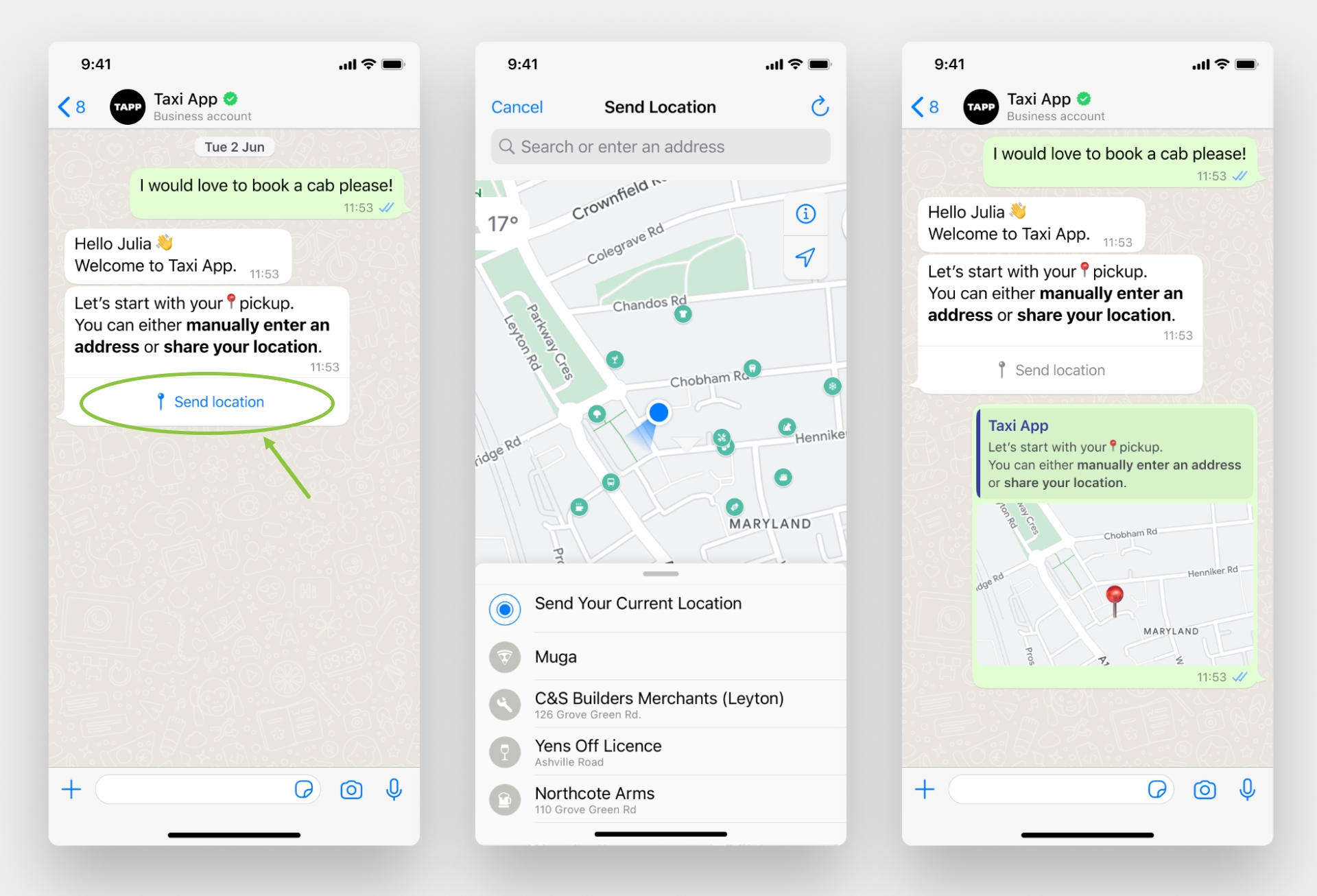
With this release, we updated the [*Location Sharing*](https://guides.clickatell.com/flow/user-facing-nodes/display-nodes/location-sharing) node to allow a business to request a location from a customer and give the customer an easy, structured way to share their location. Tapping the *Send location* button displays a location-sharing screen that the customer can use to share their location with the business.
Note that the "Send Location" button text cannot be edited. Real-time (live) locations are not supported.
{% hint style="success" %}
**Learn more:**
* [WhatsApp User Guide](https://guides.clickatell.com/whatsapp-channel/channel-capabilities/interactive-messages-lists-reply-buttons-location-requests#how-to-set-up-interactive-messages-1)
* [Location Sharing Node](https://guides.clickatell.com/flow/user-facing-nodes/display-nodes/location-sharing)
* [Sending and requesting location in WhatsApp](https://guides.clickatell.com/release-notes/q1-jan-mar-2024/channel-updates/sending-and-requesting-locations-on-whatsapp)
{% endhint %}
Location request interactive message as seen by customers in WhatsApp