# SAML & Social Login

We've launched Social and SAML Login as two additional ways for you to log in to your account.

Previously, you could only log in using an email address and password. Now you also have the ability to sign in using your Google account or via single sign-on using the credentials for the IDP as set up in your Clickatell account. This allows for quicker and easier sign-in without compromising the security of your accounts.

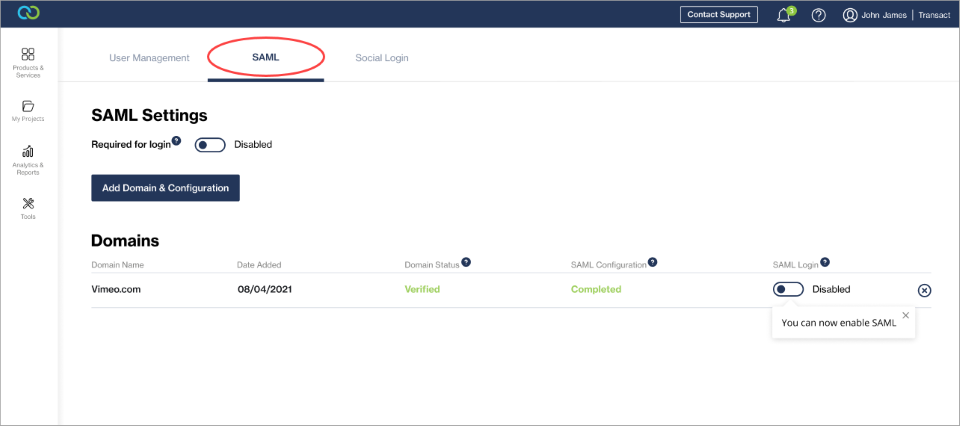
SAML and Social Login can be managed from within the Clickatell Portal by clicking on the account name and selecting "*User Management"* from the drop-down.​​​​​​​

<figure><img src="/files/AN3Z9Ja6CfzFQXJndjxH" alt=""><figcaption><p>Add and configure domains, and enable/disable SAML as a sign-in method for users of the Clickatell Portal.</p></figcaption></figure>

<figure><img src="/files/cW9BOpE1JQCnBa0PaoCq" alt=""><figcaption><p>Enable/disable Google as a sign-in option.</p></figcaption></figure>


---

# Agent Instructions: Querying This Documentation

If you need additional information that is not directly available in this page, you can query the documentation dynamically by asking a question.

Perform an HTTP GET request on the current page URL with the `ask` query parameter:

```
GET https://guides.clickatell.com/release-notes/release-notes-archive/2023-release-notes/q2-2023/other-enhancements-and-improvements/saml-and-social-login.md?ask=<question>
```

The question should be specific, self-contained, and written in natural language.
The response will contain a direct answer to the question and relevant excerpts and sources from the documentation.

Use this mechanism when the answer is not explicitly present in the current page, you need clarification or additional context, or you want to retrieve related documentation sections.
