# Release notes

## 10 DLC Brand Resubmission

Release date: 9 December 2021

When you purchase [a new long number](https://clickatell.gitbook.io/sms-user-guide/long-numbers) for the United States, you are required to register a 10DLC brand and campaign first. Upon successful submission of the application, a brand status - *verified* or *unverified* - is returned from the Campaign Registry. A user cannot proceed with a campaign application until the brand is verified by the Campaign Registry.

After this release, users can now *resubmit* a brand that was returned with an "unverified" status instead of having to start the application process from scratch. The user can select any of their unverified brands and choose to resubmit the registration.

{% hint style="info" %}
Note that for every brand submission or resubmission a fixed application fee is charged.
{% endhint %}

<figure><img src="https://2380245535-files.gitbook.io/~/files/v0/b/gitbook-x-prod.appspot.com/o/spaces%2Fl8ao2e7ogQyZBti1BuxA%2Fuploads%2FcLFDlZ3pgqYQFwwFaibF%2Fimage.png?alt=media&#x26;token=2b5fd5fe-ab43-4488-b9c0-d75276741279" alt=""><figcaption></figcaption></figure>

The unverified brand application details can be edited and resubmitted for approval. The user can only proceed with a resubmission if some information was edited. Brand verification after resubmission is not guaranteed and the result can still remain unchanged.

<figure><img src="https://2380245535-files.gitbook.io/~/files/v0/b/gitbook-x-prod.appspot.com/o/spaces%2Fl8ao2e7ogQyZBti1BuxA%2Fuploads%2Fd7z9g2ltuGq2hlfPdBvc%2Fimage.png?alt=media&#x26;token=e8588d3d-728d-4948-9080-6c6bbf2d3672" alt=""><figcaption></figcaption></figure>

## Emulator (Previewer) enhancements

Release date: 18 November 2021

### Release Summary

This release included a number of feature enhancements, user interface updates, operational improvements, as well as a couple of bug fixes.

#### **Enhancements**

**Emulator Channel Parity (Generic Features)**

When creating flows, the [Chat Flow Previewer ](https://clickatell.gitbook.io/flow/workflow-management/using-the-previewer)allows the flow-builder to preview and test their flows to ensure the flow functions as expected. The Previewer emulates to the flow-builder how the flow would be experienced by end-users.

We are in the process to ensure that all available features and functions are supported on the Previewer. With this release, we've completed Phase 1 which included "generic features", i.e., features that are common across most channels.

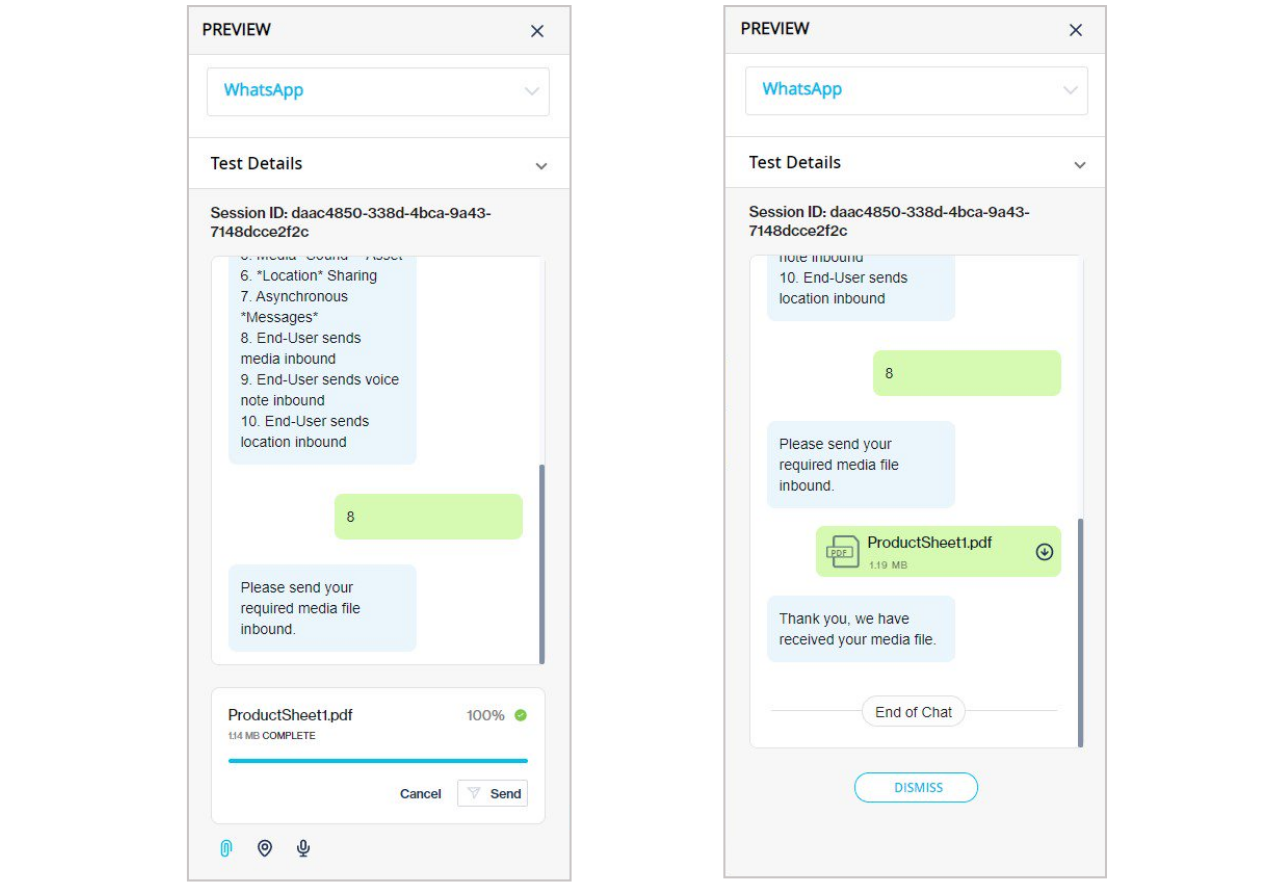
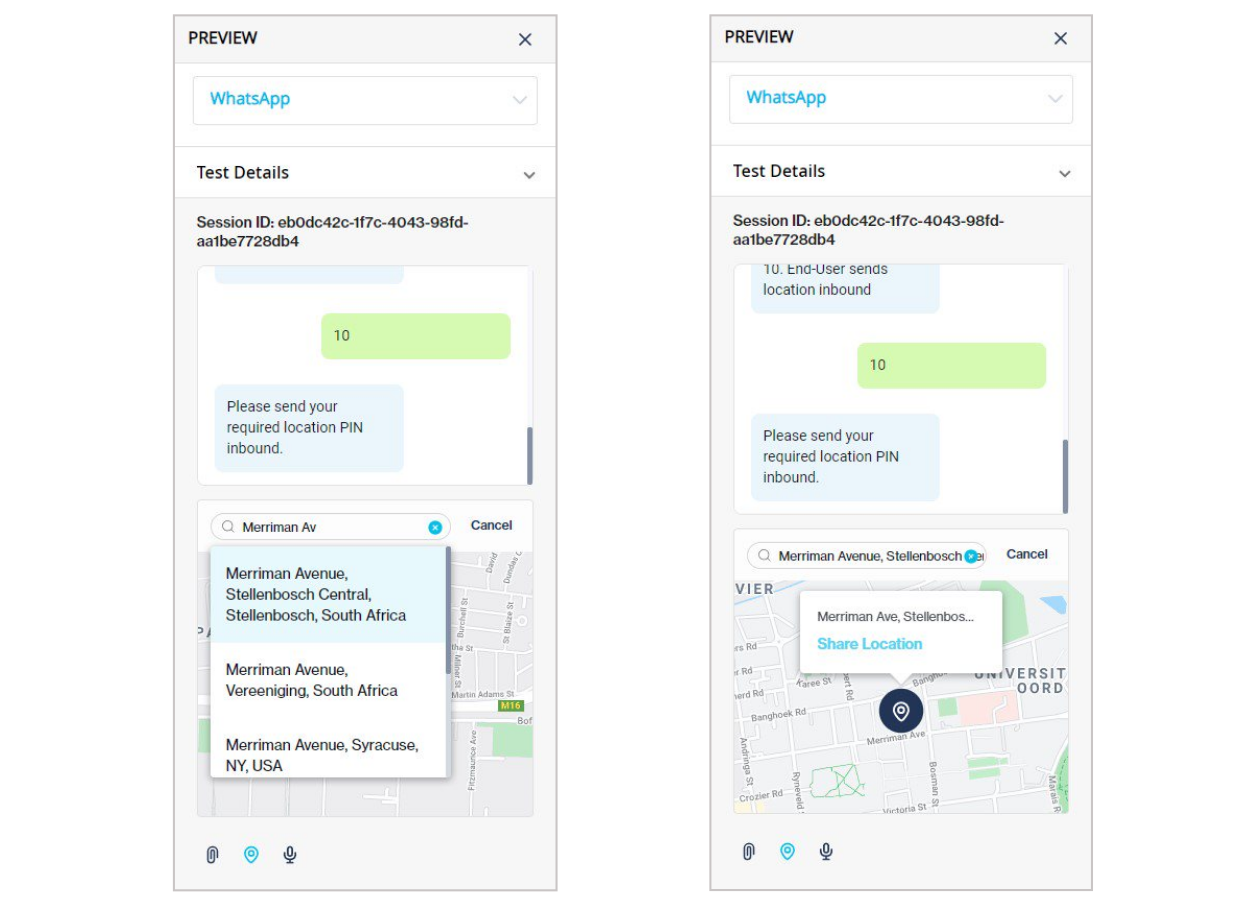
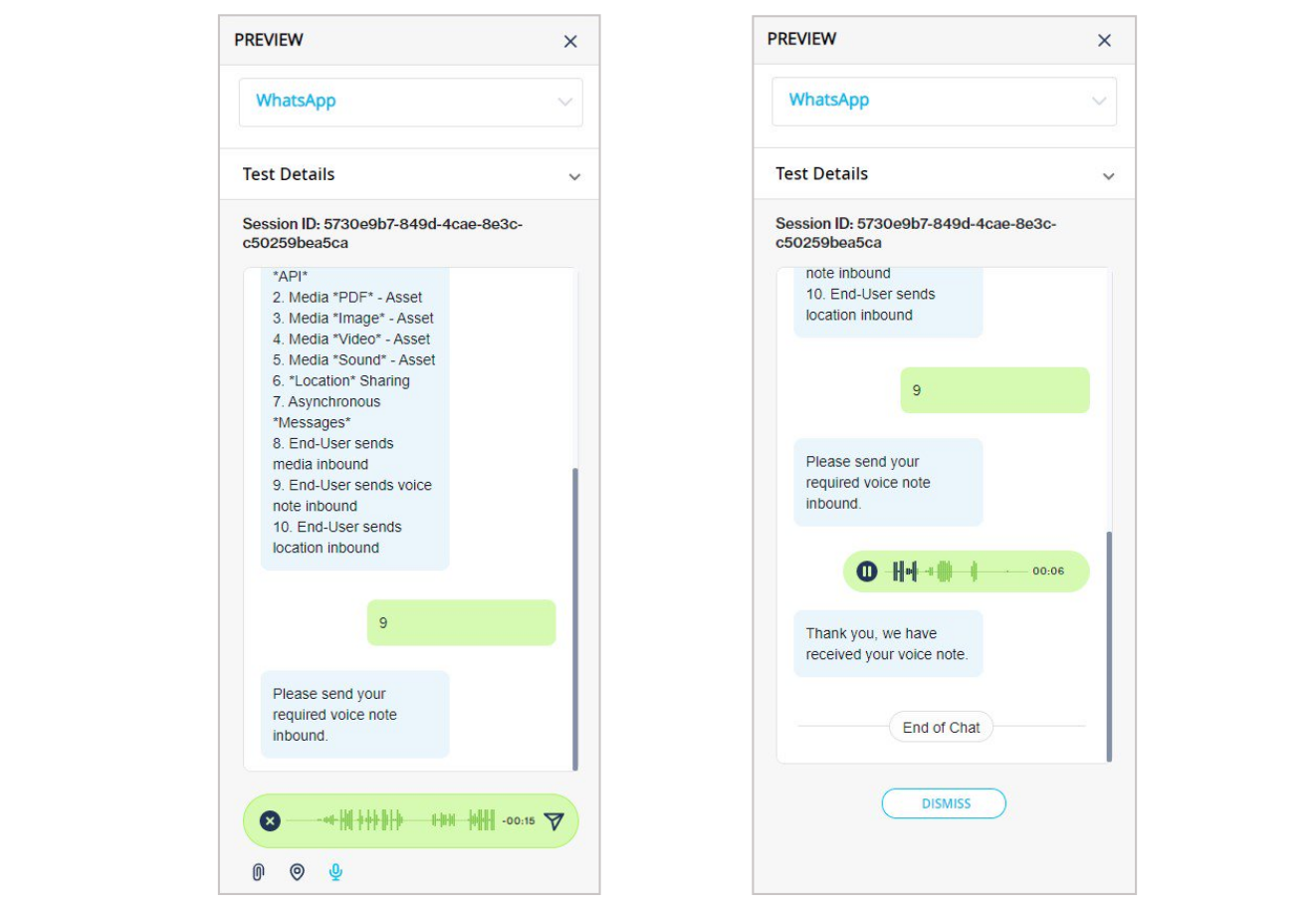
The new features that are now supported by the Previewer are:

* Sending and receiving media
* Sending and receiving voice notes
* Viewing images
* Playing videos
* Downloading files
* Sharing locations
* Character count (applicable to USSD and SMS channels)

  <div data-gb-custom-block data-tag="hint" data-style="info" class="hint hint-info"><p><em><strong>Note:</strong></em></p></div>
* "Sending" is from the Chat Flow bot that was built to the end-user so that the flow-builder can visualize what and how the user will receive the file
* "Receiving" is for the flow-builder to mimic the end-user by sending media/voice/location inbound (i.e., the Chat Flow bot that was built is receiving it)
* Viewing images and playing videos are for the flow-builder to test that media is working correctly

<figure><img src="https://2380245535-files.gitbook.io/~/files/v0/b/gitbook-x-prod.appspot.com/o/spaces%2Fl8ao2e7ogQyZBti1BuxA%2Fuploads%2FDBFUtEnzX9bu122NpmU8%2Fimage.png?alt=media&#x26;token=b0ce3d8a-bc34-4327-97d4-e775eb39adeb" alt=""><figcaption><p>Preview the sharing media files</p></figcaption></figure>

<figure><img src="https://2380245535-files.gitbook.io/~/files/v0/b/gitbook-x-prod.appspot.com/o/spaces%2Fl8ao2e7ogQyZBti1BuxA%2Fuploads%2FYUGNUVwXRnidYgynVHhz%2Fimage.png?alt=media&#x26;token=1dbe1785-b14a-4821-aacc-a71fb1cf4fc3" alt=""><figcaption><p>Preview the sharing of locations</p></figcaption></figure>

<figure><img src="https://2380245535-files.gitbook.io/~/files/v0/b/gitbook-x-prod.appspot.com/o/spaces%2Fl8ao2e7ogQyZBti1BuxA%2Fuploads%2FmXbGiavPf4U7KPreDpoT%2Fimage.png?alt=media&#x26;token=4bcb1032-f5a2-4e01-9693-00a151e7c26b" alt=""><figcaption><p>Preview the receiving of a voice note</p></figcaption></figure>

## New: Chat Flow and Chat Desk reports

Release date: 5 November 2021

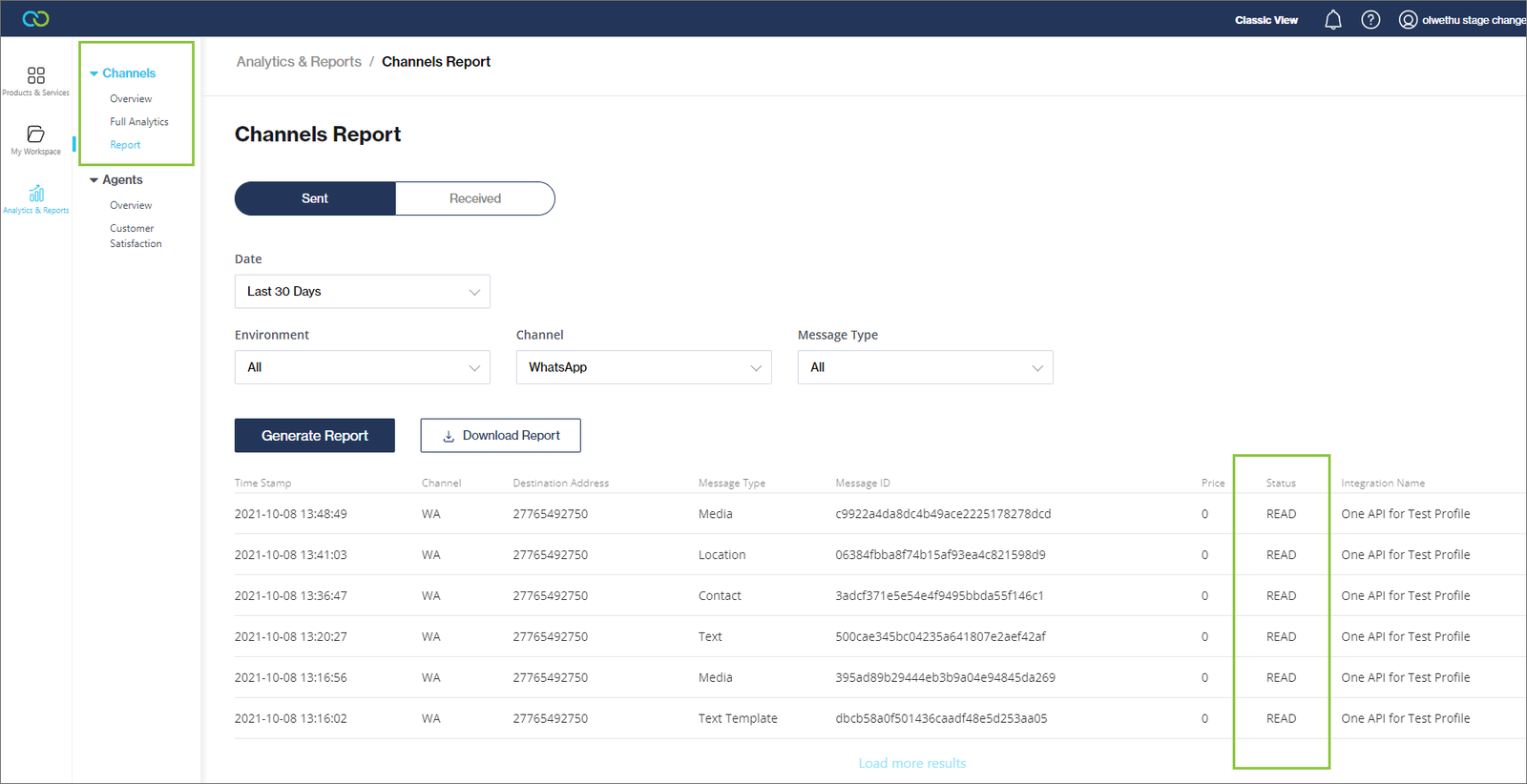
Two new reports were added to the [*Analytics & Reports*](https://clickatell.gitbook.io/chat-commerce-platform/navigation-and-access/reporting-and-analytics) section in the Clickatell Portal for users of the Chat Flow and Chat Desk products. An additional column was also added to the "Channels" report to indicate the read status of WhatsApp messages.

**Chat Flow Full Analytics**

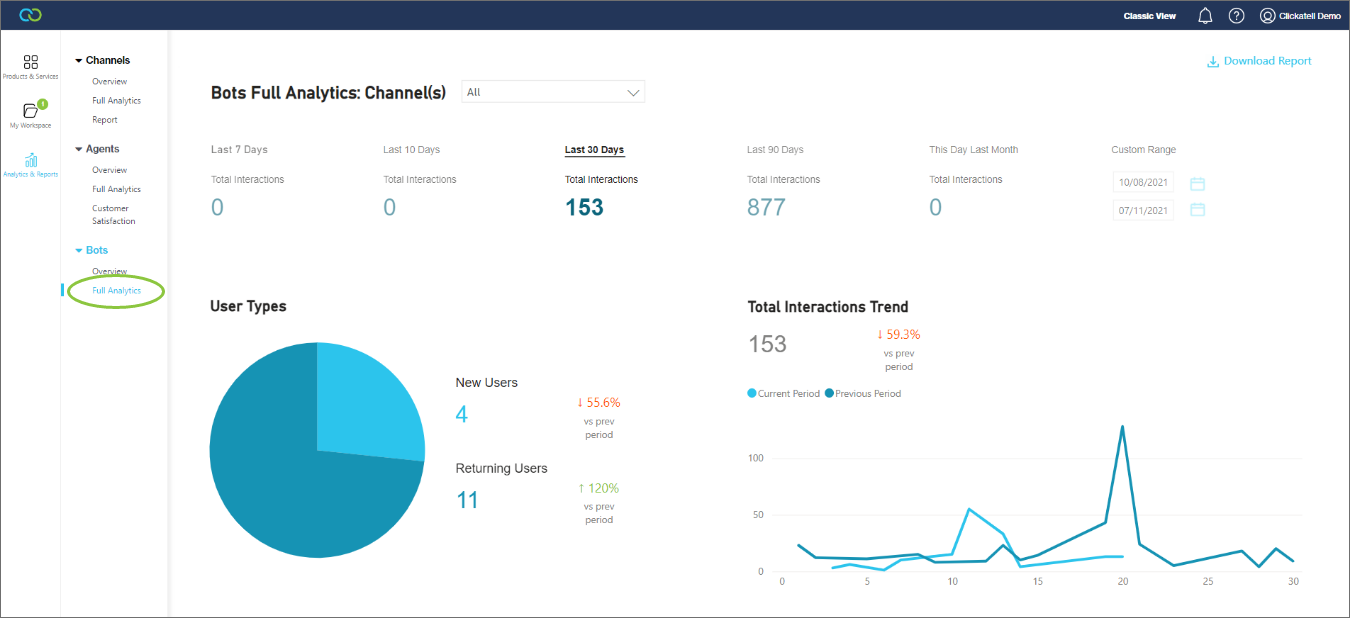
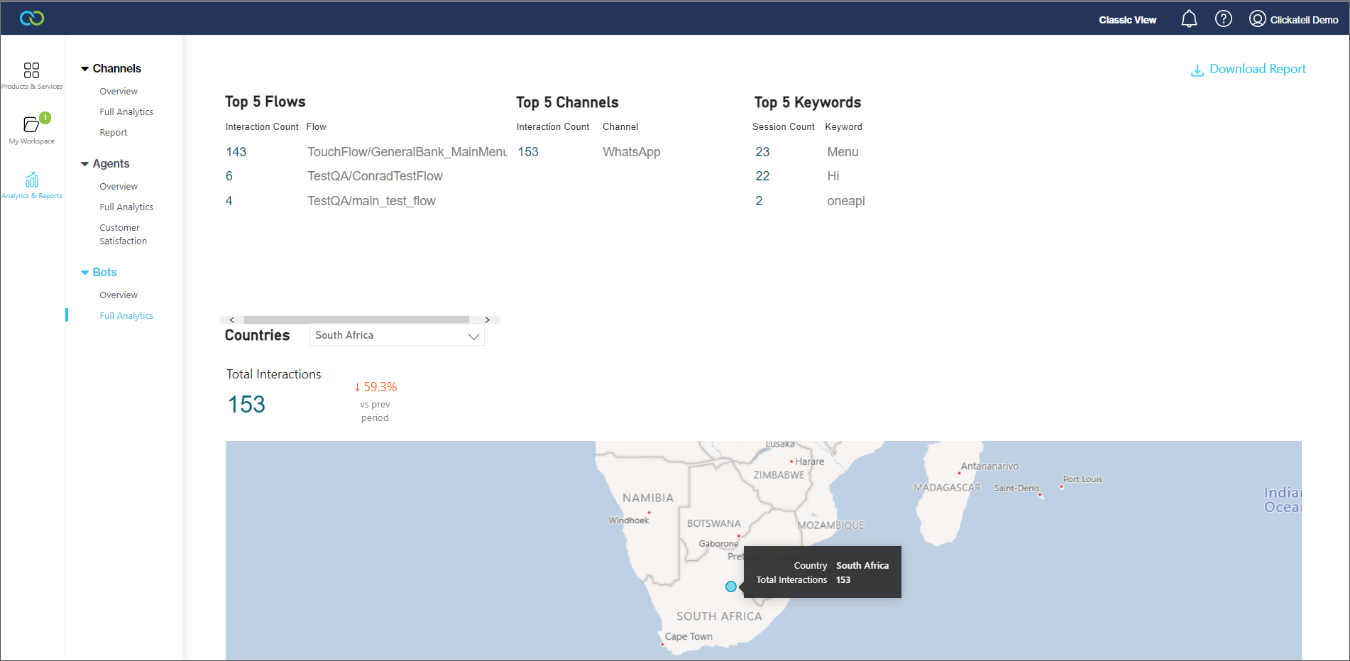
A new "Full Analytics" report is now available under the *Bots* heading. This report provides a full view of the user's Chat Flow data over different time periods.

Information you can view for the selected timeframe and channel include:

* Total number of users per user type (new vs returning)
* Total interactions trend
* Top 5 flows
* Top 5 channels
* Top 5 keywords
* Total interactions by country

​​​​​​​In each case, the current period is compared to the previous period. Users can also download the report in PDF format.

<figure><img src="https://2380245535-files.gitbook.io/~/files/v0/b/gitbook-x-prod.appspot.com/o/spaces%2Fl8ao2e7ogQyZBti1BuxA%2Fuploads%2FZYasGk40oA9nFvBMn0uU%2Fimage.png?alt=media&#x26;token=2779fd25-4d82-4d74-bb41-4ecf893bb621" alt=""><figcaption></figcaption></figure>

<figure><img src="https://2380245535-files.gitbook.io/~/files/v0/b/gitbook-x-prod.appspot.com/o/spaces%2Fl8ao2e7ogQyZBti1BuxA%2Fuploads%2FTQKPWLk8BakhTIVYfGk7%2Fimage.png?alt=media&#x26;token=df32f733-7e92-4fd5-8eff-252ecaf34c1a" alt=""><figcaption></figcaption></figure>

**Chat Desk Full Analytics**

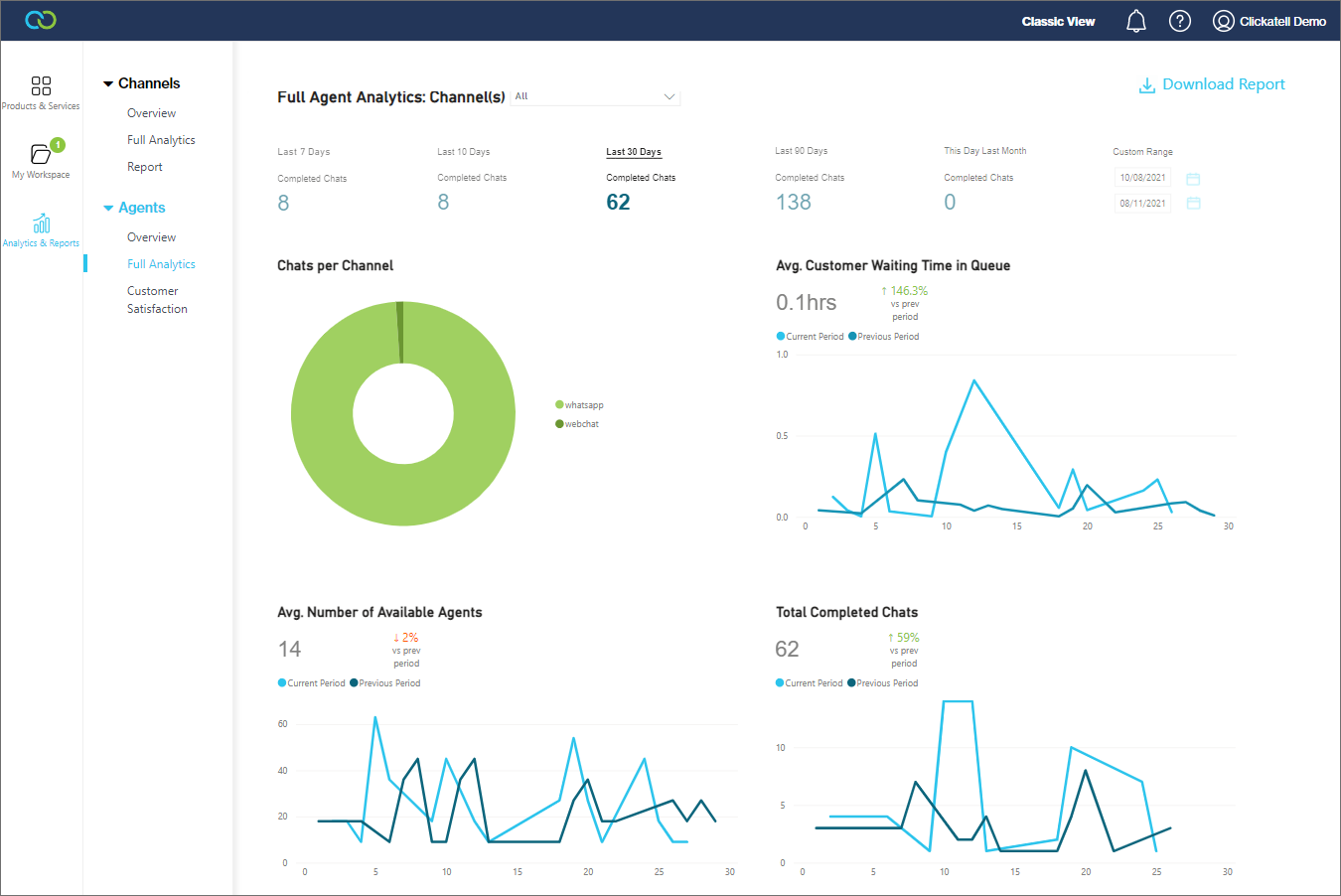
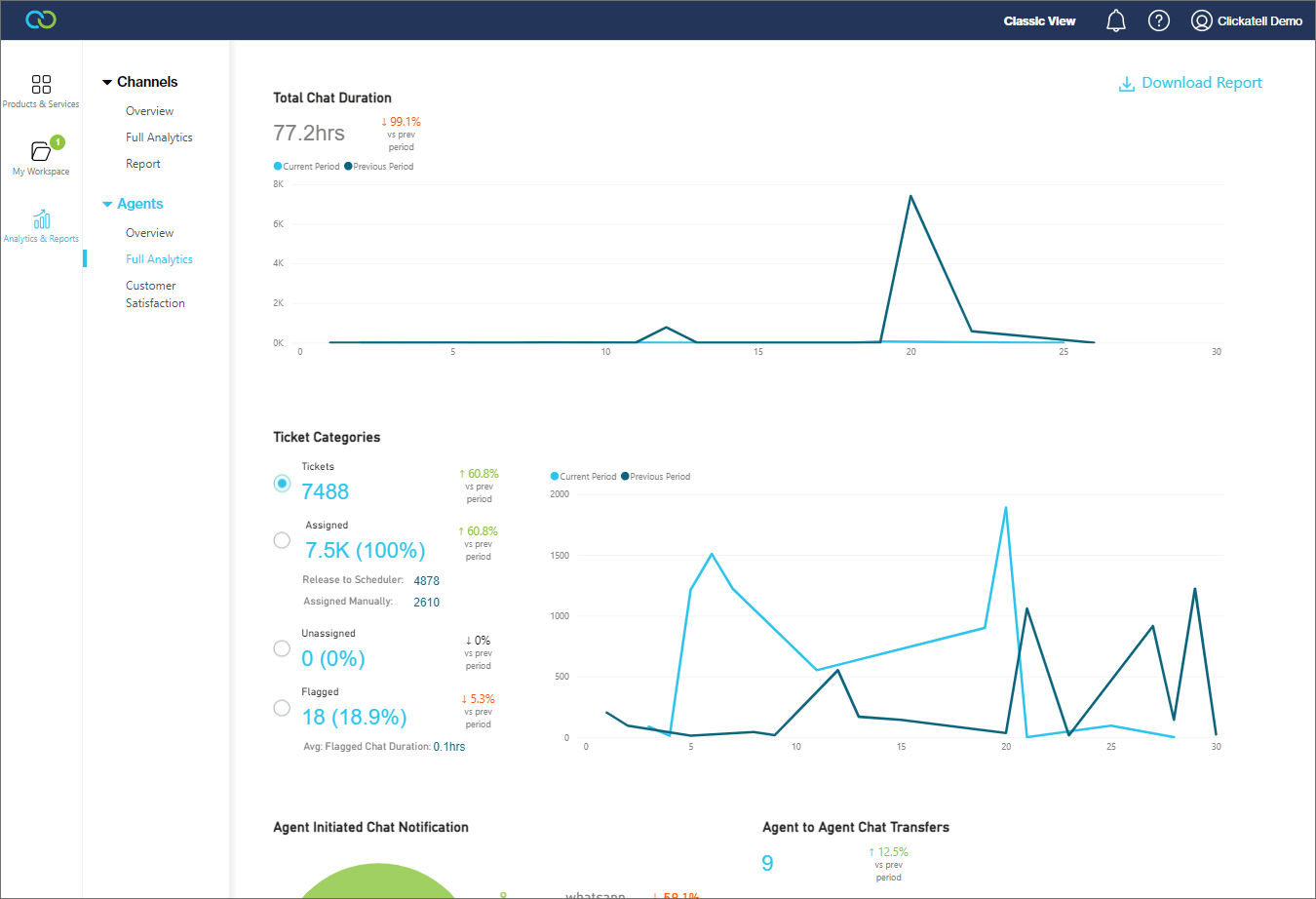
A new "Full Analytics" report is now available under the *Agents* heading. This report provides a full view of the user's Chat Desk data over different time periods.

Information you can view for the selected timeframe and channel include:

* Total number of completed chats
* Number of chats per channel
* Average customer waiting time in queue
* Average number of available agents
* Total chat duration
* Types of Tickets
  * Total number of tickets
  * Number of tickets assigned (via scheduler vs manually)
  * Number of unassigned tickets
  * Number of flagged chats
  * Average flagged chat duration
* Number of agent-initiated chat notifications per channel
* Number of agent-to-agent chat transfers

​​​​​​​In each case, the current period is compared to the previous period. Users can also download the report in PDF format.

<figure><img src="https://2380245535-files.gitbook.io/~/files/v0/b/gitbook-x-prod.appspot.com/o/spaces%2Fl8ao2e7ogQyZBti1BuxA%2Fuploads%2FjktcVDtp8OuxzfuRGK7t%2Fimage.png?alt=media&#x26;token=a7cc2e3d-1cc6-4407-9e83-eaa650faea08" alt=""><figcaption></figcaption></figure>

<figure><img src="https://2380245535-files.gitbook.io/~/files/v0/b/gitbook-x-prod.appspot.com/o/spaces%2Fl8ao2e7ogQyZBti1BuxA%2Fuploads%2FCspys98isk22LyReSqPQ%2Fimage.png?alt=media&#x26;token=f8b98f47-045e-4a85-8331-9415676d623b" alt=""><figcaption></figcaption></figure>

## 10 DLC registration process updates

Release date: 13 October 2021

This release was mainly focused on updating the [10DLC registration process](https://clickatell.gitbook.io/sms-user-guide/10dlc-regulations-us/what-is-10dlc) for US long numbers.

## Channels report update

Release date: Q4 2021

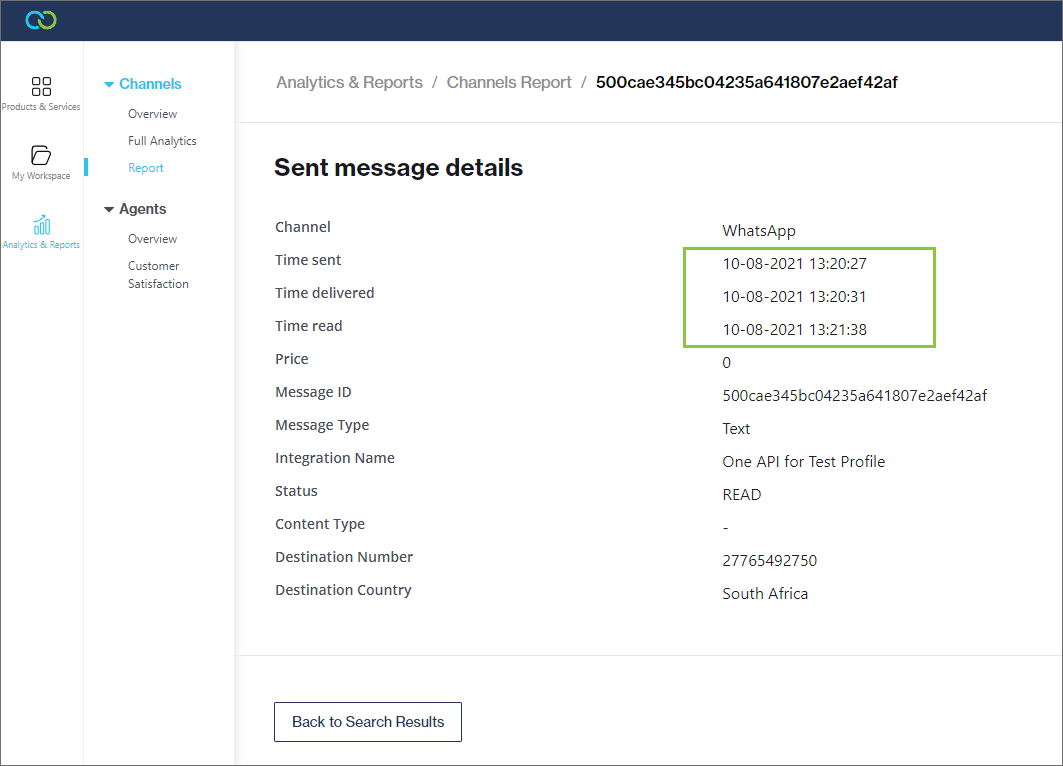
The [*Channels Report*](https://help.clickatell.com/data/dashboards/messaging-channels#channels-report) was updated to include an additional column for the status of the message. It will either show "Read" or "-" if no message is available. If the read receipt feature has not been enabled, this column will show a status of "Saved".

<figure><img src="https://2380245535-files.gitbook.io/~/files/v0/b/gitbook-x-prod.appspot.com/o/spaces%2Fl8ao2e7ogQyZBti1BuxA%2Fuploads%2FNOUGzPB6NXmS1qphnA29%2Fimage.png?alt=media&#x26;token=ee0a4165-5845-4286-8ef4-a07801254444" alt=""><figcaption></figcaption></figure>

Selecting a message from the report opens the message details page. Here the date and time that the message was read are also shown.

<figure><img src="https://2380245535-files.gitbook.io/~/files/v0/b/gitbook-x-prod.appspot.com/o/spaces%2Fl8ao2e7ogQyZBti1BuxA%2Fuploads%2F02Hkt2XbBS9vaazMvnF8%2Fimage.png?alt=media&#x26;token=40d00c73-47b4-4a7d-a873-9fbe6d005d45" alt=""><figcaption></figcaption></figure>

## Recycle bin redesign, Media and Text Display node enhancements

Release date: 27 September 2021

### Release Summary

The focus of this release was to redesign and improve the recycle bin and add further enhancements to the Media and Text Display nodes.

#### **Enhancements**

[**Redesigned recycle bin**](https://clickatell.gitbook.io/flow/workflow-management/open-an-existing-flow)

We have redesigned the Recycle Bin for a more intuitive and user-friendly experience when deleting and restoring nodes.

The Recycle Bin is accessed via the 'bin' icon in the bottom left of the flow-building canvas. To restore a deleted node to the canvas, simply drag and drop the node onto the canvas. The system will prompt the flow-builder whether they only want to restore the parent node, or if they want to restore the parent node as well as all the child nodes associated with it.

<figure><img src="https://2380245535-files.gitbook.io/~/files/v0/b/gitbook-x-prod.appspot.com/o/spaces%2Fl8ao2e7ogQyZBti1BuxA%2Fuploads%2FPmqbs7DmT1si6kUemo8v%2Fimage.png?alt=media&#x26;token=bf142eab-7ef9-4393-b317-bab8235740d6" alt=""><figcaption><p>Drag a deleted node back to the canvas</p></figcaption></figure>

<figure><img src="https://2380245535-files.gitbook.io/~/files/v0/b/gitbook-x-prod.appspot.com/o/spaces%2Fl8ao2e7ogQyZBti1BuxA%2Fuploads%2FWcRgJ13sAQx0ZqhpCMHG%2Fimage.png?alt=media&#x26;token=d0377c7b-92e2-4f7d-8d65-050ce20c95a2" alt=""><figcaption><p>The flow-builder will be prompted what they want to restore</p></figcaption></figure>

[**Text Display node enhancements**](https://clickatell.gitbook.io/flow/user-facing-nodes/display-nodes/text-display)

Previously, using a Text Display node to send a text message to an end-user would cause the current workflow to end. Now, the flow-builder also has the option to specify the next step that will automatically follow the outbound text message without requiring any input from the end-user first.

<figure><img src="https://2380245535-files.gitbook.io/~/files/v0/b/gitbook-x-prod.appspot.com/o/spaces%2Fl8ao2e7ogQyZBti1BuxA%2Fuploads%2FgMCkpcHaucQ0zcIMa4Y4%2Fimage.png?alt=media&#x26;token=bd831c8b-b643-459b-b2fc-0842d13bcbbf" alt=""><figcaption><p>Set flow to automatically continue to the next step after a Text Display node</p></figcaption></figure>

<figure><img src="https://2380245535-files.gitbook.io/~/files/v0/b/gitbook-x-prod.appspot.com/o/spaces%2Fl8ao2e7ogQyZBti1BuxA%2Fuploads%2FmFgX15PUp5cUVAnoTOt3%2Fimage.png?alt=media&#x26;token=109e2fcc-f895-4559-b73d-0324e41a24b2" alt=""><figcaption><p>What the end-user sees in WhatsApp on their device</p></figcaption></figure>

[**Media node enhancements**](https://clickatell.gitbook.io/flow/user-facing-nodes/display-nodes/user-facing-interactions-media-node)

Previously, users had to configure API calls to fetch media from a hosted location before they could send that media file to their end-users via the Media node. With this release, we've made it easier for the non-technical flow-builder to upload media files and send them to end-users.

Enhancements have been made to the Media node, letting the flow-builder select the source of the media file they want to send to their end-users. Selecting "Assets" opens another call to action, "+ Add file". Clicking this opens a pop-up modal where the flow-builder can add new media files, or select from previously uploaded ones. The current method to fetch media from a hosted location via API calls and then sending it to the end-user is still available by selecting the "API" option. ​​​​

<figure><img src="https://2380245535-files.gitbook.io/~/files/v0/b/gitbook-x-prod.appspot.com/o/spaces%2Fl8ao2e7ogQyZBti1BuxA%2Fuploads%2FOtRUsP6uiBpPP8uOi2E4%2Fimage.png?alt=media&#x26;token=2a643583-fe08-441e-b528-7880d6de6684" alt="" width="563"><figcaption><p>Media node - asset library (left) and media node - API source (right)</p></figcaption></figure>

<figure><img src="https://2380245535-files.gitbook.io/~/files/v0/b/gitbook-x-prod.appspot.com/o/spaces%2Fl8ao2e7ogQyZBti1BuxA%2Fuploads%2FDGtTUHuI3VTTtRLzg0z7%2Fimage.png?alt=media&#x26;token=f99772a0-089f-4575-9214-c1f93da1432c" alt=""><figcaption><p>After selecting "+Add File" on the node, you can upload a new media file, or select from existing ones</p></figcaption></figure>

<figure><img src="https://2380245535-files.gitbook.io/~/files/v0/b/gitbook-x-prod.appspot.com/o/spaces%2Fl8ao2e7ogQyZBti1BuxA%2Fuploads%2FY4uNzjgWKGsj6T2MeL4W%2Fimage.png?alt=media&#x26;token=661f6fd1-0d6e-4ed8-bf39-d7be048cf993" alt="" width="320"><figcaption><p>A thumbnail of the selected media file appears on the node</p></figcaption></figure>

## Location Sharing node & Media node enhancements

Release date: 27 August 2021

### Release Summary

The focus of the release was to introduce bi-directional [location sharing](https://clickatell.gitbook.io/flow/user-facing-nodes/display-nodes/location-sharing) via the WhatsApp channel and to further enhance the [Media node](https://clickatell.gitbook.io/flow/user-facing-nodes/display-nodes/user-facing-interactions-media-node).

#### **New Features**

[**Location sharing** **node**](https://clickatell.gitbook.io/flow/user-facing-nodes/display-nodes/location-sharing)

When using Chat Flow, users can now add a new **Location Sharing node** into their flows to either send a location pin to the end-user OR receive a location pin from the end-user and use the latitude, longitude, location name, and address within their flow.

*Note: this is available for use on the **WhatsApp** channel only.*

<figure><img src="https://2380245535-files.gitbook.io/~/files/v0/b/gitbook-x-prod.appspot.com/o/spaces%2Fl8ao2e7ogQyZBti1BuxA%2Fuploads%2FaNRQLPzAzYvkJfhdmR1F%2Fimage.png?alt=media&#x26;token=0251590c-37db-4fbc-820b-bc582b5f8b9a" alt=""><figcaption></figcaption></figure>

<figure><img src="https://2380245535-files.gitbook.io/~/files/v0/b/gitbook-x-prod.appspot.com/o/spaces%2Fl8ao2e7ogQyZBti1BuxA%2Fuploads%2Fm9k9ROXO1RWkLVNimgtq%2Fimage.png?alt=media&#x26;token=feefdd0d-24c0-47aa-b432-42ddeebb821d" alt=""><figcaption><p>Outbound (left) and inbound (right) location sharing</p></figcaption></figure>

**Enhancements**

[**Media node enhancements**](https://clickatell.gitbook.io/flow/user-facing-nodes/display-nodes/user-facing-interactions-media-node)

Previously, using the Media node to send outbound media to an end-user would cause the current flow to end. With the latest release, we’ve made an important enhancement to the Media node such that the flow-builder now has the option to specify a next step/flow that the flow must logically continue to after sending an outbound media file to an end-user. This allows for a much smoother experience for both the user and the flow-builder to use as an alternative to the ‘stop-and-start’ feel when sending outbound media.

Flow-builders can also now specify the file name that is displayed to the end-user when sending media files by optionally entering a file name to override the existing one with.

<figure><img src="https://2380245535-files.gitbook.io/~/files/v0/b/gitbook-x-prod.appspot.com/o/spaces%2Fl8ao2e7ogQyZBti1BuxA%2Fuploads%2FbD7Il2GiXz45mjduIZNJ%2Fimage.png?alt=media&#x26;token=c291c397-d2fc-4e36-80d9-16de752935dc" alt=""><figcaption><p>Select whether the session should end (left) or continue (right) after outbound media node</p></figcaption></figure>

## New: Chat 2 Pay

Release date: 19 August 2021

#### What is Chat 2 Pa&#x79;**?**

The Chat 2 Pay feature allows a merchant to embed a Clickatell "extension" into their CRM/OMS (Customer Relationship Management/Order Management System) which allows a call-center agent to trigger a payment request to their customers (i.e., the end-user). This payment request will be received by the customer via an SMS or WhatsApp message. The URL embedded in the message allows the customer to open a secure payment page where they can enter a new credit/debit card or utilize a saved credit/debit card that will be used by the merchant to process payments via the merchant's payment processor/gateway. This feature allows merchants to accept orders from customers via their call-center without requiring customers to expose their personal payment information to the call-center agent.

Chat 2 Pay currently supports the following CRM / OMS system and payment processors/gateways:

1. CRM/OMS: Salesforce
2. Payment Processor/Gateway: [CyberSource](https://www.cybersource.com)

#### Configuring the Chat 2 Pay service

​​​​​​​ To start using this service, you must follow these four steps:

1. Configure your payment processor/gateway
2. [Set up the Chat 2 Pay extension in the Clickatell Portal](https://clickatell.gitbook.io/chat-2-pay-user-guide/cybersource-and-salesforce/clickatell-portal-extension-setup)
3. Install the Salesforce cartridge
4. Utilize the functionality as a customer service agent in Salesforce

   <div data-gb-custom-block data-tag="hint" data-style="info" class="hint hint-info"><p>### For more information:</p></div>

* See the [Chat 2 Pay user guide.](https://clickatell.gitbook.io/chat-2-pay-user-guide/master)
* [Chat 2 Pay FAQs](https://www.clickatell.com/help-center/chat-2-pay).

## New: 10DLC SMS Regulations

Release date: 26 July 2021

### Release Summary

10DLC (10-Digit Long Code) is a service offered by major US carrier networks specifically designed for A2P (application-to-person) messages using long codes. Currently in a soft roll-out phase by carriers (since 1st May 2021), it will soon become a requirement for all US long numbers to be linked to a registered brand and campaign before any messages can be sent.

The focus of this release was primarily on creating a new journey on the Clickatell Portal for all our users who want to purchase a US long number, as well as those who have an existing US long number and want to register a brand and campaign to link to the number.

### ​​​​​​​What is 10DL&#x43;**?**

10-digit long code (10DLC) is the new industry-led long code solution for North American application-to-person (A2P) business messaging utilizing a 10-digit phone number. Although similar to the existing long code, 10DLC is a reliable messaging channel with throughput levels suitable for SMS campaigns and is sanctioned by the mobile operators for A2P messaging.

**US carriers no longer support using A2P SMS messaging over local, unregistered long codes.** For high-volume A2P SMS messaging, US carriers instead offer 10-digit long codes (10DLC). 10DLC is only used in the US, supports both transactional and promotional messaging, and can include any US area code.

The Campaign Registry guidelines require users to follow industry best practices according to the [CTIA](https://api.ctia.org/wp-content/uploads/2019/07/190719-CTIA-Messaging-Principles-and-Best-Practices-FINAL.pdf).

### The New US Long Number Application Process

​​​​​​​With the regulatory policy coming into effect from the Campaign Registry, we have enhanced our portal to manage the application process​ accordingly. Users would now need to follow a registration flow to get their long numbers working and functional in the United States. The new change **affects all our existing US long number customer accounts** and is also applicable to **any new US long number purchases**.

This new process entails three steps:

1. Registration of a brand
2. Registration of a campaign
3. Purchasing and linking numbers

   <div data-gb-custom-block data-tag="hint" data-style="info" class="hint hint-info"><p>### For more information:</p></div>

* Step-by-step walkthrough to [register US long numbers for 10DLC](https://clickatell.gitbook.io/sms-user-guide/10dlc-regulations-us/apply-for-a-10dlc-brand-and-campaign).
* [Frequently asked questions](https://www.clickatell.com/help-center/sms/10dlc-us-long-numbers) about 10DLC.

## Deleting flows & reordering options

Release date: 15 July 2021

#### Release Summary

The focus of the release was to further enhance the Chat Flow user interface and user experience. We've also added the ability to delete your own flows without requiring input from Clickatell.

#### **NEW FEATURES**

**Deleting flows from sandbox and production**

We now offer users the ability to [delete their own flows](https://clickatell.gitbook.io/flow/workflow-management/open-an-existing-flow) instead of being dependent on Clickatell’s resources.

It is as easy as clicking on the hamburger menu icon next to the flow you want to delete to access a drop-down menu. Select ‘*Delete*’.

<figure><img src="https://2380245535-files.gitbook.io/~/files/v0/b/gitbook-x-prod.appspot.com/o/spaces%2Fl8ao2e7ogQyZBti1BuxA%2Fuploads%2FjkYC8G9C35Lna4AZUJHj%2Fimage.png?alt=media&#x26;token=a1e848b9-5e31-44a6-b750-3b9652f1a868" alt=""><figcaption></figcaption></figure>

If the flow is linked to other flows, routes, or keywords, you are prompted to disconnect the linked flow/route/keyword before you can delete the flow.

<figure><img src="https://2380245535-files.gitbook.io/~/files/v0/b/gitbook-x-prod.appspot.com/o/spaces%2Fl8ao2e7ogQyZBti1BuxA%2Fuploads%2FUhwuENTCrMM5sdl30GBq%2Fimage.png?alt=media&#x26;token=3d8d04ee-ff97-4977-abec-b4540629f716" alt=""><figcaption></figcaption></figure>

Any user will be able to delete flows from the sandbox environment, however, when deleting a flow from the production environment, the flow builder is prompted to submit a deletion request. A Chat Flow administrator must then first approve this request from the ‘*Manage and approve flows*’ section before the flow will be removed.

The image below shows the screen when a request to delete a flow from production has been submitted for approval.

<figure><img src="https://2380245535-files.gitbook.io/~/files/v0/b/gitbook-x-prod.appspot.com/o/spaces%2Fl8ao2e7ogQyZBti1BuxA%2Fuploads%2FmRk60rekeQpgH0plGjG1%2Fimage.png?alt=media&#x26;token=22a77311-324f-4bc7-a661-f6d71ced5f14" alt=""><figcaption></figcaption></figure>

#### **ENHANCEMENTS**

**Reordering results on Menu and Multiple Choice nodes**

This enhancement on the [Menu ](https://clickatell.gitbook.io/flow/user-facing-nodes/branch-logic-split/menu-nodes-menu-with-options)and [Multiple Choice](https://clickatell.gitbook.io/flow/user-facing-nodes/branch-logic-split/menu-nodes-multiple-choice-input) nodes will greatly reduce development time for users. Previously, to reorder the logic options on these nodes (e.g. moving option 1 to 3, option 7 to 1, and option 3 to 7) you had to remove and re-add the logic options in the correct order. Now, you can simply “click, drag, and drop” the options into the correct order.

The logic options are also collapsible, saving space and simplifying navigation.

<figure><img src="https://2380245535-files.gitbook.io/~/files/v0/b/gitbook-x-prod.appspot.com/o/spaces%2Fl8ao2e7ogQyZBti1BuxA%2Fuploads%2FnJbTfOJUSpKJNhgrepE8%2Fimage.png?alt=media&#x26;token=9922254d-93b5-4129-829c-7ecd9ac683ff" alt="" width="188"><figcaption></figcaption></figure>

## Pending Chats Feature

Release date: 17 June 2021

#### Release Summary

**New Features:**

* The new “[Pending Chats](https://clickatell.gitbook.io/chat-desk/agent-chat-desk/manage-chat-queues-agent-desk/pending-chats)” feature enables agents to put chats in a “pending” state while they wait on a response from an end-user. This streamlines the agents’ live chat queue so they can focus on those end-users requiring immediate attention. *(See below for more detailed information.)*

**Bug fixes:**

* The calculation of the “All live chats” count on the Chat Desk Dashboard
* The updating of NPS, CSAT and past sentiment graphs when a user ends a conversation
* Media file support sharing issues
* Verifying a mobile number that was already verified for another profile

#### NEW FEATURES

**PENDING CHATS**

The [Pending Chats](https://clickatell.gitbook.io/chat-desk/agent-chat-desk/manage-chat-queues-agent-desk/pending-chats) feature helps Chat Desk agents to manage their live chat queue more efficiently.

Agents' live chat queues are often cluttered by chats awaiting a response from the end-user. Agents can now move these chats to the new "Pending" tab, cleaning up their live chat queue to only show the chats that are active and require their imminent attention.

**How it works**

In the chat management section of the Chat Desk interface, a new tab called "Pending" was added. This tab will house all chats marked as 'pending'.

<figure><img src="https://2380245535-files.gitbook.io/~/files/v0/b/gitbook-x-prod.appspot.com/o/spaces%2Fl8ao2e7ogQyZBti1BuxA%2Fuploads%2F3eIxLuowgGUT6NGrgQuE%2Fimage.png?alt=media&#x26;token=6c277028-d193-4be8-8e23-30fd37a8eade" alt=""><figcaption></figcaption></figure>

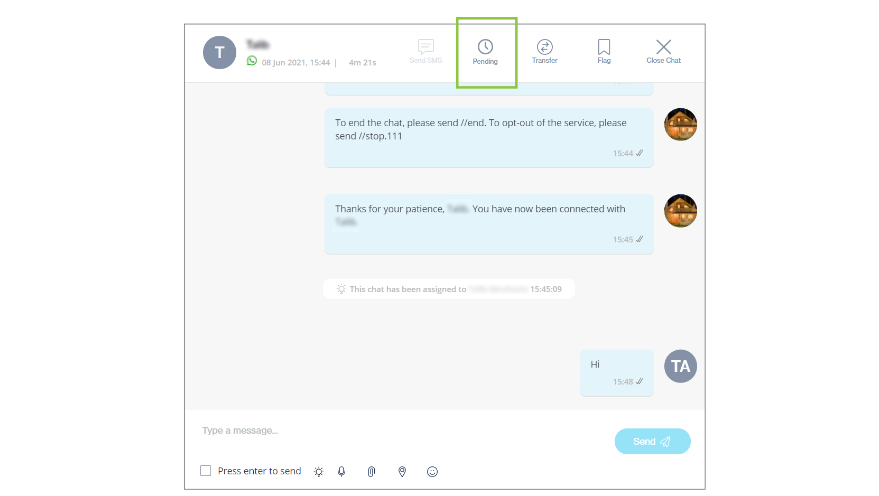
In a live chat, you will see a new "Pending" icon at the top of your chat window. Click this icon to mark the chat as 'pending'. Once marked as 'pending', the chat is moved from your "Live" tab to the "Pending" tab.

<figure><img src="https://2380245535-files.gitbook.io/~/files/v0/b/gitbook-x-prod.appspot.com/o/spaces%2Fl8ao2e7ogQyZBti1BuxA%2Fuploads%2Fea83vvHf8iM8wStZT7G5%2Fimage.png?alt=media&#x26;token=3009e27b-80a0-424f-a3b4-faa0b913b545" alt=""><figcaption></figcaption></figure>

When a chat is successfully marked as pending, you will see a confirmation message in the bottom right of your screen:

<figure><img src="https://2380245535-files.gitbook.io/~/files/v0/b/gitbook-x-prod.appspot.com/o/spaces%2Fl8ao2e7ogQyZBti1BuxA%2Fuploads%2FwVAyAyGkfJxKVToIXcyY%2Fimage.png?alt=media&#x26;token=2f1c9198-30ec-4091-91d6-41912cd4049b" alt=""><figcaption></figcaption></figure>

In the "Pending" tab, each chat card will contain a "pending" icon to illustrate that it has been marked as a pending chat.

<figure><img src="https://2380245535-files.gitbook.io/~/files/v0/b/gitbook-x-prod.appspot.com/o/spaces%2Fl8ao2e7ogQyZBti1BuxA%2Fuploads%2F3AwHiRgItrhCTWIZSxAH%2Fimage.png?alt=media&#x26;token=ecfe44e6-be07-4245-8a4c-b9411e597383" alt=""><figcaption></figcaption></figure>

{% hint style="info" %}
\* You can still send messages to users from the "Pending" tab \* Supervisors will also have visibility on which chats have been marked as pending
{% endhint %}

When the end-user replies to the pending chat, the chat will automatically be moved back to the "Live" tab. You will see a confirmation message in the bottom right of your screen:

<figure><img src="https://2380245535-files.gitbook.io/~/files/v0/b/gitbook-x-prod.appspot.com/o/spaces%2Fl8ao2e7ogQyZBti1BuxA%2Fuploads%2Fznt9ygy8JErT2UkEvXj3%2Fimage.png?alt=media&#x26;token=8df985c0-6116-4e68-a985-3268ea2e1fbd" alt=""><figcaption></figcaption></figure>

You can now continue engaging with the user from the "Live" tab. In the "Live" tab, the pending icon will not be highlighted anymore, but will still be present on the chat card to show that this chat was marked as pending. The chat will remain in the "Live" tab until you conclude the conversation or move it back to the pending state again.

<figure><img src="https://2380245535-files.gitbook.io/~/files/v0/b/gitbook-x-prod.appspot.com/o/spaces%2Fl8ao2e7ogQyZBti1BuxA%2Fuploads%2F5iZTCkT8ejuQX56NDTCi%2Fimage.png?alt=media&#x26;token=909674e6-3ad6-460f-9843-f67e068673c3" alt=""><figcaption></figcaption></figure>

An additional setting has been added to [Chat Desk Preferences](https://clickatell.gitbook.io/chat-desk/chat-desk-dashboard/settings/chat-desk) (accessible via the Chat Desk Dashboard): "Pending Chats Auto-closure Time". Here you can set a time duration after which a chat in the "Pending" tab will automatically close and move to the "Closed" tab.

This setting is only applicable to chats in a 'pending' status.

<figure><img src="https://2380245535-files.gitbook.io/~/files/v0/b/gitbook-x-prod.appspot.com/o/spaces%2Fl8ao2e7ogQyZBti1BuxA%2Fuploads%2FTdF7pE6aE0ckK5NRwoDX%2Fimage.png?alt=media&#x26;token=3e142bb0-8b69-464b-b5cc-0a64a1347e6a" alt=""><figcaption></figcaption></figure>

## New: Reporting & Analytics for Transact

Release date: 14 June 2021

We understand how important it is to measure a product's performance and have visibility into the usage of a product. In addition to the existing *Overview* and *Full Analytics* reports for our Transact users, this release now also brings reporting on historical *Marketplace* data, including payments data and a month-on-month product performance dashboard. These reports will allow our customers to monitor and gain insights into the usage and performance of all their Transact products.

<figure><img src="https://2380245535-files.gitbook.io/~/files/v0/b/gitbook-x-prod.appspot.com/o/spaces%2Fl8ao2e7ogQyZBti1BuxA%2Fuploads%2FV3CqnrAzKdcwv9orDANl%2Fimage.png?alt=media&#x26;token=7bf76653-71e8-4479-89e6-a68bf4ebbcb6" alt=""><figcaption></figcaption></figure>

## New sign-up and discount vouchers

Release date: 14 June 2021

### Release Summary

The focus of this release was primarily on simplifying our user onboarding journey by making fundamental changes to the portal and the Clickatell website.

**New Features**

* New sign-up process
* Application of discount voucher code

**Improvements & bug fixes**

Issues relating to the following were addressed:

* **Ability to directly download the channel** **reports** without generating the report first
* Improved the behavior of variables in the **header** of new **WhatsApp templates**
* Fixed the **amount update** in the message details report
* Fixes on **Forgot Password email**
* UI fixes for **resending a pin** for WhatsApp number activation
* **Logic** management for an **invited user** to confirm their password or create a password based on the user's account status
* **Banner** display fix on '**My Workspace**' so the banner is shown/hidden based on the user's account status

#### New Features

**New sign-up process**

It is now even easier for new users to start exploring Clickatell's product offering!

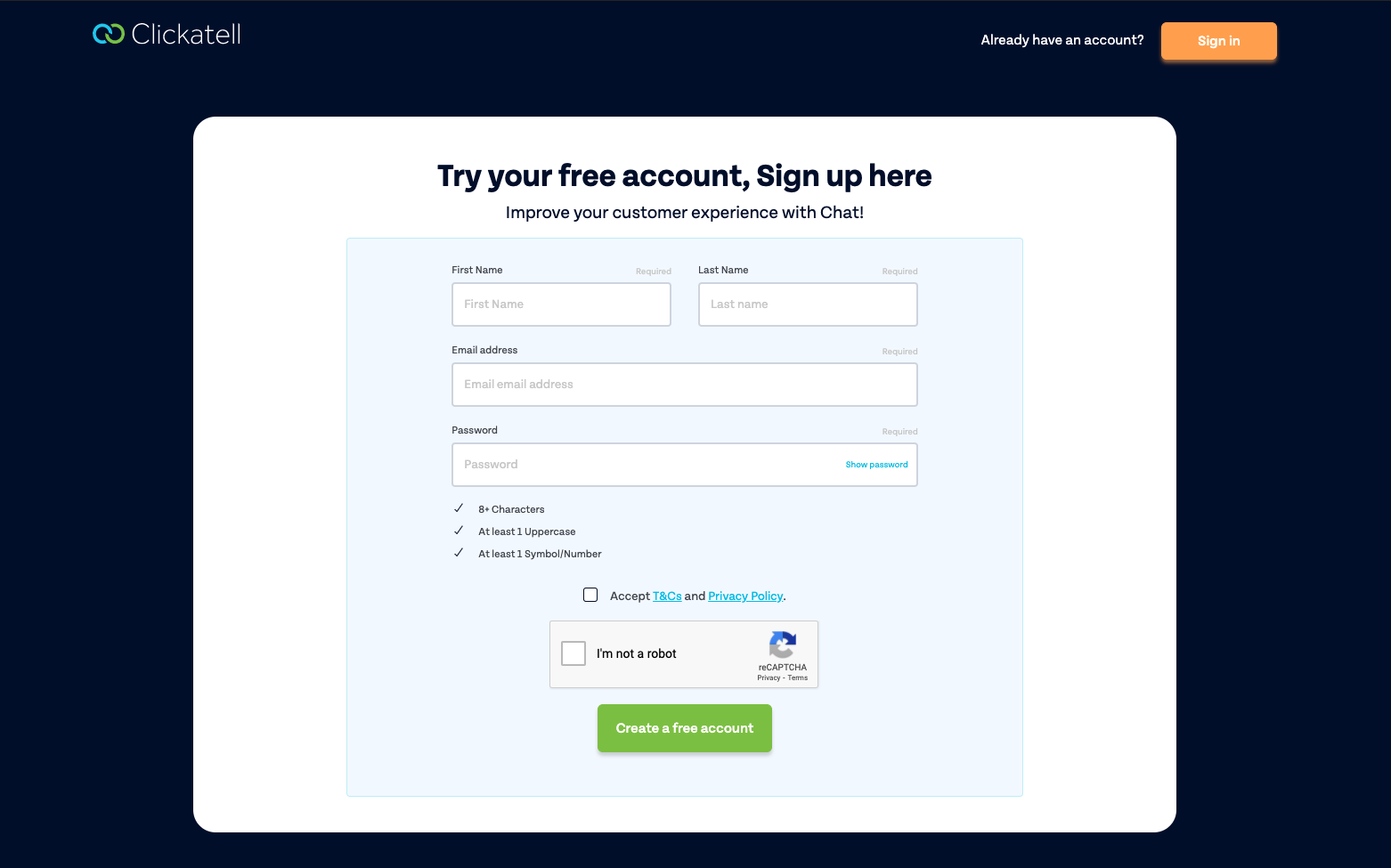
With this release, we've included a brand-new, simplified sign-up process. A few basic details and a click give new users immediate access to the user portal. This new one-step process gives new users access to the portal (albeit restricted), allowing them to explore Clickatell's products and channels and gather the information they require to make an informed decision. A user only needs to verify their email address when they want to gain full access to all the functionality available on the portal and to start using our products and channels.

This replaces the multi-step sign-up process where users had to create an account name and verify their email address before they could enter the portal.

<figure><img src="https://2380245535-files.gitbook.io/~/files/v0/b/gitbook-x-prod.appspot.com/o/spaces%2Fl8ao2e7ogQyZBti1BuxA%2Fuploads%2FcizewjQ0UfBrMnKt1Tjb%2Fimage.png?alt=media&#x26;token=478edc63-4945-4e9e-8ec1-8e64716dd795" alt=""><figcaption></figcaption></figure>

**Application of discount voucher codes**

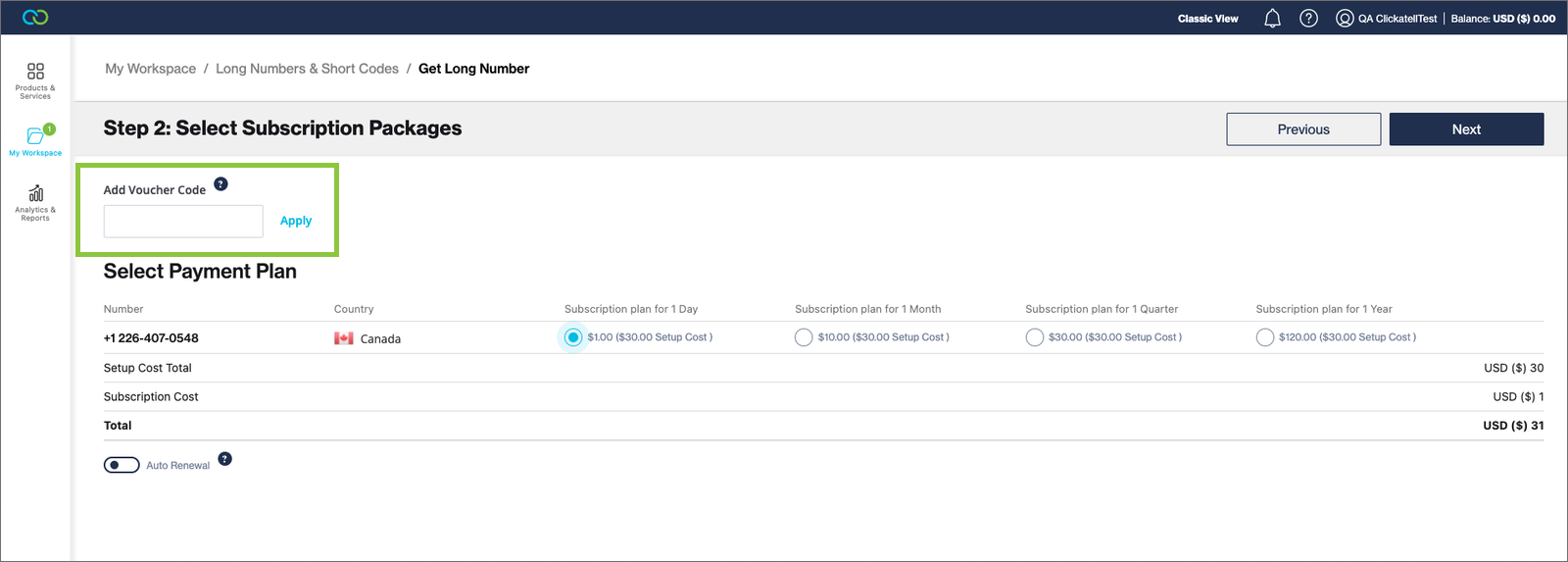
We've added the ability to use discount vouchers issued by Clickatell as part of promotions we may run on our products and channels. When applicable, users can simply add a Clickatell-generated voucher code on the payments page to receive the applicable discount on that product.

<figure><img src="https://2380245535-files.gitbook.io/~/files/v0/b/gitbook-x-prod.appspot.com/o/spaces%2Fl8ao2e7ogQyZBti1BuxA%2Fuploads%2FCewpGtdebkvUBZUvCdrx%2Fimage.png?alt=media&#x26;token=38011bec-3971-4762-8c06-48bab532b370" alt=""><figcaption></figcaption></figure>

## User Interface Redesign

Release date: 8 June 2021

### Release Summary

The focus of the release was on redesigning components of the Chat Flow product's user interface. We've also enhanced the flow approval process for our self-service clients.

#### **New Features**

**User Interface Redesign**

Although no functional changes were made, the redesigned user interface makes [Chat Flow](https://clickatell.gitbook.io/flow/overview/overview) feel like a brand new product! With its modern look that's easy on the eye, the way elements are arranged on the interface also makes it easy to do what you need to do, quicker. The use of colors helps identify node types at a glance, and the removal of unnecessary text makes it clean and uncluttered.

The following components have been **redesigned** for a cleaner, more user-friendly experience:

* Left panel
* Top bar
* Canvas
* Workflow nodes

<figure><img src="https://2380245535-files.gitbook.io/~/files/v0/b/gitbook-x-prod.appspot.com/o/spaces%2Fl8ao2e7ogQyZBti1BuxA%2Fuploads%2FSoj8ChDcPU9ksZgcwl8F%2Fimage.png?alt=media&#x26;token=90a04920-d61f-455a-84b6-20116e55ec9c" alt=""><figcaption><p>Redesigned left panel, top bar, canvas and nodes</p></figcaption></figure>

You can now **sort** your workflow [nodes ](https://clickatell.gitbook.io/flow/workflow-management/create-new-flow)by type, most used, or alphabetically to easily find the specific node you are looking for.

<figure><img src="https://2380245535-files.gitbook.io/~/files/v0/b/gitbook-x-prod.appspot.com/o/spaces%2Fl8ao2e7ogQyZBti1BuxA%2Fuploads%2Fdu0LxJfMd7v8vbm0k7wK%2Fimage.png?alt=media&#x26;token=556a1f18-c3f7-4c52-a290-c7fc68fe645c" alt=""><figcaption><p>Redesigned nodes and sorting capabilities</p></figcaption></figure>

You can also search for a specific node. Hovering over a node provides more info about its function.

<figure><img src="https://2380245535-files.gitbook.io/~/files/v0/b/gitbook-x-prod.appspot.com/o/spaces%2Fl8ao2e7ogQyZBti1BuxA%2Fuploads%2FVneZ1mZnxOh3e9nzCYaQ%2Fimage.png?alt=media&#x26;token=fd7d57d5-9aee-4a7e-a6f5-61596ba6ea02" alt=""><figcaption><p>Redesigned action and user-facing nodes</p></figcaption></figure>

A '**Settings and Shortcuts**' menu was also added to the bottom right of the canvas. This provides a summary of shortcuts for often-used actions to make workflow-building even quicker and easier.

<figure><img src="https://2380245535-files.gitbook.io/~/files/v0/b/gitbook-x-prod.appspot.com/o/spaces%2Fl8ao2e7ogQyZBti1BuxA%2Fuploads%2FEUwEtQZ1Hmrzm9pMvOZ8%2Fimage.png?alt=media&#x26;token=c4ff8b05-5040-4f56-b02f-a30c60f454cf" alt=""><figcaption><p>Settings and Shortcuts menu</p></figcaption></figure>

#### **Enhancements**

**Self-Approval Process for Clickatell Portal clients**

If you are a Clickatell Portal user (i.e., self-service client) you can now [approve and deploy](https://clickatell.gitbook.io/flow/workflow-management/approving-deploying-workflows) your flows yourselves instead of relying on Clickatell's involvement. Previously, a Chat Flow user with 'approver' permissions still had to contact Clickatell to enable them to approve flows created in their account.

You now have full control to approve and deploy flows within your own organization, increasing the speed with which you can get new flows into the market.

## Department filtering, chat sorting, and CSAT support for WhatsApp

Release date: 5 May 2021

### Release Summary

**New Features**

* Department filtering
* Chat Sorting

**Improvements**

* CSAT and NPS surveys for clients with WhatsApp via Chat Flow
* Chat limit per agent

**Bug fixes**

* Bugs relating to file attachments were addressed. Agents and customers can now send various file types as attachments on WhatsApp via Chat Flow.
* Scalability and performance enhancements
* UX improvements relating to error messages, alphabetical ordering, indication of online agents

More information on each of the items in this release can be found below.

#### New features

[**Department Filtering**](https://clickatell.gitbook.io/chat-desk/chat-desk-dashboard/departments-management)

Supervisors can now choose to view all chats across all departments or to filter to view chats for a specific department only (if set up). These options are available for live chats and closed chats via the 'filter' icon in the left panel.

<figure><img src="https://2380245535-files.gitbook.io/~/files/v0/b/gitbook-x-prod.appspot.com/o/spaces%2Fl8ao2e7ogQyZBti1BuxA%2Fuploads%2FuRqEENCvsVa7u6mnRI5C%2Fimage.png?alt=media&#x26;token=d8989d76-fb7c-40df-ba9a-88023e43c2c3" alt=""><figcaption></figcaption></figure>

[**Live Chat Sorting**](https://clickatell.gitbook.io/chat-desk/agent-chat-desk/search-and-filter-chats)

Agents can now select how to sort their live chats:

* '*New Customer Activity*': sorts live chats based on new activity from an end-user, i.e. any new message/activity from an end-user moves the relevant chat to the top of the list (*note: new activities by an agent are not considered for sorting*).
* '*New Chats*': sorts live chats based on the time when a chat arrived in Chat Desk, i.e. new chats appear at the top and the oldest chat at the bottom

These options are available via the 'sorting' icon as shown below.

<figure><img src="https://2380245535-files.gitbook.io/~/files/v0/b/gitbook-x-prod.appspot.com/o/spaces%2Fl8ao2e7ogQyZBti1BuxA%2Fuploads%2FWTPPmdaXcJJXiwRKXB52%2Fimage.png?alt=media&#x26;token=8490c7df-5951-4cb6-bf61-747a776cab5f" alt=""><figcaption></figcaption></figure>

#### Improvements

[**CSAT & NPS Support for WhatsApp via Chat Flow**](https://clickatell.gitbook.io/chat-desk/chat-desk-dashboard/settings/survey-management)

With this release, we have enabled the CSAT and NPS surveys for clients using WhatsApp via Chat Flow. This was previously not supported.

{% hint style="warning" %}
**Note:** CSAT ratings per agent are only presented if a [survey ](https://clickatell.gitbook.io/chat-desk/chat-desk-dashboard/settings/survey-management)has been set up on your Chat Desk account.
{% endhint %}

<figure><img src="https://2380245535-files.gitbook.io/~/files/v0/b/gitbook-x-prod.appspot.com/o/spaces%2Fl8ao2e7ogQyZBti1BuxA%2Fuploads%2F7aEGElKFehRFTy0WH1zF%2Fimage.png?alt=media&#x26;token=19f82d3d-688e-4cb9-967a-339bdaefda1e" alt=""><figcaption></figcaption></figure>

[**Chat Limit Per Agent**](https://clickatell.gitbook.io/chat-desk/chat-desk-dashboard/settings/chat-desk)

On your [Chat Desk preferences](https://clickatell.gitbook.io/chat-desk/chat-desk-dashboard/settings/chat-desk), you can set the maximum number of chats that can be assigned to an agent at any time. We have introduced a limit of **100** chats per agent to prevent users from accidentally setting this to a higher number which could potentially result in performance and UI issues.

<figure><img src="https://2380245535-files.gitbook.io/~/files/v0/b/gitbook-x-prod.appspot.com/o/spaces%2Fl8ao2e7ogQyZBti1BuxA%2Fuploads%2FTmXHmoqJzv9vhI18Fs9s%2Fimage.png?alt=media&#x26;token=30eff2e1-d24a-4ee4-b2b2-0bda1c1932cb" alt=""><figcaption></figcaption></figure>

## UX improvements & subscription packages

Release date: 1 May 2021

### Release Summary

The focus of the release was primarily on enriching and simplifying the user journey. We've also upgraded our technology stack to ensure the best possible user experience for our customers.

**New Features**

* Manage and control subscriptions from within the portal

**Improvements**

* Improved error notification and handling
* Aligned the currency display throughout the portal
* Simplified the Campaign Manager onboarding journey
* Enhanced the top-up balance page
* Added the direct download of reports
* Improved field validation
* Improved auto-renewal services
* Added dynamic URLs as an option to WhatsApp Template Messages
* Voucher discounts included on the *Transaction History* page
* Miscellaneous UX improvements

**Bug fixes**

Issues relating to the following were addressed:

* Billing details & payments
* Auto-renewal and -payments of subscriptions
* Reports & Analytics
* WhatsApp application and template messages

These are described in more detail below.

#### New Features

**Manage and control subscriptions**

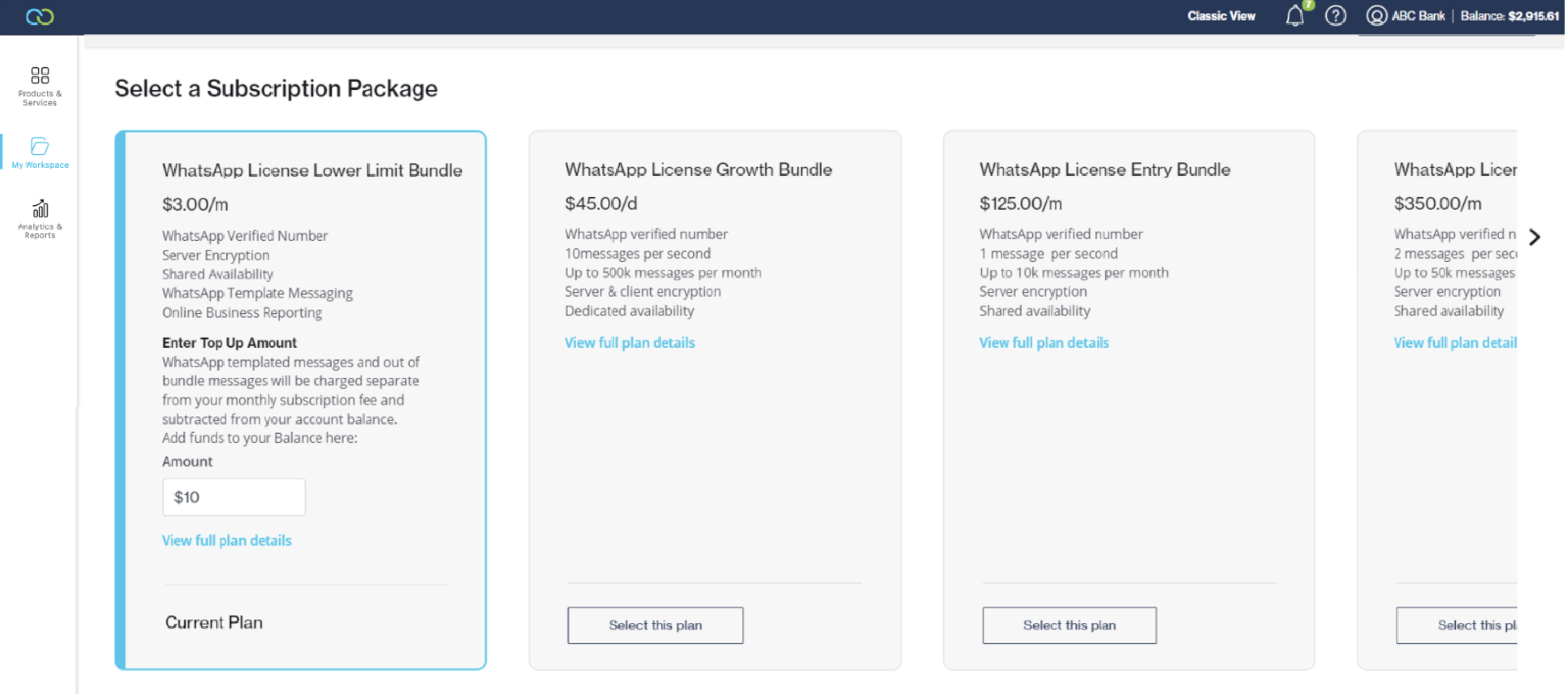
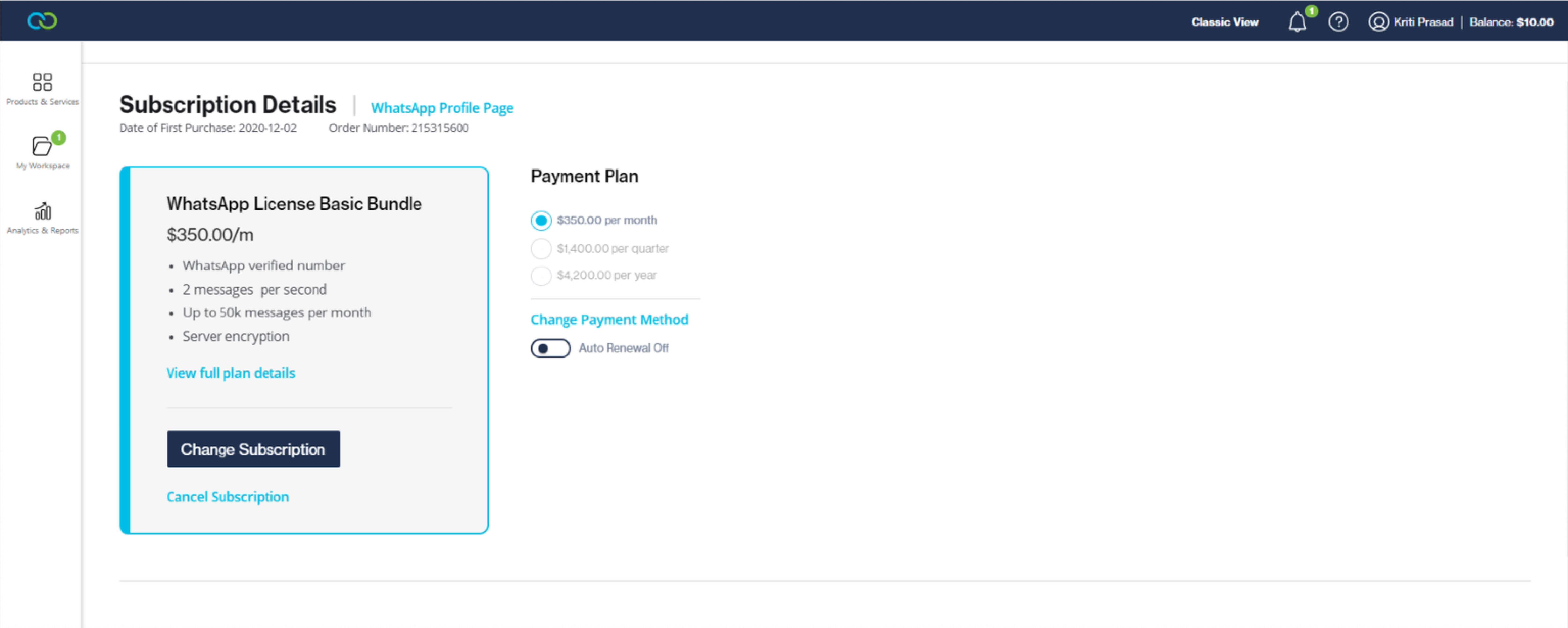
Instead of having to log support requests every time a change to a subscription plan is required, Portal users can now manage their own subscriptions from within the Portal. At any stage, the user can view the details of their current plan and compare it to the other options that are available. They also get the flexibility to upgrade, downgrade, or cancel their existing product subscriptions.

<figure><img src="https://2380245535-files.gitbook.io/~/files/v0/b/gitbook-x-prod.appspot.com/o/spaces%2Fl8ao2e7ogQyZBti1BuxA%2Fuploads%2FttU5DB8MaXKRZ6ziP8xC%2Fimage.png?alt=media&#x26;token=adb65b13-de92-43d1-8e72-7ce5875f670c" alt=""><figcaption></figcaption></figure>

<figure><img src="https://2380245535-files.gitbook.io/~/files/v0/b/gitbook-x-prod.appspot.com/o/spaces%2Fl8ao2e7ogQyZBti1BuxA%2Fuploads%2FgCpBWm2VTRsDFGB4Ztxe%2Fimage.png?alt=media&#x26;token=4958ff47-8070-41a2-971b-f52cd08ab1ca" alt=""><figcaption></figcaption></figure>

With the release of Clickatell Portal V2.0.0, we've upgraded the technology that the Portal is built on. This upgrade reduces any vulnerabilities of using an old technology stack and provides a more secure digital product to the customer. It also ensures a quicker turn-around time for Portal deploys.

#### Improvements

Significant UX improvements were made to improve customers' experience when interacting with our products:

* Added **user-friendly error messages for** all possible errors that users could encounter when submitting a payment via the Portal so that users are clear on what the exact problem is that they are experiencing and more easily resolve them.
* The Portal allows users to select different **currencies** for billing and display purposes. We have improved the way these currencies are shown throughout the portal to make it clear to the user what their balance is at all times.
* We have simplified the user journey when **activating the Campaign Manager tool** via the Portal.
* Enhanced our API performance to ensure the synchronous updating of the **Top-Up balance page** and the overall balance as displayed in the portal whenever top-ups are purchased.
* In the *Channel Reports* section, users can now **directly download the report** without having to generate the report first. This reduces the number of steps and time required for a user to download a report.
* **Miscellaneous** smaller UX improvements relating to icon resolution, persistent scrolling position, improved feedback messages, country drop-down menus, button styles and positioning, screen responsiveness, field validation, navigation indicators, and collapsing/expanding menus.
* **Voucher discounts** are now included on the *Transaction History* page.
* Improved the management of **auto-renewal** services for products/channels.
* Chat Desk **seat upgrade** improvements.
* Added a mandatory acceptance of **WASPA terms and conditions** for SMS.
* Added a mandatory input of **​​​​​​​Facebook Business Manager ID** for a WhatsApp Business Application.
* Added the option to select **Dynamic URLs** when applying for WhatsApp Template Messages.
* Improved **error notification and handling** related to billing details not submitted in the portal.

#### Bug Fixes

This release also included important fixes and improvements based on customer and QA feedback. The following minor bugs and improvements have been addressed:

* Update of **Email ID** in the account information section
* Fix applied for **downloading SMS message status reports** from the *Reports & Analytics* section
* Fixes applied for a purchase made via **PayPal** ID under the *Billing & Payments* section of the portal
* Added details and made several fixes and improvements to **short codes** and **auto-renewal of subscriptions**
* Enabling the **auto payment** switch after successfully saving the payment method in the account
* **Miscellaneous bug fixes** relating to incorrect/vague error messages, enabling/disabling of buttons, *Billing & Payments* and *Top-Up* sections, subscription management & expiry/renewal, report filtering errors and missing details, test phone display and management, OTP logic when adding test phones, missing/broken hyperlinks, typos, pro forma invoice improvements, and product name changes

## Support of bi-directional location sharing

Release date: 28 April 2021

### **Release Summary**

This release focused on building a solid foundation for features that were subsequently included in V5.22.0 as well as for features that are planned for upcoming releases. One enhancement relevant for Chat Desk users only was also included in this release (see below for details).

#### **Enhancements**

**Support of bi-directional location sharing for Chat Desk**

{% hint style="info" %}
This enhancement pertains only to clients who are also using Clickatell's Chat Desk product.
{% endhint %}

With the help of [Chat Flow](https://clickatell.gitbook.io/flow/overview/overview) and One API, our [*Chat Desk*](https://clickatell.gitbook.io/chat-desk/overview/overview) users can now share their location

The following is now possible:

* End-users can share their approximate location or a specified address with a Chat Desk agent
* A Chat Desk agent can share a specified address with an end-user

Note that the sharing of a 'live location' is **not** supported at this stage. Location sharing is not yet possible from within Chat Flow itself.

## Department-specific operating hours, notes, UX enhancements

Release date: 24 March 2021

#### New Features

[**Department-Specific Operating Hours**](https://clickatell.gitbook.io/chat-desk/chat-desk-dashboard/settings/about-your-business)

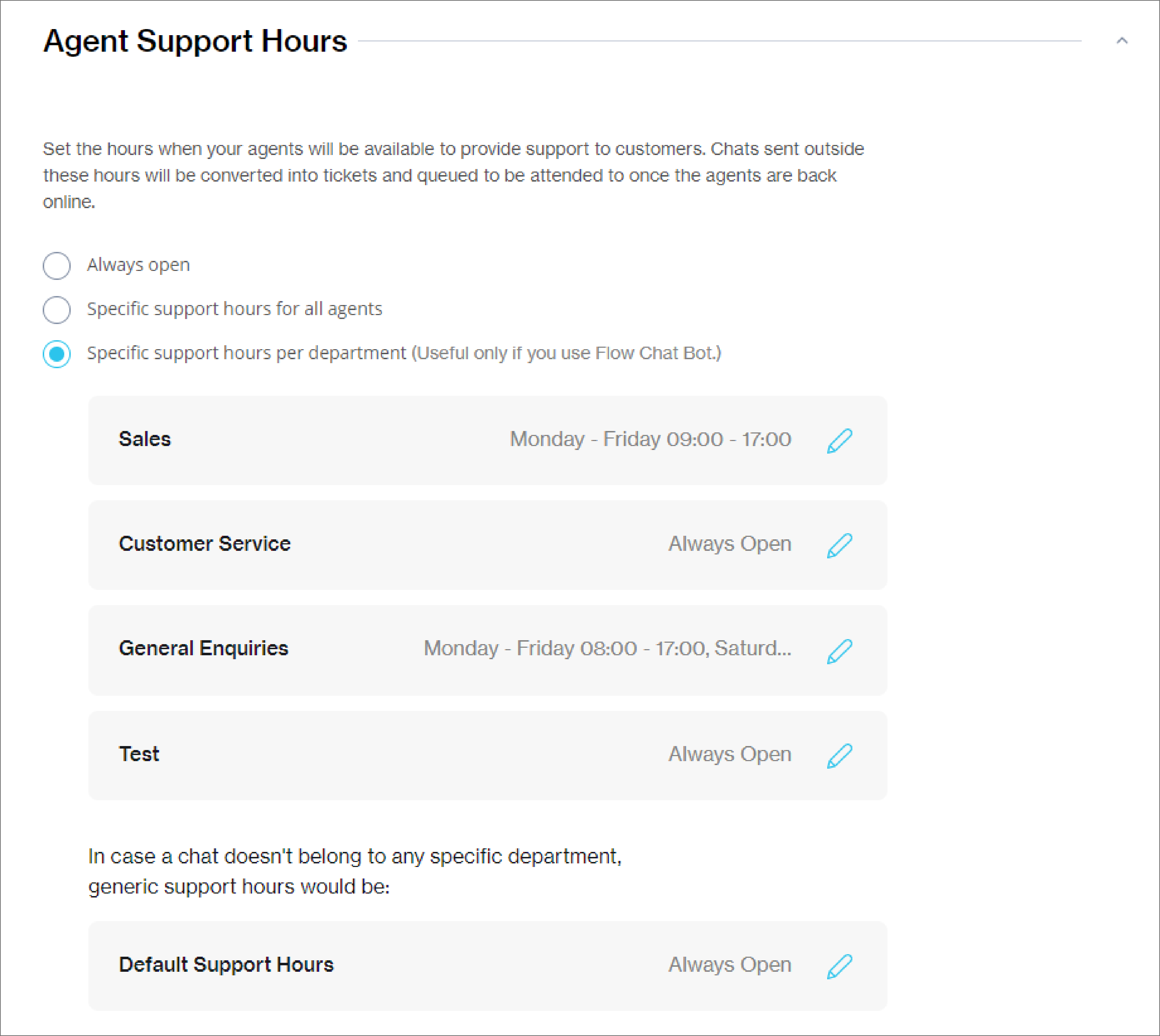
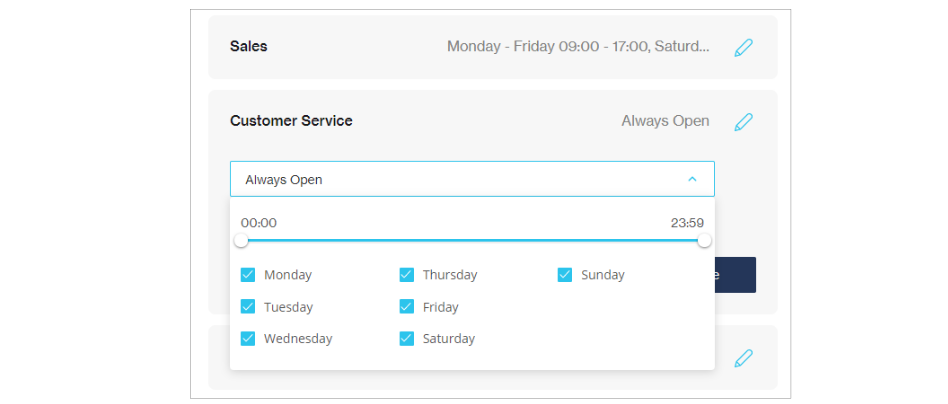
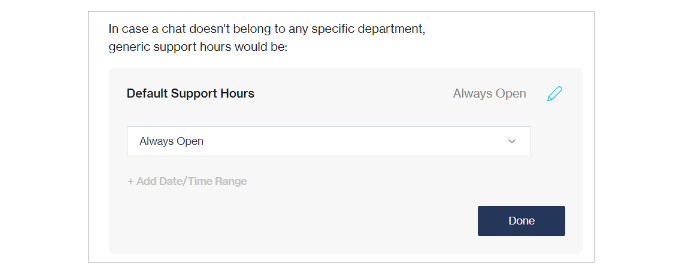
You can now configure operating hours specific to each individual department in your Chat Desk account. This allows you to align the support hours with the availability of your agents in their respective departments, ensuring that your end-users are always informed correctly when reaching out to you.

{% hint style="danger" %}
This feature is only supported for users who have integrated our [Chat Flow ](https://clickatell.gitbook.io/flow/)solution to Chat Desk.
{% endhint %}

<figure><img src="https://2380245535-files.gitbook.io/~/files/v0/b/gitbook-x-prod.appspot.com/o/spaces%2Fl8ao2e7ogQyZBti1BuxA%2Fuploads%2F5nlzikhAZbsPIiRe46yX%2Fimage.png?alt=media&#x26;token=344d2a89-b61f-40a3-bc3a-9ed715f87830" alt="" width="563"><figcaption><p>Set support hours per individual department</p></figcaption></figure>

<figure><img src="https://2380245535-files.gitbook.io/~/files/v0/b/gitbook-x-prod.appspot.com/o/spaces%2Fl8ao2e7ogQyZBti1BuxA%2Fuploads%2FG6BeyOIoMD5iJrTa9qjo%2Fimage.png?alt=media&#x26;token=0aa55177-f826-4188-adef-411995c87b20" alt=""><figcaption><p>Set support hours for each day of the week</p></figcaption></figure>

<figure><img src="https://2380245535-files.gitbook.io/~/files/v0/b/gitbook-x-prod.appspot.com/o/spaces%2Fl8ao2e7ogQyZBti1BuxA%2Fuploads%2FtQtsy0ez4uQgdvPhKNJD%2Fimage.png?alt=media&#x26;token=b2e1241d-03b3-43d3-9d44-98e9daf4a5af" alt=""><figcaption><p>Default support hours for agents who are not assigned to a department</p></figcaption></figure>

[**New activity vs New chat**](https://clickatell.gitbook.io/chat-desk/agent-chat-desk/manage-chat-queues-agent-desk/chats-and-tickets)

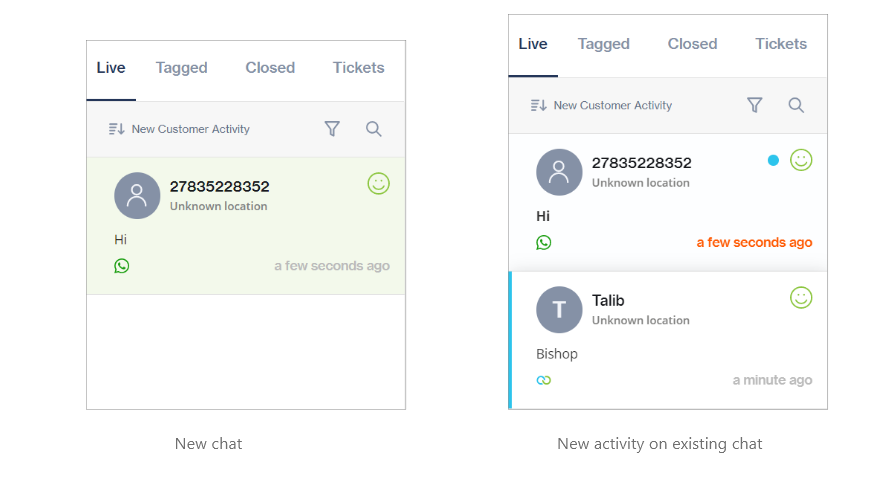
We have made a clear distinction between a new activity on an existing chat versus a brand new chat: New incoming chats display with a green background and a blue dot indicates new activity on an existing chat (this blue dot only appears on a chat card if you are on a different chat at the time a new message is received).

This enables agents to immediately distinguish between a response from an end-user they have already engaged with as opposed to a new chat that is assigned to them.

<figure><img src="https://2380245535-files.gitbook.io/~/files/v0/b/gitbook-x-prod.appspot.com/o/spaces%2Fl8ao2e7ogQyZBti1BuxA%2Fuploads%2FwsRGiz74GOkSu4nzJbJC%2Fimage.png?alt=media&#x26;token=804806e5-b547-4175-aa5c-2fd35e6a8800" alt=""><figcaption></figcaption></figure>

#### Improvements

[**Add Notes**](https://clickatell.gitbook.io/chat-desk/agent-chat-desk/chat-details-and-history)

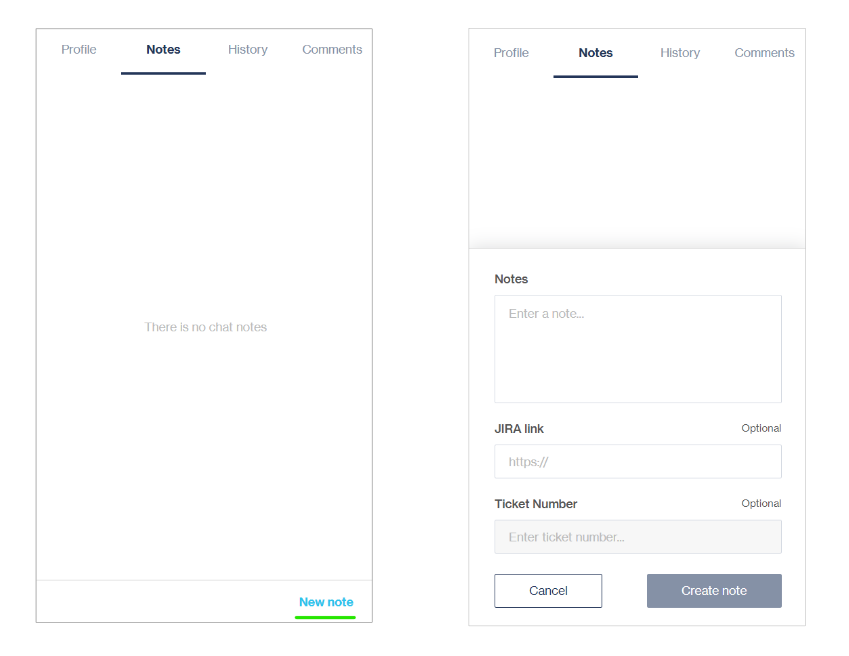
Agents can now add notes to a chat at any time during a conversation with an end-user, as well as for closed chats and tickets. Previously, agents could only add notes when closing a conversation.

<figure><img src="https://2380245535-files.gitbook.io/~/files/v0/b/gitbook-x-prod.appspot.com/o/spaces%2Fl8ao2e7ogQyZBti1BuxA%2Fuploads%2F9KVk7lUTDud9rELyH4i3%2Fimage.png?alt=media&#x26;token=704703b1-51fa-4cec-9591-3bf54240184d" alt=""><figcaption><p>Add new notes</p></figcaption></figure>

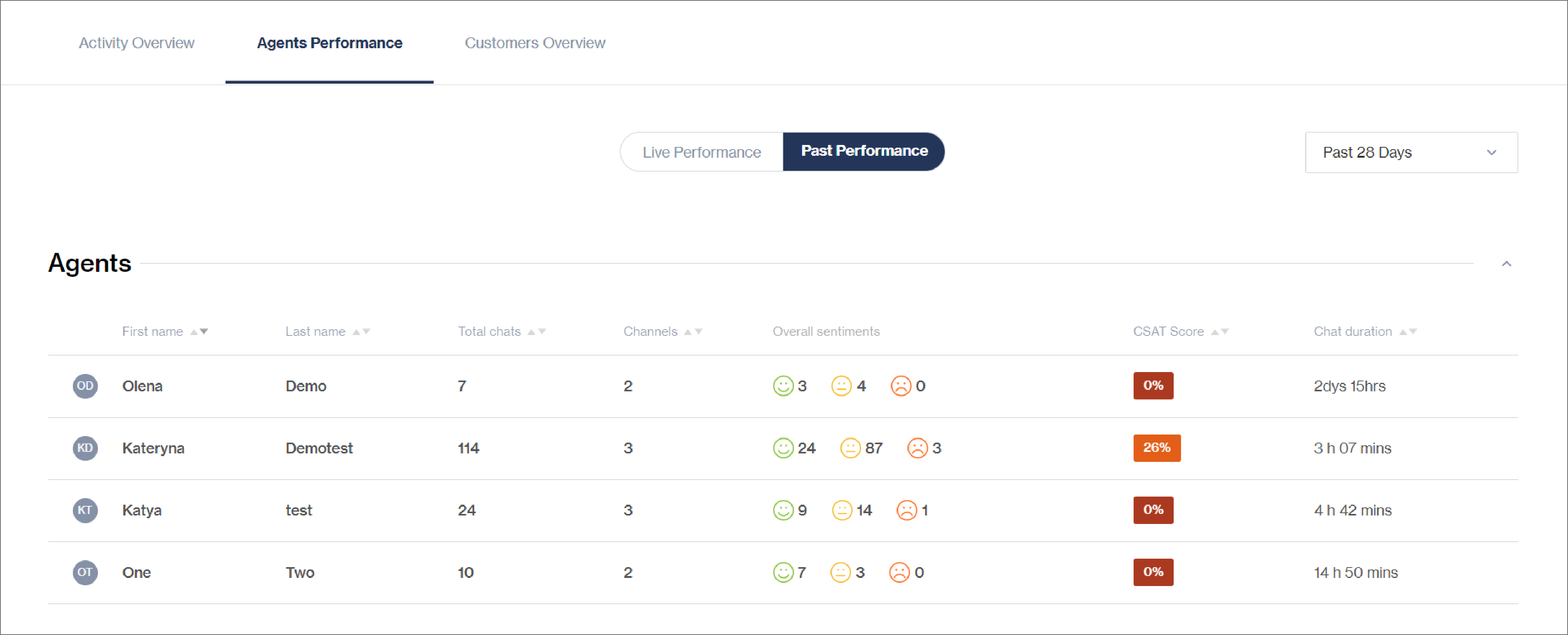
We have enabled a customer satisfaction (CSAT) rating per agent to illustrate to Supervisors how Agents are performing based on the feedback received via the CSAT surveys.

{% hint style="info" %}
The CSAT ratings will only be applicable to the CSAT survey.

CSAT ratings per agent will only be presented if a survey has been activated on your Chat Desk account [here](https://clickatell.gitbook.io/chat-desk/chat-desk-dashboard/settings/survey-management).
{% endhint %}

<figure><img src="https://2380245535-files.gitbook.io/~/files/v0/b/gitbook-x-prod.appspot.com/o/spaces%2Fl8ao2e7ogQyZBti1BuxA%2Fuploads%2FO5FOFVN7CmV5zDA8NTbl%2Fimage.png?alt=media&#x26;token=f1ee3a35-bc0a-4b8b-b353-0a54018b74df" alt=""><figcaption><p>CSAT scores per agent</p></figcaption></figure>

#### Bug Fixes

The following issues have been resolved:

* Chat window blurring after sending or receiving messages
* Transfer list not updating with available agents
* Blank screen appearing after a transfer is rejected
* Incorrect agent name displayed for a rejected transfer
* Inaccurate timestamp on notes
* Ticket assignment to a department from the Supervisor desk as opposed to a specific agent
* Agent disconnection issues


---

# Agent Instructions: Querying This Documentation

If you need additional information that is not directly available in this page, you can query the documentation dynamically by asking a question.

Perform an HTTP GET request on the current page URL with the `ask` query parameter:

```
GET https://guides.clickatell.com/release-notes/release-notes-4.md?ask=<question>
```

The question should be specific, self-contained, and written in natural language.
The response will contain a direct answer to the question and relevant excerpts and sources from the documentation.

Use this mechanism when the answer is not explicitly present in the current page, you need clarification or additional context, or you want to retrieve related documentation sections.