> For the complete documentation index, see [llms.txt](https://guides.clickatell.com/release-notes/llms.txt). Markdown versions of documentation pages are available by appending `.md` to page URLs; this page is available as [Markdown](https://guides.clickatell.com/release-notes/release-notes-2.md).
# Release notes
## Business-Triggered Messages
Release date: 15 November 2023
Previously, the only way a workflow could be triggered in Chat Flow was when an end-user sent a keyword to the business WhatsApp number. If a business wanted to initiate a conversation with its end-users, it had to integrate with One API to trigger a WhatsApp template message, which is quite a technical and roundabout way to start a conversation.
With this release, we've introduced the concept of a “**dynamic API flow**” in Chat Flow. This workflow gets triggered by an **incoming payload** and lets a business initiate a conversation with their customers by sending a pre-approved WhatsApp template (using the [*Send Template*](https://guides.clickatell.com/release-notes/release-notes-archive/2023-release-notes/q4-2023/automated-messaging/broken-reference) node), prompting them to take action and trigger a standard workflow. This opens up many opportunities for new use cases, e.g., sending reminders, shipping updates, marketing messages, and promotions via WhatsApp message templates without having to wait for customers to contact the business first.
Clickatell creates these dynamic API flows on your behalf during onboarding. In the flow list on the left of the canvas, a new yellow icon is used to differentiate the dynamic API workflows from the standard ones. Dynamic API flows are read-only and not visible to end-users.
In combination with the new [*Send Template*](https://guides.clickatell.com/release-notes/release-notes-archive/2023-release-notes/q4-2023/automated-messaging/broken-reference) node, it is now easier than ever for businesses to send WhatsApp message templates to their customers!
A yellow icon differentiates it from a standard flow.
## New Send Template Node
Release date: 15 November 2023
Whenever you as a business want to initiate a WhatsApp conversation with your customers, you must use a WhatsApp message template.
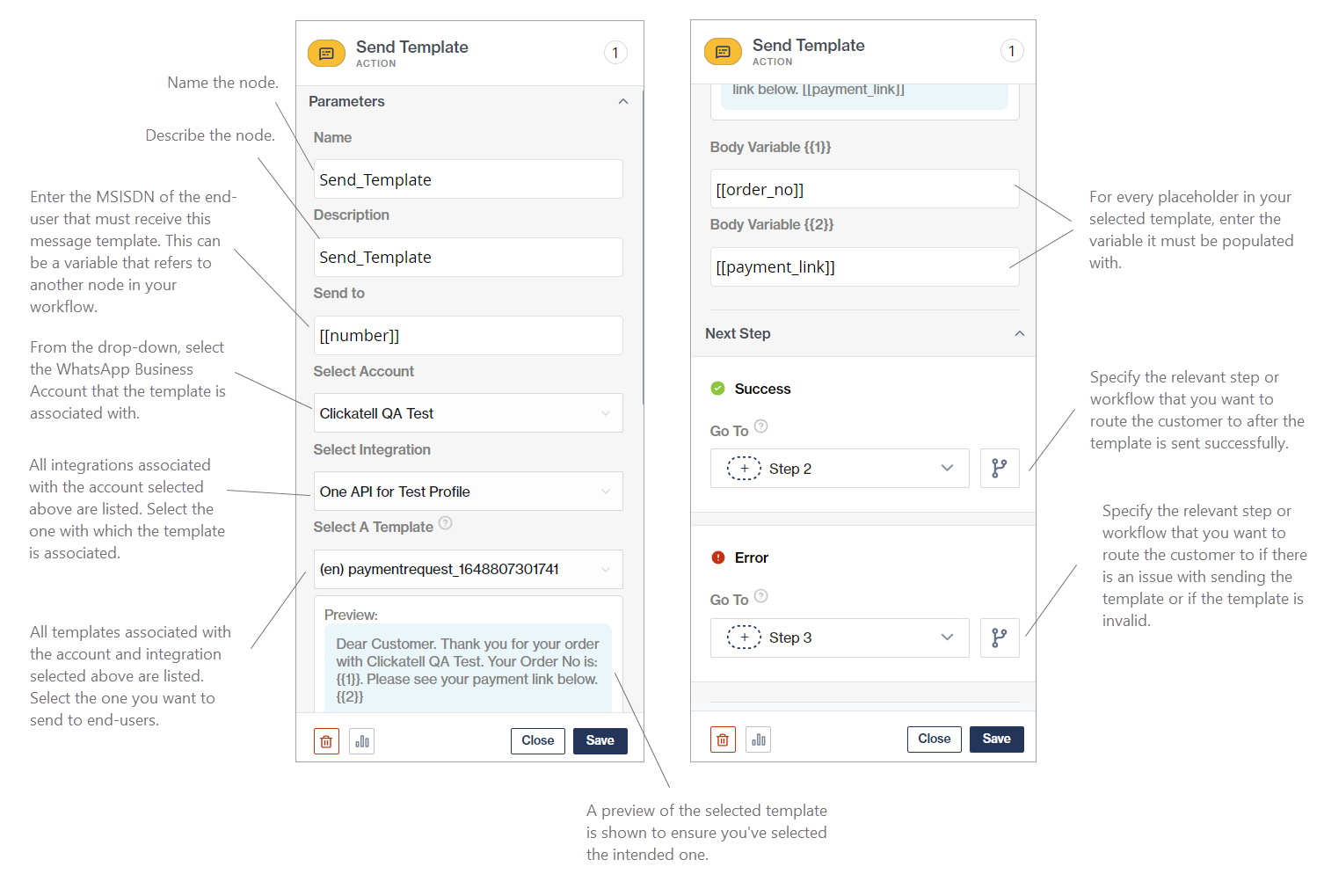
We've released a new workflow node, the [*Send Template*](https://guides.clickatell.com/flow/action-nodes/send-template) node, that makes it easier to send a WhatsApp message template to end-users via Chat Flow. Previously, flow-builders had to configure API calls from Chat Flow to One API to trigger WhatsApp message templates. Now, it's as easy as dragging and dropping this node onto the canvas!
When adding the node to your workflow, Chat Flow does a lookup in the Clickatell Portal account and pulls in all information regarding your WhatsApp Business accounts, API integrations, and approved message templates so it is easy to select the specific template you want to add to the workflow.
The “Select a Template” dropdown displays all approved templates that are available in the selected account and integration. Selecting a template dynamically updates the required fields to match the template type and the number of variables it contains.
Setup of a Send Template node
## Chat 2 Pay 3.2.0
Release date: 23 October 2023
In this Chat 2 Pay release, we've added several improvements and features to enhance the payment experience for our valued clients and addressed some bugs that we've identified. This deployment represents our continuous efforts to provide our clients a seamless and efficient chat payment solution.
Some highlights of this release are detailed below.
### New features and enhancements
#### **Pay U Charge Payment Flow Implementation**
With this release, we have optimized our payment processing by implementing the *Charge* (also known as *Sale*) payment flow. This payment flow provides the ability to combine the *Authorization* and *Capture* steps of a payment request, thereby significantly reducing the number of calls required to process a transaction and streamlining the overall payment process. It is the most common method of processing card payments and enables us to handle more use cases. With this implementation and in conjunction with the *Authorize* and *Capture Payment* flow, we are able to handle most use cases in payments.
#### **Card Token Deletion**
Our new release includes a feature that allows for the secure and efficient deletion of generated card tokens, enhancing the overall security and user control within the payment system.
### Bug fixes & performance improvements
* **Payment settings configuration in the Clickatell Portal:** The *Chat 2 Pay Configuration* form on the Clickatell Portal was redesigned to streamline the process and remove the confusing setup options provided on the form. The confusion stems from there being two ways in which Cybersource can be used as the payment provider, i.e., by using the Clickatell-hosted checkout page or using the Cybersource Unified checkout page. The form has been modified to enable the user to select the Payment Provider they wish to utilize, with the rest of the form then adjusting accordingly based on the selected option.
Old Payment Configuration Page
Updated Payment Configuration Page
* **Country selection on the Clickatell-hosted checkout page:** We have fixed the issue with the usability of the *Country* dropdown on the Clickatell-Hosted Checkout page by correctly sorting the countries. This ensures a smoother user experience during the checkout process.
* **Card expiry details:** The receipt page displayed to the customer during the checkout process did not include the card expiry details due to this information not being saved correctly. This has been resolved, ensuring accurate and comprehensive transaction records for our clients and their customers.
* **Shipping Country:** We also fixed the problem related to the shipping country not being saved during the checkout process, ensuring that all necessary transaction details are accurately recorded and maintained.
* **Billing information capture:** We successfully resolved the bug that caused merchant billing information captured on the merchant configuration page on the Clickatell Portal to override the billing information inputted by the customer on the checkout page. This ensures that accurate transaction records are kept and mitigates transaction failures due to the billing information being incorrect.
* **Kibana logs update:** We enabled the filtering of transactions in Kibana logs based on the Payment Gateway, allowing for more efficient tracking and management of transactions within the system.
We are confident that these improvements will go a long way in addressing some of the known issues we have on the Chat 2 Pay application while elevating Chat 2 Pay with new features. Look out for more exciting features and enhancements coming soon!
## New: WhatsApp Templates 2.0
Release date: 20 October 2023
A new and improved template creation experience was released whereby you must now create new WhatsApp message templates from within your Facebook Business Manager (FBBM) account instead of from within the Clickatell Portal.
Once submitted in FBBM, these templates are pulled into the Clickatell Portal with their status and, once approved, templates can be utilized as usual from within the Clickatell environment.
Creating message templates directly in FBBM is a much quicker process, and gives you access to the real-time feedback provided by Meta.
{% hint style="info" %}
***Please note:***
* This feature is only available to clients onboarded via WhatsApp Embedded Sign-Up (WAES). The template creation process does not change for clients onboarded via the old On-Behalf-Of (OBO) model, and they will still use the old method for creating templates from within the Clickatell Portal.
* Only template categories supported by Clickatell's One API will be synced from FBBM to the Clickatell Portal. The templates not supported by Clickatell will not be synced.
* The creation of Chat 2 Pay templates remains unchanged at this point.
{% endhint %}
\## How does it work?
If you've onboarded via WAES, you are now prompted to access FBBM to create your WhatsApp message templates by clicking on the *Manage & Create Templates in Facebook Business Manager* button.
A new button in the Clickatell Portal directs clients to FBBM to create their templates.
You are informed that you cannot sync non-supported templates. Click *Go to Facebook Business Manager*.
You are now directed to the template creation page in FBBM. Click *Create template* and follow the steps as prompted to create their message template.
Once the template has been submitted for approval in the FBBM, you can return to your Clickatell Portal and sync to pull in all new templates that are supported by Clickatell. As soon as the template is approved by Meta, you can start sending them to your customers.
{% hint style="info" %}
For more information and detailed steps, please refer to our \[WhatsApp User Guide]\().
{% endhint %}
## WhatsApp Quality Rating & Messaging Limits
Release date: Q4 2023
You can now view your quality rating and messaging limits directly from within the Clickatell Portal under your [*WhatsApp Profile Details page*](https://guides.clickatell.com/whatsapp-channel/getting-started/add-and-manage-whatsapp-business-profiles#manage-your-business-profiles). The quality rating of your WhatsApp Business phone number is based on feedback from your customers on the messages that they’ve received over the past seven days. This rating can impact the messaging limits imposed on your account.
{% hint style="info" %}
**Learn more:**
* [What does the quality rating of my WhatsApp Business phone number mean?](https://www.clickatell.com/help-center/whatsapp/general-whatsapp/what-does-the-quality-rating-of-my-whatsapp-business-phone-number-mean/)
* [What messaging limits apply to my WhatsApp Business account?](https://www.clickatell.com/help-center/whatsapp/general-whatsapp/what-messaging-limits-apply-to-my-whatsapp-business-account/)
{% endhint %}
## Channels Report Update
Release date: Q4 2023
We have introduced a new filter to the [*Channels Report*](https://guides.clickatell.com/chat-commerce-platform/navigation-and-access/reporting-and-analytics/messaging-channels#channels-report) in the Clickatell Portal that allows clients to search on specific WhatsApp template names. This long-awaited feature allows clients to do more targeted searches on their template usage and template performance by generating a report containing data for a selected template only.
To make use of this filter, follow these steps:
1. In the Clickatell Portal, go to *Analytics & Reports → Channels → Report.*
2. Select “Sent” messages, your date range, and the environment.
3. Select “WhatsApp” as the Channel and “HSM” as the Message Type.
4. A drop-down appears listing all the approved templates in the account. Search for a specific template by scrolling or by typing the template name.
5. Select a template and click *Generate Report*.
The report that is generated will contain data for the selected template only.
## Clickatell Portal Updates
Release date: 15 November 2023
We’ve worked hard on streamlining our onboarding process to reduce the time required for clients to get up and running significantly. We've also introduced a series of further enhancements and new features in the Clickatell Portal:
* **Link to old user guide replaced with new Clickatell Platform user guide link:** The old user guide link in the Clickatell Portal was replaced with a link to the new and improved [Clickatell Chat Commerce Platform guide](https://guides.clickatell.com/chat-commerce-platform/).
* **Remove the Bots Overview report from the portal:** The *Bots Overview* report in the Clickatell Portal is no longer valuable since all metrics are captured and presented in the *Bots Full Analytics* report.
* **Cleaned up the Chat Flow & Chat Desk pages:** We've cleaned up the Chat Flow and Chat Desk pages in the Clickatell Portal to align better with the packages and how these applications are now provisioned for our clients. We've removed the step-by-step guides for all repackaged clients since they no longer have to follow any steps to get access to these applications. We've also removed the *Contact Support* button, unnecessary tooltips, and the option to delete linked channels since our clients no longer manage provisioning and channel linking themselves.
* **Updated WhatsApp & SMS Step-By-Step Guides:** We've updated the details of the step-by-step guides for configuring WhatsApp and SMS channels in the Clickatell Portal to match the precise steps that clients must take when setting up these communication channels.
* **Display SLA Breakdown In-Portal:** To enhance transparency, we've added a new *Support Package* section under *Account Management* in the Clickatell Portal that provides a comprehensive SLA breakdown aligning with the support package that the client subscribed to (i.e., Standard, Business, Enterprise).
## Other Enhancements & Improvements
Release date: Q4 2023
* **Chat Desk:** Addressed the issue where clients experienced intermittent timeout issues with Chat Desk agents.
* **WhatsApp:**
* Removed the $1 package from the UI of the embedded sign-up screen, and removed the ability to renew existing $1 subscriptions. This was a limited promotional offering that had come to an end.
* Resolved the issue with WhatsApp Template Management where it was possible to import/sync templates with an unknown button type, resulting in errors.
* **SMS (10DLC):**
* The inability to register a Campaign was resolved.
* Resolved 10DLC brand and campaign details that were displayed multiple times.
## Default flow for invalid input
Release date: 18 September 2023
This feature was added to all [Branch/Logic Split nodes](https://guides.clickatell.com/flow/user-facing-nodes/branch-logic-split) and ensures that, if the customer enters an invalid option (i.e., an option that is not part of the list presented to the customer), you can configure a "default" node/flow to follow automatically. This default flow is optional, and if not set up, the node will simply repeat itself if an invalid option is entered.
Watch the video below to see a simplified example of the default flow in action.
{% hint style="info" %}
If you are interested in utilizing our NLP offering, contact your account manager or our [Sales Team](https://www.clickatell.com/contact/contact-sales/).
{% endhint %}
## Dynamic List node enhancements
Release date: 3 August 2023
We've enhanced the [Dynamic List](https://guides.clickatell.com/flow/user-facing-nodes/branch-logic-split/menu-nodes-dynamic-list) node to allow for:
* Adding subtext/descriptions to options in a list, and
* [Configuring channel display types](https://guides.clickatell.com/flow/channel-capabilities/configure-channel-display-type).
### Release Details
When setting up the [Dynamic List](https://guides.clickatell.com/flow/user-facing-nodes/branch-logic-split/menu-nodes-dynamic-list) node, you can now also configure the [channel display type](https://guides.clickatell.com/flow/channel-capabilities/configure-channel-display-type) and choose between Reply Buttons, List Messages, or a Numbered List. When selecting List Message, you can also customize the button text displayed to customers.
{% hint style="info" %}
For more information, see [*Configure channel display type*](https://guides.clickatell.com/flow/channel-capabilities/configure-channel-display-type).
{% endhint %}
Setup of a Dynamic List node
The [Dynamic List](https://guides.clickatell.com/flow/user-facing-nodes/branch-logic-split/menu-nodes-dynamic-list) node now also supports subtext/descriptions to give clarity or additional information to customers about the options in your list.
{% hint style="info" %}
For more details, see the [Dynamic List node](https://guides.clickatell.com/flow/user-facing-nodes/branch-logic-split/menu-nodes-dynamic-list) page.
{% endhint %}
## New & enhanced nodes
Release date: 13 July 2023
### New Switch Case node
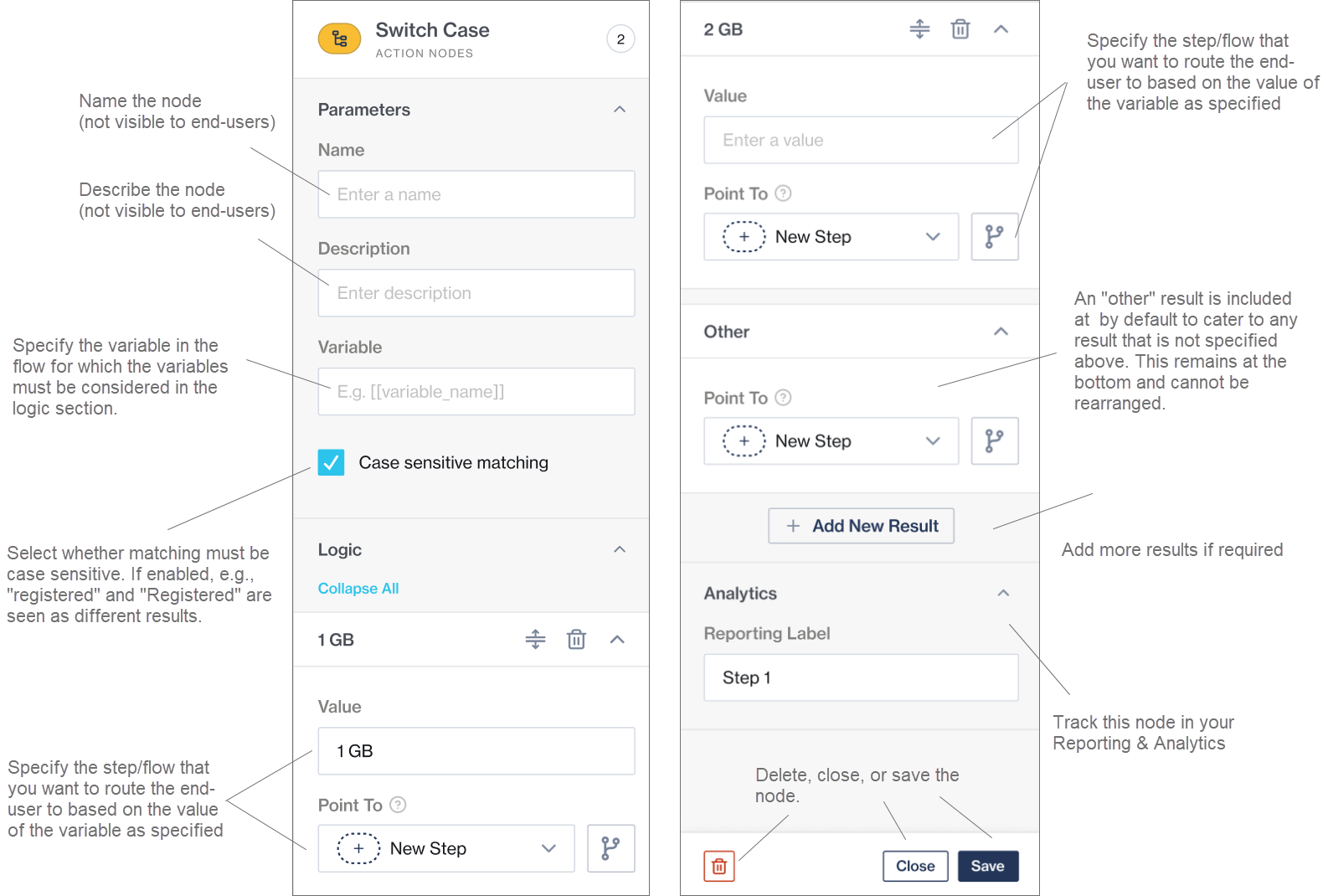
The [Switch Case](https://clickatell.gitbook.io/flow/action-nodes/action-nodes-switch-case) node is an action node (i.e., not user-facing) that routes a user to a specific step based on a flow variable's value. It is similar to a [Menu node](https://clickatell.gitbook.io/flow/user-facing-nodes/branch-logic-split/menu-nodes-menu-with-options), but instead of relying on the end-user's input to decide which route to take, this node relies on the value of a certain flow variable.
{% hint style="info" %}
[Find out more](https://clickatell.gitbook.io/flow/action-nodes/action-nodes-switch-case) about the Switch Case node and how to set it up.
{% endhint %}
A new action node - the Switch Case node.
Setup of the Switch Case node.
### Enhanced Chat 2 Pay node
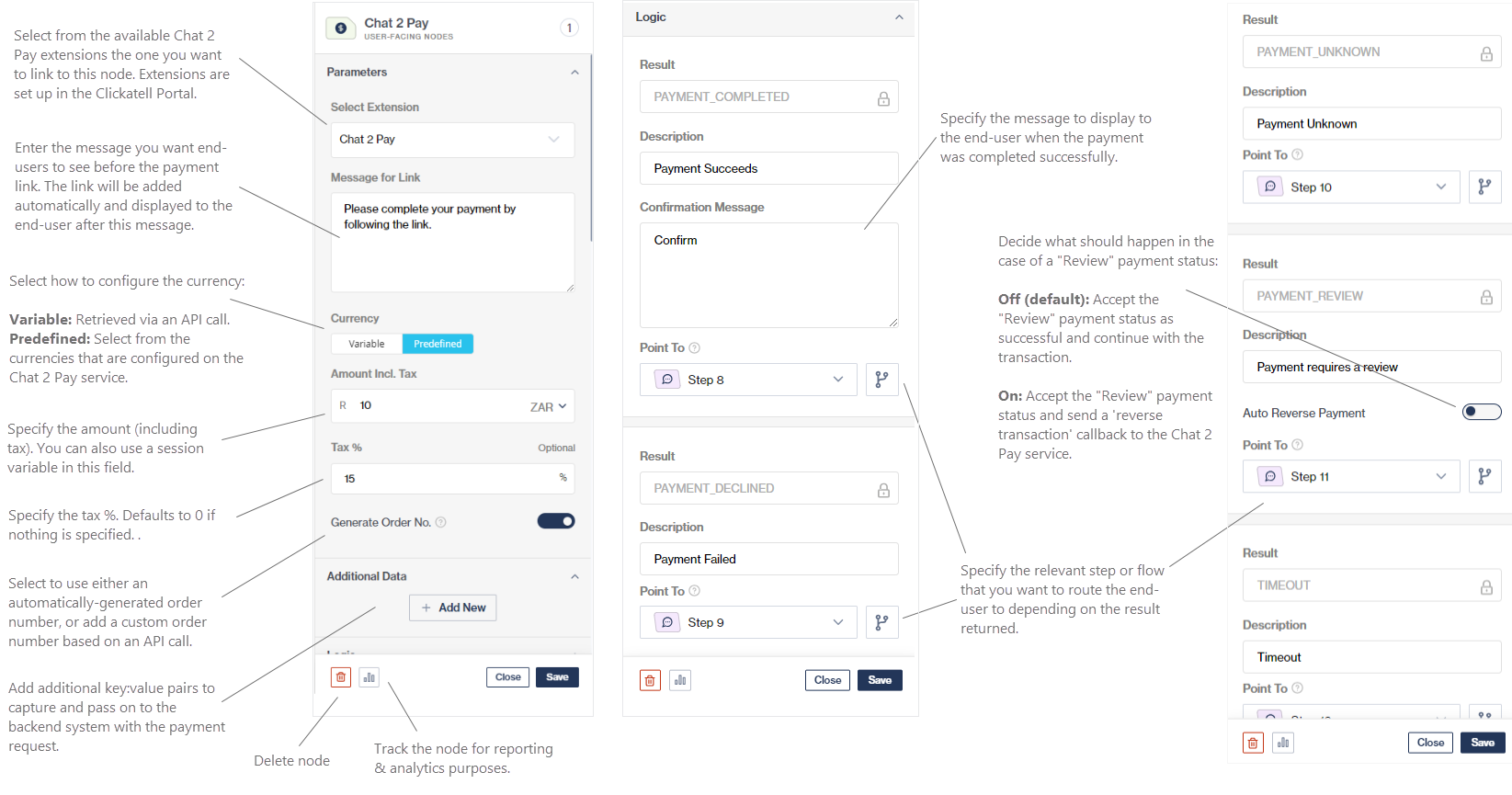
We've made several enhancements to the [Chat 2 Pay node](https://clickatell.gitbook.io/flow/user-facing-nodes/commerce/chat-2-pay).
Flow-builders now have the option to either let Chat Flow **generate an order number automatically** or they can **generate a custom order number** specific to your business based on an API call. Auto-generated order numbers are available as variables to be used in the workflow.
We've also included the ability for flow-builders to add any **additional data** to payment requests. This gets passed to the payment provider and can be used to match on their backend system (in case of incomplete transactions). These key:value pair fields support variables.
Enhanced Chat 2 Pay node
### Dynamic List pagination
{% hint style="info" %}
### [Find out more](https://clickatell.gitbook.io/flow/user-facing-nodes/branch-logic-split/menu-nodes-dynamic-list) about how to set up pagination on this node.
{% endhint %}
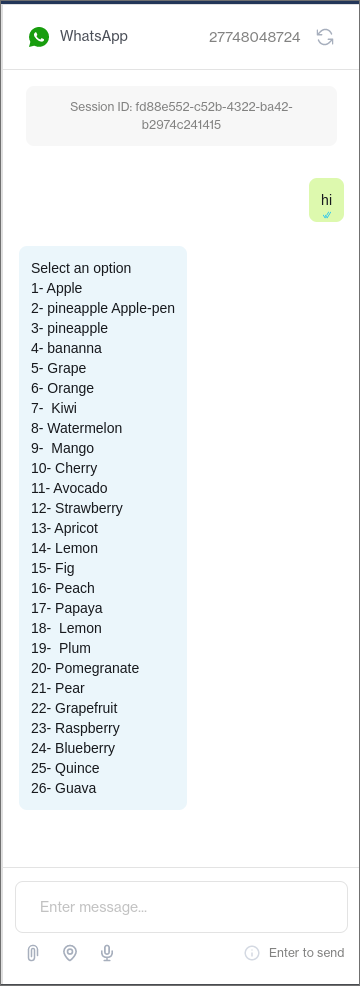
Previously, when using the [Dynamic List node](https://clickatell.gitbook.io/flow/user-facing-nodes/branch-logic-split/menu-nodes-dynamic-list) to present an option list that exceeded 10 items to your end-users, it was automatically rendered as a text menu as shown below.
Example of an unpaginated Dynamic List in WhatsApp
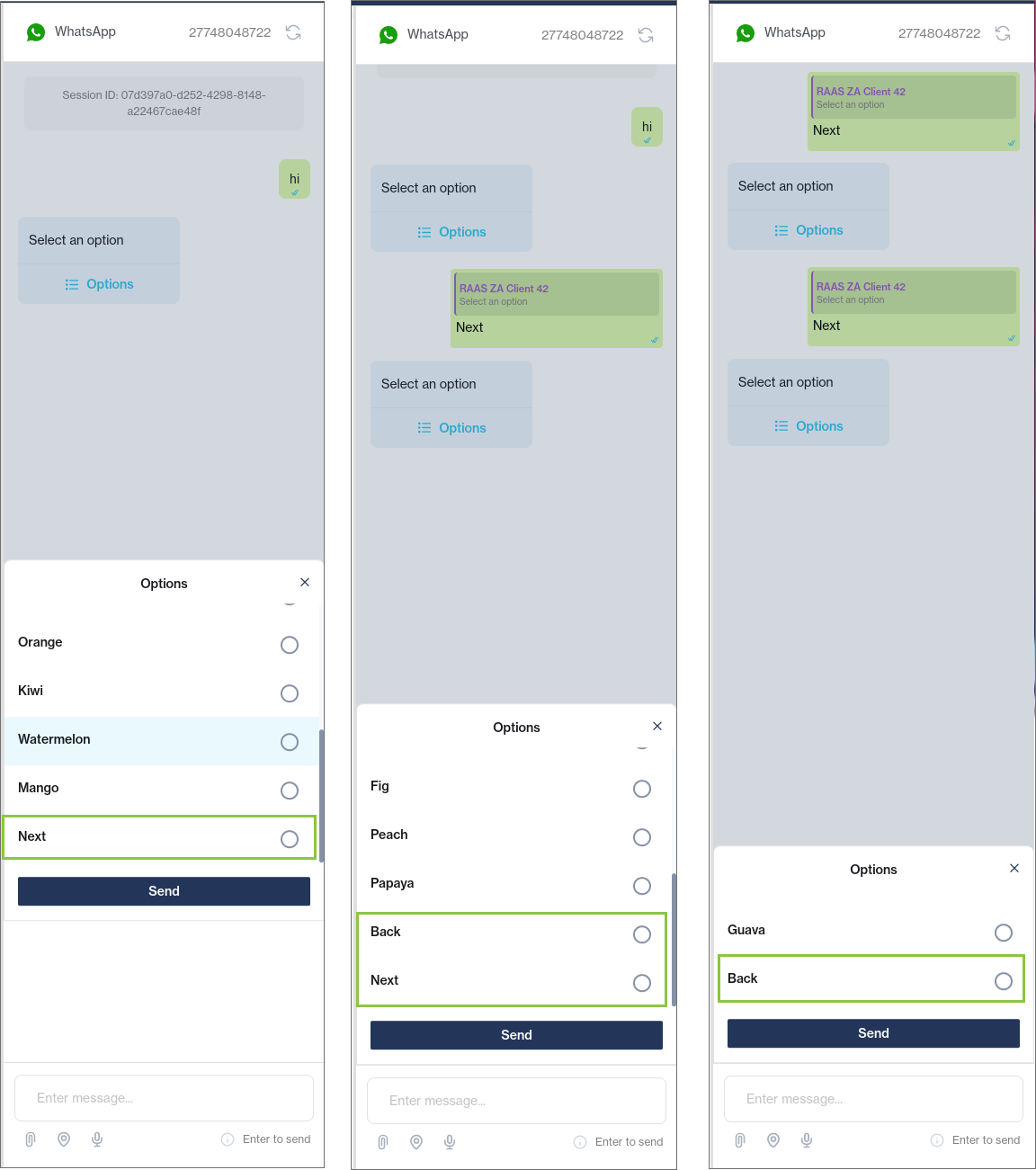
We now support the ability to paginate dynamic lists instead of reverting to a text menu. If enabled for the node (default), the list above will now render as shown below.
{% hint style="info" %}
Note that pagination, even if enabled, will only come into effect for lists of more than 10 items.
{% endhint %}
Example of a paginated Dynamic List node on WhatsApp
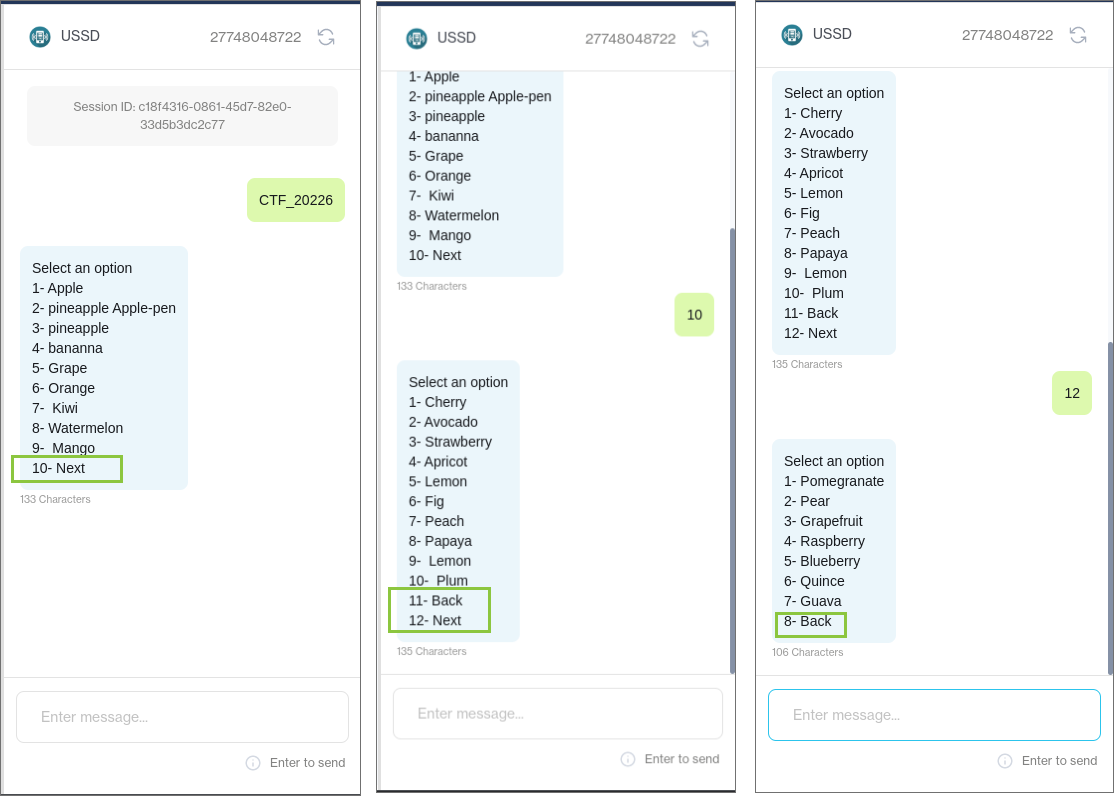
Example of a paginated Dynamic List node on USSD. The SMS channel will have a similar experience.
## New: Support for 3rd-party integrations in Chat Desk
Release date: Q3 2023
{% hint style="info" %}
## Available on [**Interact** ](https://www.clickatell.com/products/interact/)and [**Transact** ](https://www.clickatell.com/transact/)packages.
{% endhint %}
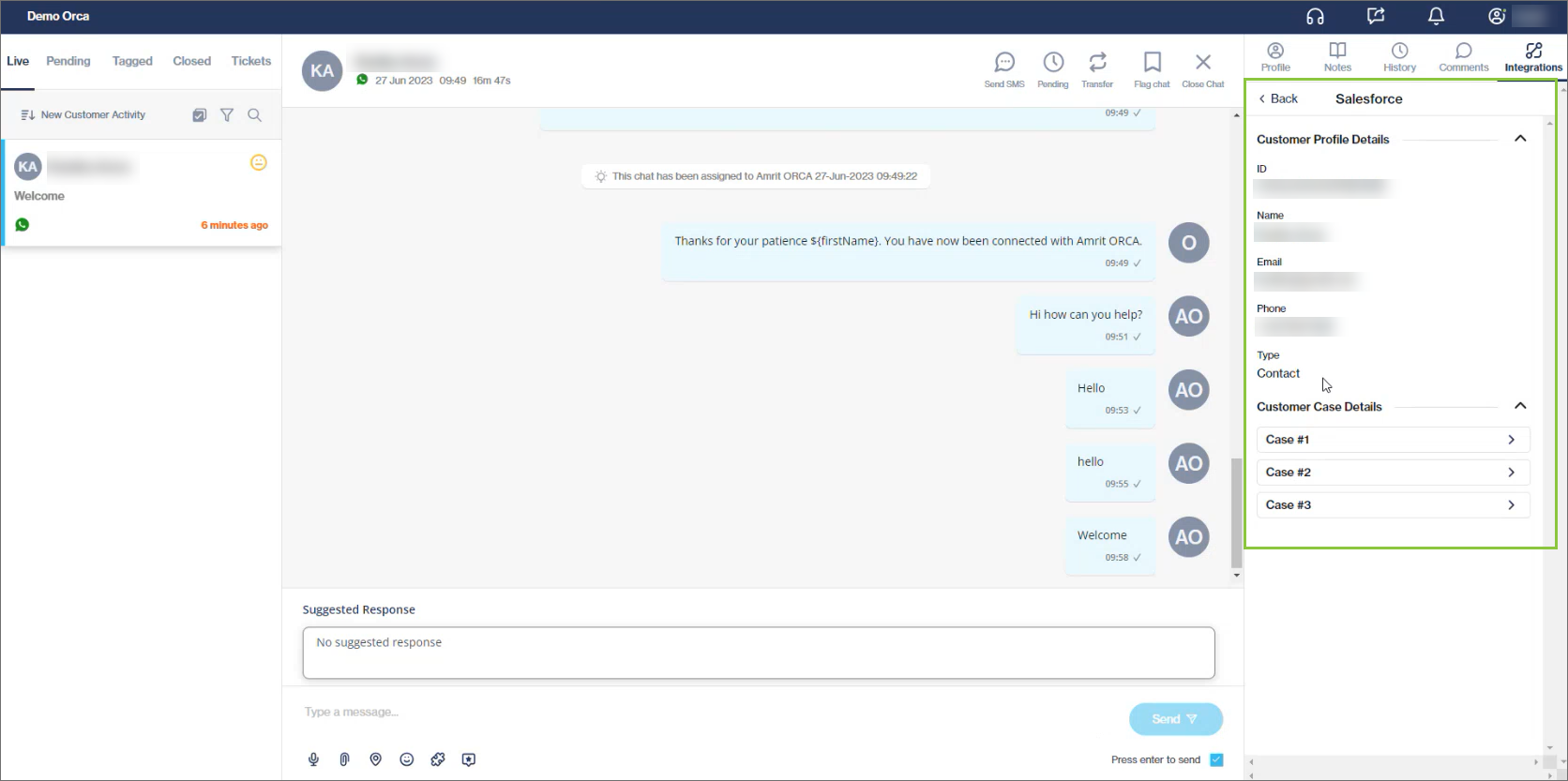
Chat Desk agents and supervisors can now view customer information from 3rd party applications while engaging with customers in Chat Desk, removing the need to switch between applications and managing multiple browser tabs.
Available for integrations with Salesforce, Zendesk Sell, Zendesk Support, and Shopify.
{% hint style="success" %}
[Learn more](https://guides.clickatell.com/chat-desk/agent-chat-desk/view-customer-details-from-3rd-party-applications) about viewing customer information from 3rd party applications in the Agent Desk.
{% endhint %}
A new Integrations tab (for Live, Pending, and Tagged chats) contains customer information as fetched from 3rd party providers.
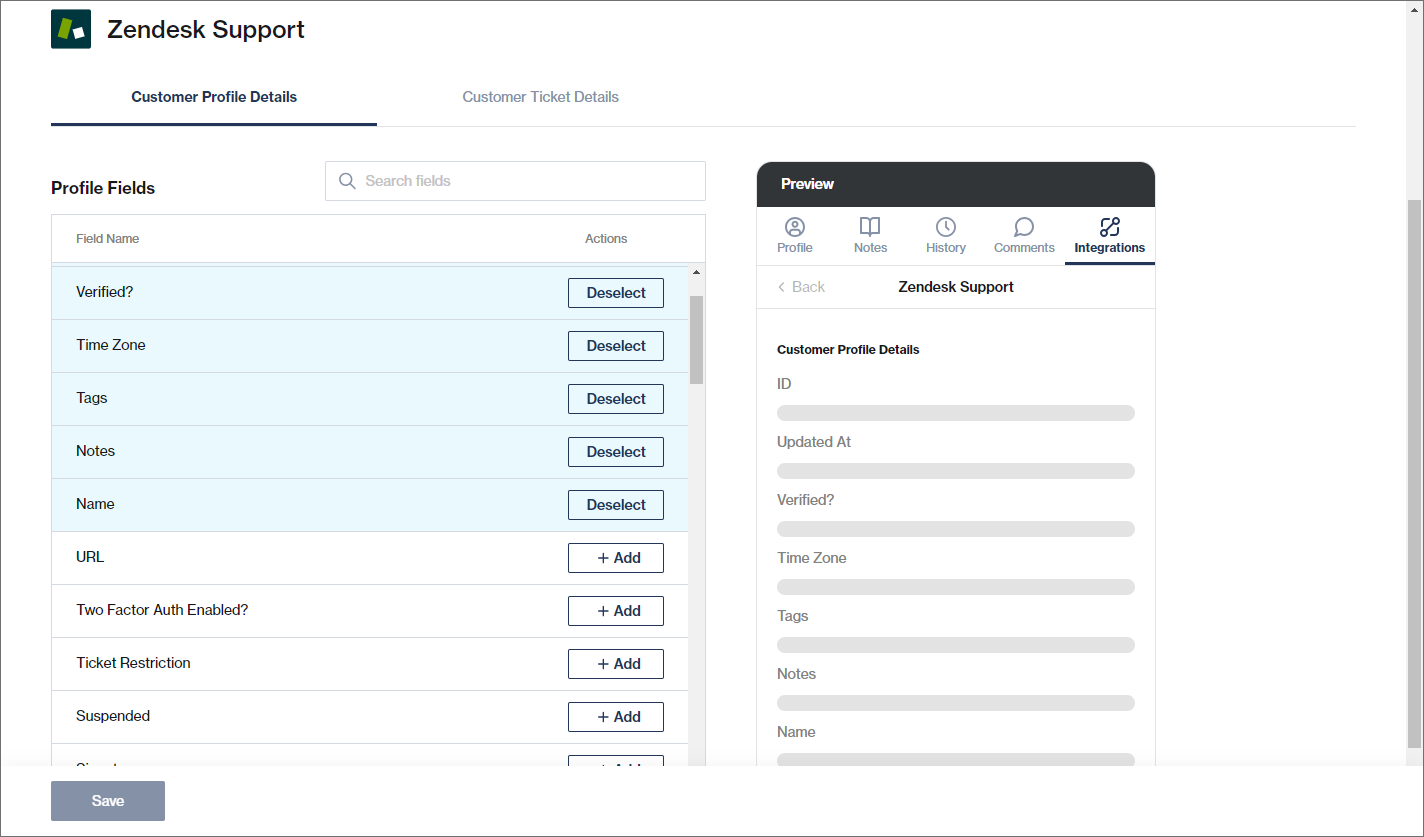
From the Chat Desk settings page, admin users can select the specific fields that should be visible to agents and Supervisors in Chat Desk for each of the 3rd party applications.
{% hint style="success" %}
[Learn more](https://guides.clickatell.com/chat-desk/chat-desk-dashboard/settings/integrations) about selecting which fields should be visible in Chat Desk.
{% endhint %}
In the Chat Desk Settings, admin users can (de)select the fields that should be visible to agents and supervisors in Chat Desk. A preview is shown on the right.
{% hint style="success" %}
You can view our [Chat Desk User Guide](https://guides.clickatell.com/chat-desk/overview/overview) for further details on using this feature.
{% endhint %}
### Other Enhancements and Improvements
Release date: 13 September 2023
### Bugs 🐞
The following issues were fixed:
* **Opt-out button on the WhatsApp marketing template:** When setting up a WhatsApp marketing template in the User Portal and selecting Quick Reply buttons, the opt-out button failed to appear as an option.
* **WhatsApp sample template - invalid (missing) parameter:** Clients were not able to send sample WhatsApp templates due to a duplicate default template in the backend with conflicting template parameters.
* **Chat Flow button on the Clickatell Portal is only visible for the admin role:** All users with any Chat Flow role assigned to them will now see the *Launch Chat Flow* button when navigating to *My Workspace → Chat Flow* in the Portal. Previously, only those with an “admin” role could see this button.
* **SMS 10DLC: Status mismatch for Campaigns in listing page:** We've corrected the mismatch that existed on some accounts between the actual status of a 10DLC campaign and what was shown on the Campaign list page (see below). The correct status is now accurately shown for each campaign.
* **Integrations section incorrectly added to newly created Connect Lite accounts:** When a new Connect Lite account was created, *Integrations* were automatically added to the account. The *Integration* capability should only be added when the account is upgraded to the Interact or Transact package, and *Integrations* have now been removed for Connect Lite clients.
* **Activated Campaign Manager does not display in My Workspace for repackaged accounts:** The *Campaign Manager* card now displays on *My Workspace* after it was activated for any of the packages (Interact, Transact, or Connect).
* **Long numbers displaying subscriptions in repackaged accounts:** A Clickatell client with a repackaged account should not see the *Subscription Details* section when viewing their number, since it's included in their package.
* **Account package page: Date not refreshing:** The “Last Update” label under the *Account Package* section has been removed.
* **User password creation should validate at least 12 characters:** When a new user is asked to create a password, the validation has been fixed to correctly display that the password should be more than 12 characters instead of 8 characters.
* **Users are unable to reset the password:** Users received an error message when resetting their passwords because the API expected a minimum of 12 characters, but the UI allowed them to submit a minimum of 8 characters. The UI now also requires users to enter a new password of 12 characters minimum.
* The *What's New* section should not be available for Connect Lite customers in the Portal.
* Page loading spinner spins indefinitely on *My Workspace* for newly created accounts instead of showing the correct empty state.
* Account package page:
* Media utilization - value is now rounded off to two decimals.
* Removed an incorrect tooltip.
* When activating *SMS notification* on Chat Desk, the user receives an error: “*Your SMS notifications was not deployed*”.
* When purchasing a long number, prepaid customers were directed to the payment method page without allowing them to make changes to the payment plan first.
### Enhancements 🚀
27 July 2023
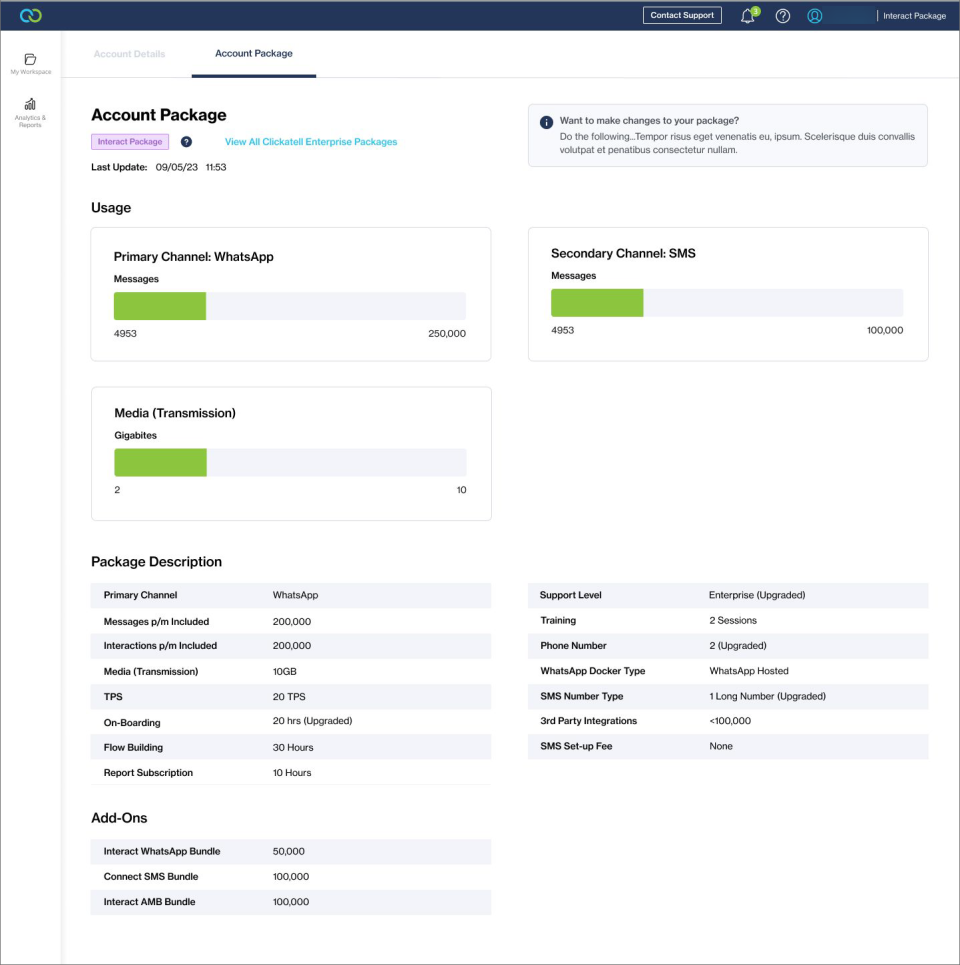
* **New Account Package tab under Account Details:** A Clickatell package client is now able to see what is included in their package by navigating to the profile dropdown and selecting *Account Details*. On the Account Package tab, they'll see information about their package allocation and usage.
* Enterprise clients will now also be able to see when the message bundle runs out and an out-of-bundle will be charged.
Enteprise Account Package Description
* **Chat Desk and Chat Flow Product Subscription Boxes Removed:** A client on an Interact or Transact package will no longer see the *Subscription Details* box on the Chat Desk and Chat Flow product pages since these applications are already included in the respective packages.
* **SMS Channel Provisioning Changes:** All pages relating to the purchasing of SMS numbers were removed for clients that are on any package (Connect, Interact, Transact) as a number is included in the package price.
* **WhatsApp Channel Provisioning Changes:** When purchasing a WhatsApp number, clients that are on any package (Connect, Interact, Transact) will see an updated subscription page indicating that the number is already included in the package price. All pages relating to the purchasing of WhatsApp numbers were also removed.
* **Update Category of Chat 2 Pay templates to Utility:** Meta has recently introduced [new WhatsApp message template categories](https://guides.clickatell.com/release-notes/release-notes-archive/2023-release-notes/q3-2023/other-enhancements-and-improvements/broken-reference). All Chat 2 Pay templates in the Clickatell Portal were migrated to a *Utility* category as the current categories assigned to them are no longer supported.
* **Changes to the Portal view for Connect Lite clients:**
* After creating an account via Clickatell.com, clients land on the *My Workspace* page.
* On the *My Workspace* page, clients only see the products, channels, and other functionality relevant to them as Connect Lite clients.
* A label can be seen in the top right corner of the Clickatell Portal indicating that the client is Connect Lite.
* The current balance indication is no longer visible in the top bar and can be found in the profile drop-down.
* In the profile drop-down, we've added an *Upgrade Package* button and a *Top Up Balance* button.
* We have simplified the *Account Details* page with the following changes:
* Added the First Name and Last Name fields to the Account section.
* Removed the Account Admin, Support Contact, and Technical Contact sections.
* Add a “Connect Lite Account” label at the top of the page.
### Bugs 🐞
The following **bugs** were addressed in this release:
* Incorrectly displays account package tab for non-enterprise clients.
* Unable to add account details.
* WACH/On-Prem: Unable to select subscription plan.
* Unable to test WA API - templates not showing in drop-down.
* Incorrect wording on WhatsApp Subscription plan page.
## New: In-Channel Payments & Improved Checkout Experience
Release date: Q2 2023
{% hint style="info" %}
## Available on the [**Transact** ](https://www.clickatell.com/transact/)package.
{% endhint %}
The new **Clickatell-hosted checkout page** and innovative **tokenization and customer profile** feature additions to our platform will empower merchants and customers alike, enabling frictionless and secure in-channel, reply-based payments that are optimized for conversion and repeat purchases.
### Clickatell-Hosted Checkout Page
Our new Clickatell-hosted checkout page represents a significant leap forward in optimizing conversions for our merchants. With the new checkout page, Clickatell controls the end-to-end user journey which allows us to optimize the checkout experience for you. By reducing the payment experience from a two-step to a one-step checkout flow, we also significantly reduce friction for customers, resulting in higher conversion rates and increased revenue for our merchants.
**Old Checkout Experience**
**New Checkout Experience**
Clicking the payment link opens the new Clickatell-hosted checkout page. Customers can save their card details for future transactions across any merchant. This will be the last time the customer sees this page.
**Key benefits of our new hosted checkout page include:**
* **One-step checkout**: The checkout flow has been reduced from a two-step to a one-step checkout experience which will lead to **higher conversion rates** and **increased sales** for our merchants.
* **Unified payment experience**: It is merchant and payment processor agnostic, meaning that customers will have the same experience regardless of the processor their payment is routed through.
* **Secure and customizable checkout**: Clickatell controls the end-to-end payment experience for the customers and gives merchants the ability to customize the look and feel of the checkout page.
### Tokenization, Customer Profiles & In-Channel Payments
Customers can now save and retrieve their card details that were tokenized with Clickatell or a 3rd party payment provider. When making their next payment, the customer can select and use these card details to make a payment from within the messaging channel. The tokenization and customer profile service stores and maintains the customer's token, unique customer identifier, and their mapping to a payment provider. By securely storing card details for future use, we eliminate the need for customers to enter their payment information repeatedly, significantly improving convenience and fostering customer loyalty.
If the card details were saved, the customer can make in-channel payments for future transactions by tapping a button or replying "yes" - no need to leave the channel or to complete card details again!
**Key benefits of our tokenization feature include:**
* **Tokenization:** Customers can use their saved card details with any other merchant who makes use of Clickatell's new checkout experience, thereby leading to higher conversion rates and increased sales for our merchants.
* **Customer Profiles:** As more customers opt to save their cards, and create a profile on chat, merchants will immediately be able to recognize returning customers, and deliver a personalized, seamless checkout experience across Clickatell's messaging ecosystem.
* **In-channel payments**: Customers can enjoy the convenience of secure, lightning-fast, reply-based payment experiences by simply tapping a button or replying to a message - no need to leave the messaging channel
## WhatsApp Supported Features
Release date: Q2 2023
### Ads that click to WhatsApp
Chat Flow now supports the [Ads that Click to WhatsApp](https://clickatell.gitbook.io/whatsapp-user-guide/channel-capabilities/ads-that-click-to-whatsapp) feature so that it can receive and store additional data in the session and make it available as [session variables](https://clickatell.gitbook.io/flow/variable-management-1#a-ds-that-click-to-whatsapp).
* **Source URL:** The Meta URL that leads to the ad or post clicked by the end-user (i.e., the source URL of the ad/post on Facebook).
* **Source ID**: The Meta ID for the ad or post that was clicked by the end-user.
* **Source Type:** The source type will be either an ad or a post.
* **Headline:** The headline of the ad/post that was clicked by the end-user.
* **Content:** The content of the ad/post that was clicked by the end-user.

### URL Preview
When a URL is sent to an end-user on WhatsApp via Chat Flow, it will now include a preview of the URL as shown below (2). Previously, only the URL was shown without a preview (1). The URL preview is also shown when [previewing your flow](https://clickatell.gitbook.io/flow/workflow-management/using-the-previewer) in the emulator.
## New Analytics Settings
Release date: Q2 2023
Previously, tracking customer activity with a chatbot was not possible. Businesses had limited visibility into the way their customers engage with their brand, what their pain points are, or where they may be dropping off in the chatbot flow. This lack of information makes it difficult to optimize the chatbot experience for customers.
We've added several enhancements to make this tracking easier for businesses. These enhancements are discussed in detail below.
### Analytics Button
We've added an *Analytics* button to every node.
This opens a dedicated space where you can attach a report label to the node and add the step to a collection of data markers.
You can also add a new collection from here, or navigate to the *Analytics Settings* page to manage your collections (see below).
### Analytics Settings
We've introduced a new page under *Configuration* where you can manage your data marker collections.
You can add single or multiple data markers to any step (see above). This will be grouped into **data collections** that can then be tracked and included in your analytics report in the Clickatell Portal.
In the *Analytics Settings* section, you can:
1. Add new collections.
2. See a list of all the collections you've created.
3. Search and filter collections.
4. Remove, rename, and view usage of collections.
5. See if there are alerts and issues with your collections.
### Flow Feature Report
We've added a new [Flow Feature Report](https://clickatell.gitbook.io/flow/reporting-and-analytics/clickatell-portal-reports#flow-feature) to the Clickatell Portal.
The Flow Feature report provides an in-depth view of the flow features as set up in Chat Flow (Clickatell will help you set these up using your data collections). This report gives insight into your user journeys, which flows are most successful, and where the drop-off rate is big so that you can address the pain points with training or other interventions.
{% hint style="info" %}
Learn more about the [Flow Feature Report](https://clickatell.gitbook.io/flow/reporting-and-analytics/clickatell-portal-reports#flow-feature).
{% endhint %}
## Updated WhatsApp Message Template Categories & Pricing
Release date: 17 April 2023
{% hint style="info" %}
## Available on all packages.
{% endhint %}
## Changes to Template Categories
WhatsApp recently simplified its [template categories](https://developers.facebook.com/docs/whatsapp/updates-to-pricing/new-template-guidelines). Previously, when adding new WhatsApp message templates, you could select from a great variety of categories. Now, all message templates fall into one of only three categories:
* **Utility** – Facilitate a specific, agreed-upon request or transaction or update to a customer about an ongoing transaction, including post-purchase notifications and recurring billing statements.
* **Marketing** – Include promotions or offers, informational updates, or invitations for customers to respond/take action. Any conversation that does not qualify as utility or authentication is a marketing conversation.
* **Authentication** – Enable businesses to authenticate users with one-time passcodes (e.g., account verification, account recovery, etc.).
{% hint style="warning" %}
Authentication template categories are **not** currently supported by Clickatell.
{% endhint %}
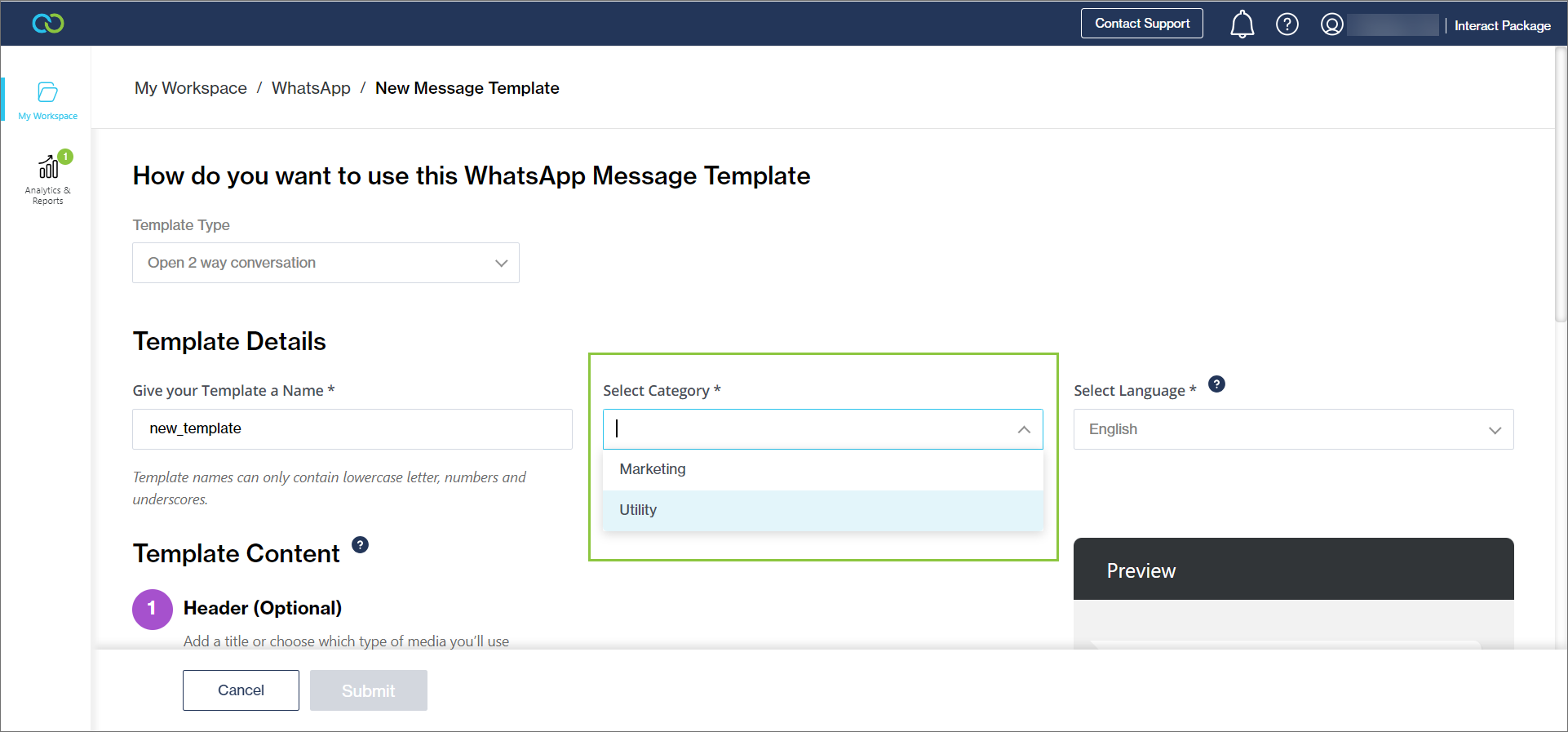
Marketing and Utility template categories **are** supported. The Clickatell Portal now reflects these new category changes implemented by WhatsApp. Going forward, when [adding a new open 2-way conversation template](https://clickatell.gitbook.io/whatsapp-user-guide/channel-capabilities/whatsapp-message-templates/add-message-templates#add-an-open-2-way-conversation-template), you can select either the Marketing or Utility category only.
WhatsApp reduced the number of their template categories.
### Pricing Changes
Meta also introduced a new pricing strategy. The category of the template message used also defines the **conversation category.** Businesses are charged per 24-hour conversation, with different rates by conversation category.
There are three business-initiated conversation categories (all of which require customer opt-in):
* **Utility conversations** – Facilitate a specific, agreed-upon request, transaction, or update to a customer about an ongoing transaction, including post-purchase notifications and recurring billing statements.
* **Authentication conversations** – Enable businesses to authenticate users with one-time passcodes, potentially at multiple steps in the login process (e.g., account verification, account recovery, integrity challenges) *(Not supported by Clickatell currently.)*
* **Marketing conversations** – Include promotions or offers, informational updates, or invitations for customers to respond/take action. Any conversation that does not qualify as utility or authentication is a marketing conversation.
The fourth category is **service conversations** – all user-initiated conversations will be categorized as service conversations, which help customers resolve queries.
{% hint style="info" %}
For more information, see Meta's documentation [here](https://developers.facebook.com/docs/whatsapp/pricing).
{% endhint %}
Rates for business-initiated and user-initiated conversations vary by country or region. See [here ](https://developers.facebook.com/docs/whatsapp/updates-to-pricing)for rate cards.
In general, prices were impacted as follows:
* **User-initiated:** Service messaging rates will remain the same.
* **Marketing:** Generally increasing from today's business-initiated rate.
* **Utility:** Generally decreasing from today's business-initiated rate.
## New Marketing Opt-Out Button
{% hint style="info" %}
## Available on all packages.
{% endhint %}
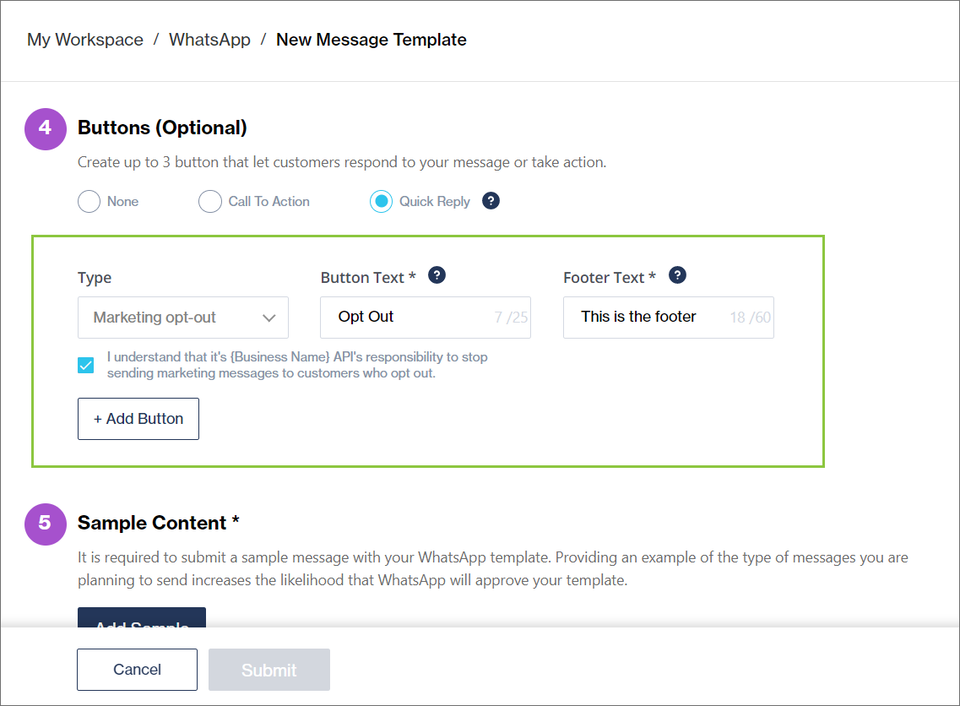
When adding a Marketing template, you now have the option to add a new "[Opt-Out](https://www.facebook.com/business/help/448422200528701)" quick-reply button to give your end-users an easy way to opt out of all marketing messages. This can help reduce blocks from customers and increase the template's [quality rating](https://developers.facebook.com/docs/whatsapp/messaging-limits). Note that it is still your responsibility to actually remove these end-users from your contact list.
New Opt-Out quick-reply button on the Marketing template
## Support for Media Templates
Release date: 13 April 2023
Before, Chat Desk only supported *plain text* message templates via WhatsApp. After this release, the following WhatsApp message templates are also now supported by Chat Desk:
* **Media Message Templates:** Videos, images, documents
* **Interactive Message Templates:** Quick-reply buttons, call-to-action buttons
Header and footer text are also now supported in WhatsApp message templates in Chat Desk.
{% hint style="info" %}
Also see:
* [Setting up message templates ](https://clickatell.gitbook.io/whatsapp-user-guide/channel-capabilities/whatsapp-message-templates/add-message-templates)in the Clickatell Portal.
* [Send WhatsApp message templates](https://clickatell.gitbook.io/chat-desk/agent-chat-desk/send-whatsapp-message-templates) from within Chat Desk.
{% endhint %}
WhatsApp media templates are now supported. Select from your existing message templates as set up via the Clickatell User Portal. Start typing to find a specific template. If no template exists, all the buttons and fields will be greyed out. Contact number will be pre-populated if available.
#### **Media Message Templates**
* **Video**: Agents can now add mp4 files (up to 30 MB) to a message template. A video preview will be displayed so that the agent knows which video they've uploaded.
* **Image:** Agents can upload .jpg or .png images (up to 30 MB) to an image message template.
* **Document media message templates**: Currently, only PDF files are supported in media templates.
Example of a video file uploaded to a template. Preview on the right.
#### **Interactive Message Templates**
There are two types of predefined buttons:
* **Quick Reply:** Allows your end-user to return a simple text message.
* **Call-to-Action:** Allows your end-user to call a phone number (like the '*Call us*' button) and visit a website (like the '*Visit Clickatell Website*' button).
Preview of a message template containing an image and two call-to-action buttons (left) and three quick-reply buttons (right)
#### **Additional functionality supported in message templates**
* **Header text**: You can add a header to a message template. The header is displayed in bold and can have one variable that the agent adds.
* **Footer text**: You can add a footer to a message template (e.g., '*offer applicable while stocks last*' or 't*erms and conditions apply*').
#### Message template preview
Chat Desk also added a preview section for message templates to give agents clear visibility of the message before sending it. This will prevent accidentally sending the incorrect message template.
A preview on the right shows how the message template will display to the end-user. This is an example of a PDF document attached to the message template.
Once a message template is sent, it will form part of the chat history so that agents and supervisors can easily refer back to it.
Below is an example of what a message template containing an image looks like to the agent in Chat Desk after they've sent it to the end-user. There is a clear indication that this message was a template. The media file can be downloaded from the view.
An example of what a message template containing an image looks like to the agent in Chat Desk after they've sent it to the end-user.
## Other Enhancements & Improvements
## Enhancements 🚀
The following **enhancements** were made:
* **WhatsApp Display Name Rejection.** When a client goes to WhatsApp Manager, they should be able to change the WhatsApp display name from there and they will be notified via the notifications tab if their display name change request has been approved or rejected.
* **Display the WhatsApp subscription number in My Purchases -> Subscriptions.** As a Clickatell client with more than one active WhatsApp profile number, the client must clearly indicate the subscriptions applied/linked to each WhatsApp Profile Number and the ability to manage them independently.
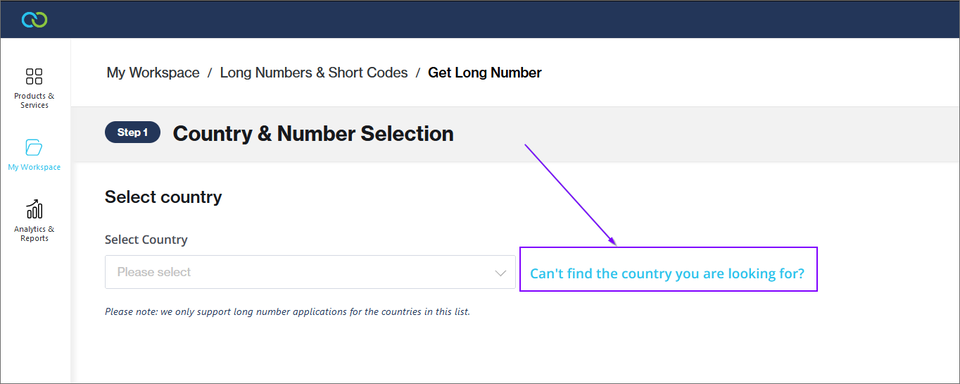
* **Long Number: Hide Additional Country Requests.** Clients can no longer request long numbers if no numbers are available for certain countries. The call to action as shown below has been hidden.
* The following Toll-Free Number status values have been added to the mapper: APPLICATION\_RECEIVED, APPLICATION\_DOWNLOADED, and CANCELLED.
* Clickatell Portal: SMS Report - Added the ability to select the number of items to display on the page.
* SMS: 10DLC - Implemented Campaign Vetting processing changes from Bandwidth.
### Bugs 🐞
The following **bugs** were addressed:
**SMS**
* 10DLC Unverified Brand: The "*Register a Campaign*" button should be hidden.
* API: When Editing a One-Way and Two-Way HTTP API Integration, the "*Description*" field was missing on the Clickatell Portal.
* SMS setup: "*Next*" button was incorrectly disabled.
* Portal: A Clickatell user must be able to edit the *Reply Callbacks* target address.
**WhatsApp**
* Clickatell Portal: WhatsApp customer was unable to upgrade via the portal.
* Templates: New templates in approved status were showing differently on the Clickatell Portal.
* Templates: Business Name was not populated.
* Verification error received but the number still appears.
**Chat Desk & Chat Flow**
* For Chat Desk, the “*Reply Callbacks*” and “*Enable Delivery Notification*" sections on the API details page should not be editable by users.
* For Chat Flow, the “*Reply Callbacks*” and “*Enable Delivery Notification*" sections on the API details page should be auto-populated with the correct URLs, and should not be editable by users.
**Billing and Payments**
* Billing and Payments: Incorrect Voucher Display. If a discount was applied, it should be shown as a percentage and not as a rand value.
* Chat 2 Pay Default Billing Details:
* Added asterisks to all required fields.
* Payment Settings: The user should be unable to save the configuration if *Default Billing Details* is selected and no details are entered.
* Added the email field to the "*Edit Default Billing Details"* box for Clickatell Hosted Checkout. The merchant should be able to update the email address.
**General**
* Portal: Some notifications were not displayed.
* Portal: Billing and Payments - Add asterisks on the Billing Information page and popup modal to indicate required fields.
* Portal: Change subscription options to Cloud-Hosted Subscription options.
* Portal: *Date Range* fields allowed unacceptable values.
* Portal: Breadcrumbs - When a user refreshed their browser, the breadcrumb path was no longer visible.
* Portal WhatsApp redirection issue: An issue was fixed where a client received a console error and failed to be redirected when trying to navigate to WhatsApp from *My Workspace*.
* WACH incorrect tooltip: The incorrect tooltip and help information was displayed in the Portal when purchasing a subscription for WhatsApp Cloud-Hosted.
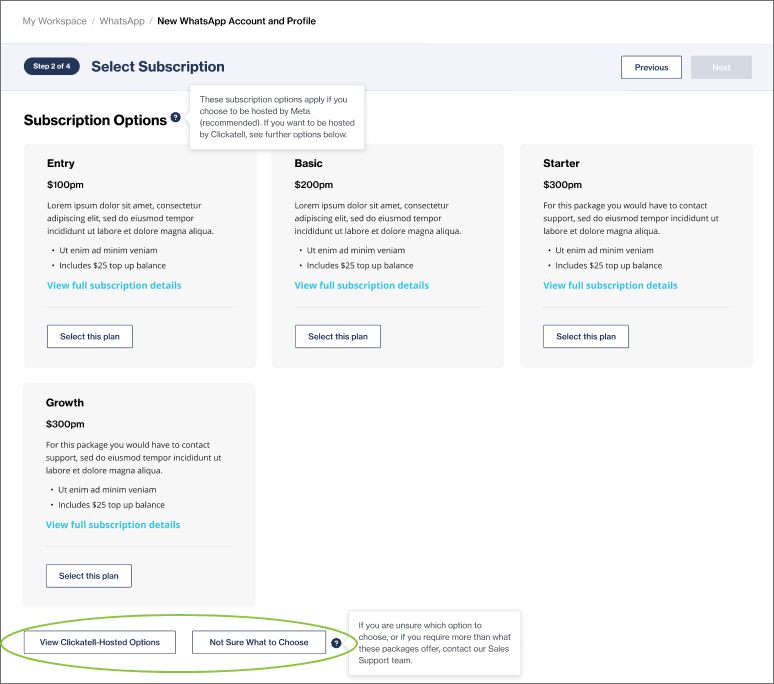
* WACH Profile status and caution banner: When purchasing a WhatsApp subscription, a user can send a query to our Support Team if they are unsure which subscription to choose. After submitting this request, they will now be redirected to the correct screen and see the correct status and caution banner.
## SAML & Social Login
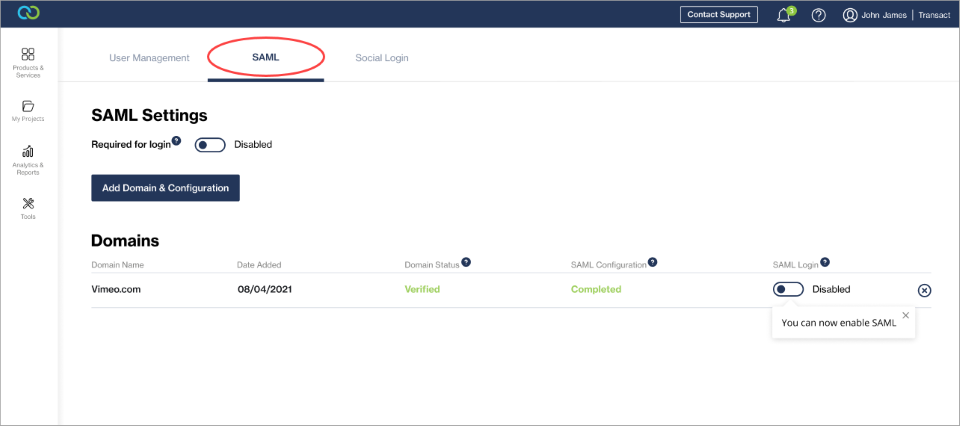
We've launched Social and SAML Login as two additional ways for you to log in to your account.
Previously, you could only log in using an email address and password. Now you also have the ability to sign in using your Google account or via single sign-on using the credentials for the IDP as set up in your Clickatell account. This allows for quicker and easier sign-in without compromising the security of your accounts.
SAML and Social Login can be managed from within the Clickatell Portal by clicking on the account name and selecting "*User Management"* from the drop-down.
Add and configure domains, and enable/disable SAML as a sign-in method for users of the Clickatell Portal.
Enable/disable Google as a sign-in option.
## Authentication Portal Enhancements
We enhanced the experience for users with dormant accounts who try to log in to their accounts again. A reason for the inactive account is displayed, and you'll get prompted to contact Support if you wish to reactivate your account.
We also added additional validation when a client modifies their password to accept passwords with a minimum of 12 characters only (as opposed to 8 previously).
A minimum of 12 characters are required when changing a password.
## WhatsApp Cloud-Hosted API
Release date: 31 March 2023
{% hint style="info" %}
## Available on [all packages](https://www.clickatell.com/clickatell-platform/).
{% endhint %}
We now offer you a choice to use either an On-Premises or Cloud-Hosted solution (with the latter being the recommended option) when you [add a new WhatsApp account](https://clickatell.gitbook.io/whatsapp-user-guide/getting-started/create-a-whatsapp-business-account) via the Clickatell Portal.
When compared to the on-premises solution hosted and managed by Clickatell, Cloud API is a more user-friendly version of the WhatsApp Business Platform. This means the onboarding journey is quicker, and the combination of features and benefits makes Cloud API the best option for small and medium businesses looking for a more cost-effective way to connect with customers who have opted-in to receive messages from them on WhatsApp.
{% hint style="info" %}
\* See [this FAQ](https://www.clickatell.com/help-center/whatsapp/general-whatsapp/what-is-the-difference-between-the-whatsapp-cloud-hosted-api-and-the-on-premises) for a comparison between the On-Premises and Cloud-Hosted APIs.
* For more information, please view Meta's FAQs [here](https://developers.facebook.com/docs/whatsapp/cloud-api/support/faqs).
{% endhint %}
When setting up an API in the Clickatell Portal, the Cloud-Hosted API will be the default option displayed. However, you can select the On-Premises (Clickatell-Hosted) option or contact Clickatell for more information on which option to select.
## NEW: Integrations feature
Release date: 22 March 2023
{% hint style="info" %}
## Available on [**Interact** ](https://www.clickatell.com/products/interact/)and [**Transact** ](https://www.clickatell.com/transact/)packages.
{% endhint %}
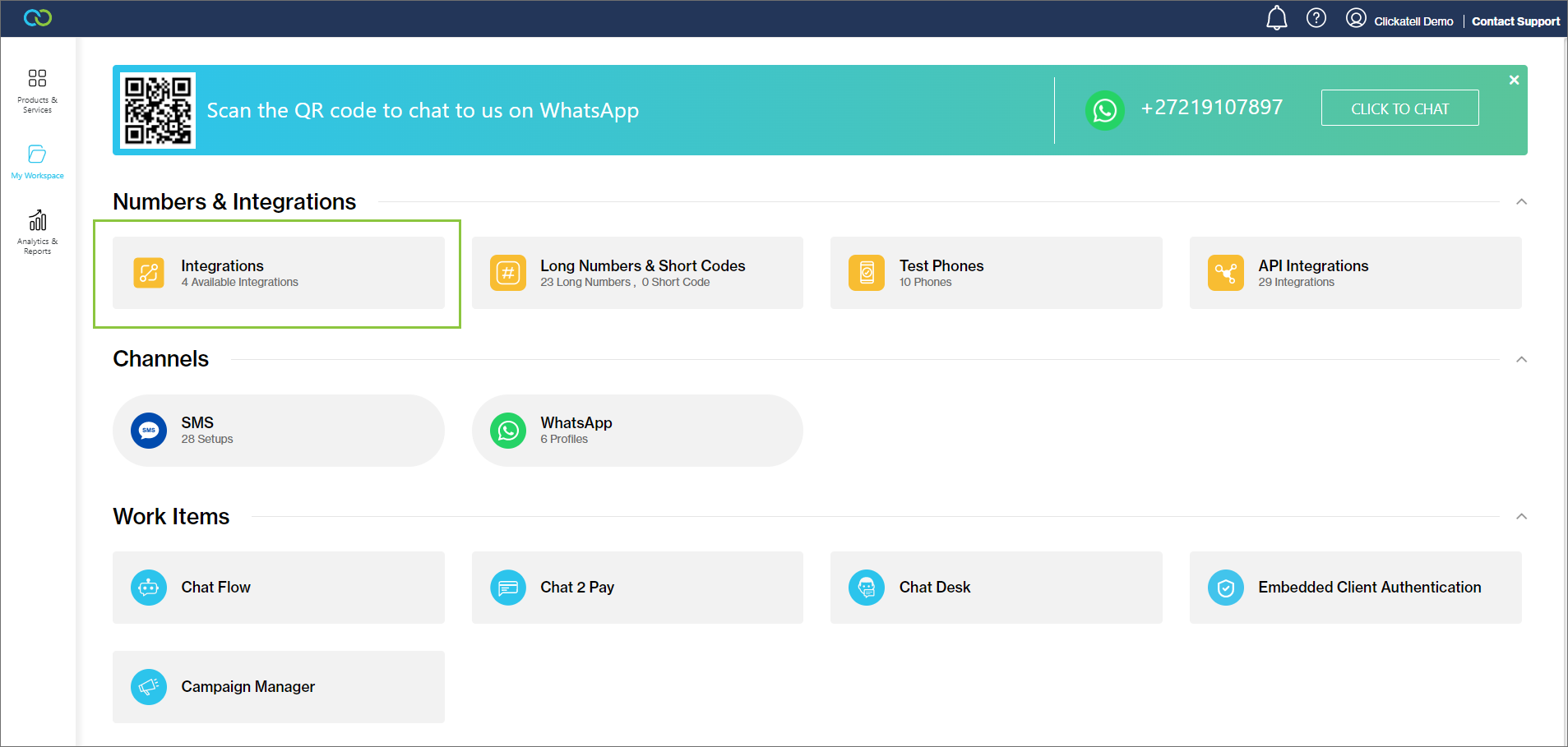
*Integrations* provides you with a self-serve, no-code way to integrate third-party applications in just a few minutes. Once the integration is [set up in the Clickatell Portal](https://clickatell.gitbook.io/integrations/getting-started/adding-a-new-integration), you can use them in your automated workflows ([Chat Flow](https://clickatell.gitbook.io/flow/integrations/integration-nodes)), creating a more robust chat journey. *Integrations* mitigates confusion, data loss, and inconsistencies across applications, resulting in more efficient customer service and happier customers.
With integrations, you can:
* Perform various frequently used operations (like creating a ticket in Zendesk or adding a Sales Lead in Salesforce) automatically via Chat Flow.
* Keep your customer data in sync across all these mentioned 3rd-party applications.
* Fetch data from other applications in your tech stack and use the data in Chat Flow.
* Push your chat support data (from Chat Flow) to other applications in your tech stack.
### What 3rd-party apps can I integrate with Clickatell?
Currently, we support the following 3rd-party apps:
* Salesforce
* Shopify
* Zendesk Sell
* Zendesk Support
Please refer to the relevant section of this guide for more information and integration steps for each.
### How do I use Integrations?
1. [Configure the integration](https://clickatell.gitbook.io/integrations/getting-started/adding-a-new-integration) in your Clickatell Portal
2. Use an [Integrations node](https://clickatell.gitbook.io/flow/integrations/integration-nodes) in your workflow in Chat Flow
### Benefits of using Chat Hub integrations
* **Happier and more productive customer support agents:** Customer support agents often need to open multiple browser tabs to support a single customer. Some customer information may be present in Salesforce, whereas other info is in Hubspot, or the customer tickets might be in Zendesk. With *Integrations*, all this information will be passed to Clickatell chat applications so that the chatbot or agents have easy access to more holistic customer information.
* **Customer data stays updated:** With *Integrations*, you can keep data across your SaaS applications up to date. This makes data analysis, interpretation, and application easier and more accurate as it removes the silos between these applications.
## Custom Button Text (WhatsApp)
Release date: 10 February 2023
{% hint style="info" %}
## Available on [**Interact** ](https://www.clickatell.com/products/interact/)and [**Transact** ](https://www.clickatell.com/transact/)packages.
{% endhint %}
You can now customize the button text displayed to end-users when using [WhatsApp list messages](https://clickatell.gitbook.io/flow/channel-capabilities/use-whatsapp-with-chat-flow/whatsapp-interactive-messages#list-messages).
Customize this button's text when using WhatsApp List Messages
When [configuring your display type](https://clickatell.gitbook.io/flow/channel-capabilities/configure-channel-display-type), select the *Customize* icon next to *List Message*.
Customize the button text when using WhatsApp List Messages
Edit the button text. It can be up to 20 characters long and defaults to "Options".
Add your custom button text and click Done. Save your changes.
## New workflow nodes
Release date: 8 March 2023
{% hint style="info" %}
## Available on [**Interact** ](https://www.clickatell.com/products/interact/)and [**Transact** ](https://www.clickatell.com/transact/)packages.
{% endhint %}
We've added four new node types for flow-builders to use when building out their workflows:
1. Dynamic List node
2. Set Variables node
3. Wait For Callback node
4. Integration node
More detail about each new node type is given below.
### Dynamic List node
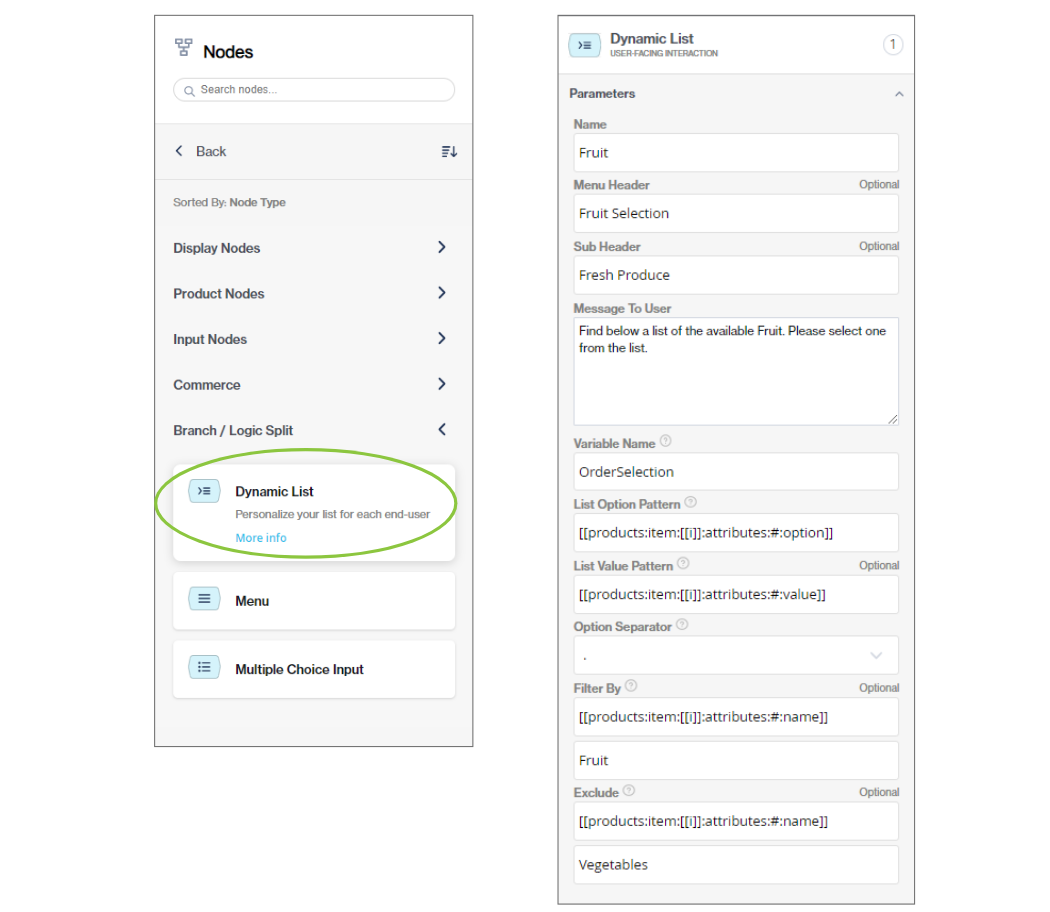
The [Dynamic List node](https://clickatell.gitbook.io/flow/user-facing-nodes/branch-logic-split/menu-nodes-dynamic-list) allows the flow-builder to display a personalized list of options to an end-user.
The options shown to end-users in the list are retrieved from the API response.
Under the User-Facing nodes, drag-and-drop the Dynamic List node onto the canvas and configure its details.
### Set Variables node
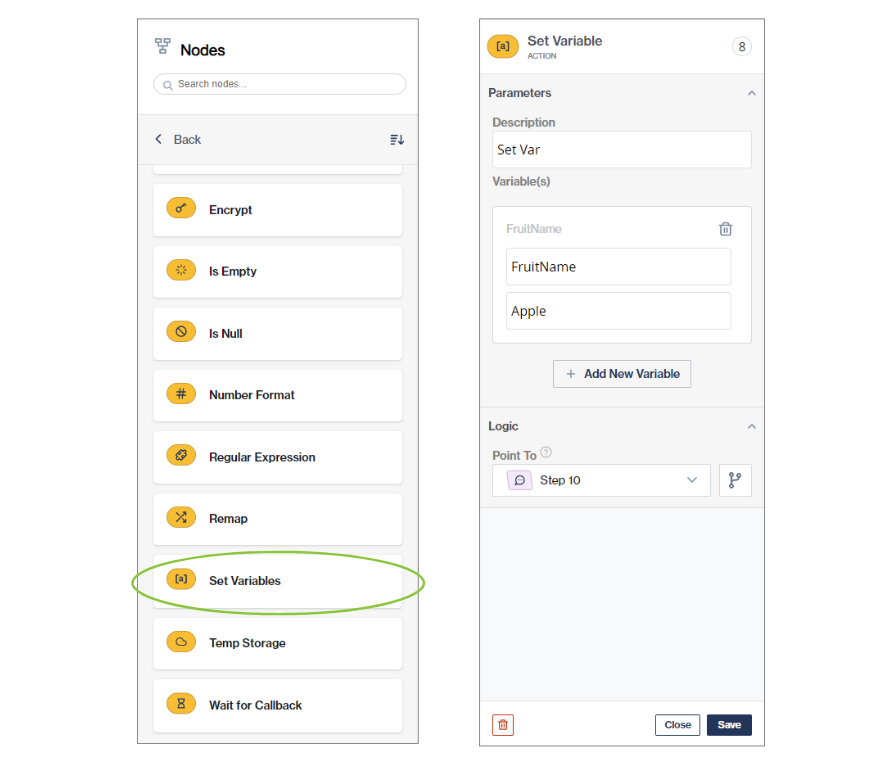
The [Set Variables nod](https://clickatell.gitbook.io/flow/action-nodes/action-nodes-set-variables)e allows the flow-builder to create variables that can be used (and reused) in a given session. You can set multiple variables using the same Set Variables node.
These variables will only be available for the duration of the session.
This is an Action node and is not displayed to the end-user.
Under the Action nodes, drag-and-drop the Set Variables node onto the canvas and configure its details.
### Wait For Callback node
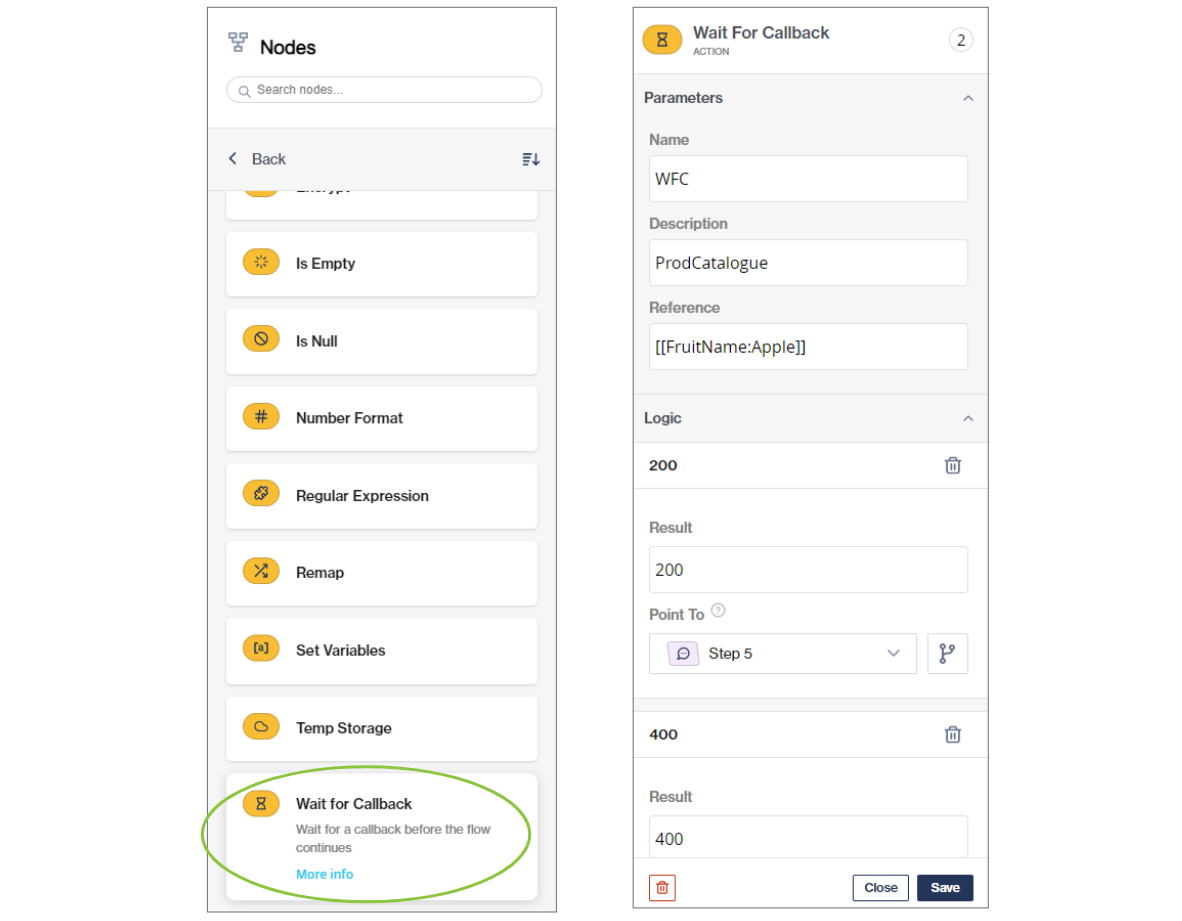
The [Wait For Callback node](https://clickatell.gitbook.io/flow/action-nodes/action-nodes-wait-for-callback) is used to facilitate an asynchronous process external to Chat Flow and continue the flow when a callback is received.
This node will block the flow until a callback is received or the session times out.
This node has to used with the Set Variables node.
Under the Action nodes, drag-and-drop the Wait For Callback node onto the canvas and configure its details.
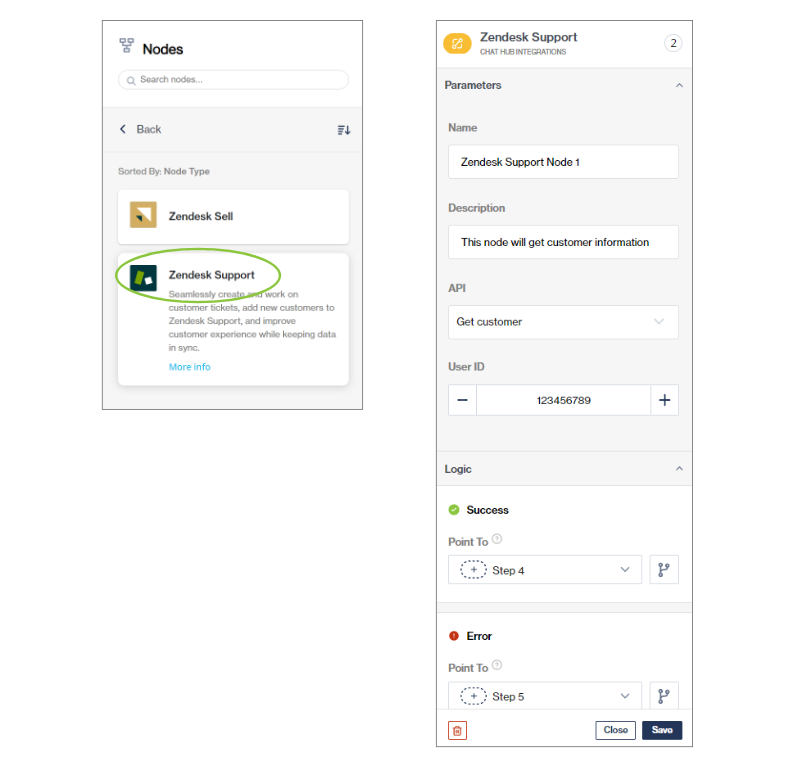
### Integration node
You can integrate your Chat Flow application with the following 3rd-party apps using the [Integration node](https://clickatell.gitbook.io/flow/integrations/integration-nodes):
* Salesforce
* Shopify
* Zendesk Support
* Zendesk Sell
Note that these integrations first need to be set up in the Clickatell Portal before they'll be available in Chat Flow.
Under the Integrations nodes, drag-and-drop the 3rd party application node onto the canvas and configure its details.
## Canned Replies
Release date: 16 February 2023
{% hint style="info" %}
## Available on [**Interact** ](https://www.clickatell.com/products/interact/)and [**Transact** ](https://www.clickatell.com/transact/)packages.
{% endhint %}
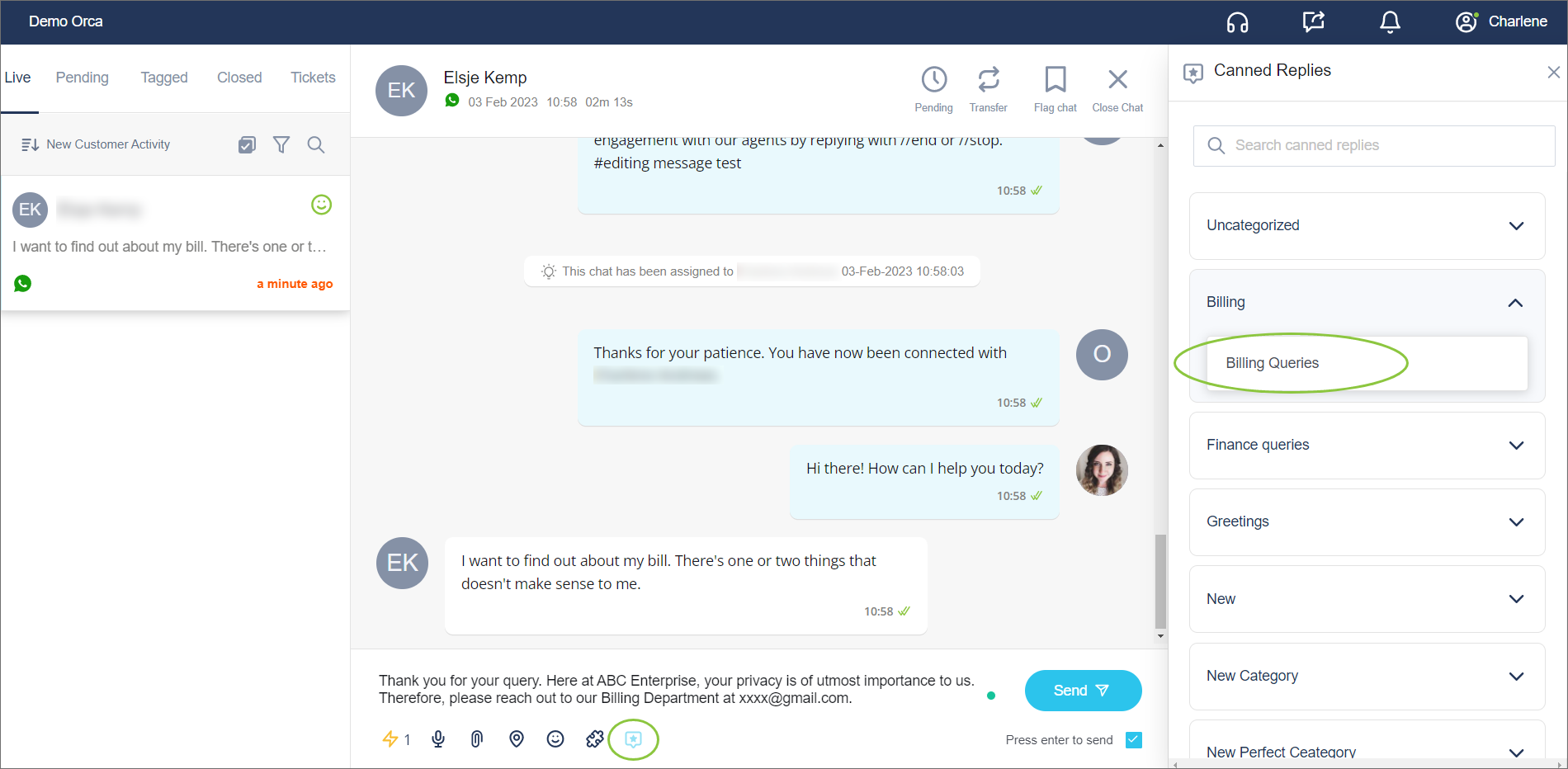
As a Supervisor, you can create pre-written replies that agents can use in the chat environment to save time in resolving the tickets and ensuring consistency of replies for important queries.
All canned replies are added by Supervisors/Admin in the Dashboard under "[*Settings*](https://clickatell.gitbook.io/chat-desk/chat-desk-dashboard/settings/canned-replies)".
Supervisors can add as many canned replies as they wish. They can also edit and delete canned replies.
Canned replies can be "uncategorized" or assigned to specific categories. Categories are also set up and managed by the Supervisor/Admin.
Add, delete, edit categories.
Once set up by the Supervisor, all categories and canned replies are automatically [available for agents to use ](https://clickatell.gitbook.io/chat-desk/agent-chat-desk/chat-capabilities/use-canned-replies)in the Agent Desk while engaging with end-users.
Edits made by Supervisors pull through to the canned replies in the Agent Desk. Deleted canned replies are removed from the Agent Desk so that they can no longer be used by agents.
{% hint style="success" %}
For more information, see:
* [Adding & managing canned replies & categories](https://clickatell.gitbook.io/chat-desk/chat-desk-dashboard/settings/canned-replies)
* [Using canned replies in the Agent Desk](https://clickatell.gitbook.io/chat-desk/agent-chat-desk/chat-capabilities/use-canned-replies)
{% endhint %}
## Other Enhancements & Improvements
Release date: 23 January 2023 & 16 February 2023
### New Authentication Portal
We've released a new and much faster customer sign-in and authentication page for the Clickatell Portal. This is a huge win, not only for a frictionless user journey but also from a security perspective.
### Enhancements 🚀
The following **enhancements** were made on the Clickatell Portal:
* Chat Desk: Address *1 Free seat* confusion
* Chat Flow & Chat Desk: Purchase/upgrade subscription package improvements
* *Explore* Page: WA and SMS buttons are not intuitive
* SMS: Update text for the Long Number box; Update query to retrieve TFNs and Long Number
* SMS: Provide the user with more info about Short Code and Long Number
* SMS: State Long Number/Short Code country limitation
* SMS: Remove countries and add supporting text to Long Number Request forms
* SMS: Short Code - Provide more assistance for the various contact screens
* SMS Short Code: Update Short Code confirmation page with dynamic durations based on country
* SMS: Get Short Code - add tooltip
* SMS 10DLC: Change the campaign status from '*Approved*' to '*Registered*'
* SMS 10DLC: Update 10DLC campaign pricing
* SMS HTTP API: Provide a better description for the '*Protect my account from fraud*' feature (whitelisting IP addresses)
* WhatsApp Templates: Show loader when loading templates
* WhatsApp Template: Add a *cancel* button to the "*Create new* *template"* feature
* WhatsApp OBO: Align with WAES clients - *Manage API screen*
* WhatsApp: Add two new message types to the reports dropdown
* Clickatell Portal: Fix duplicate creators
* Active channels should link to the *Channel* page in *My Workspace*
* Implement standard email validation across all email fields
* Implement the Cache Service Worker Code into Unity
* Billing Info: Mark the required fields clearly
### Bugs 🐞
The following **bugs** were addressed on the Clickatell Portal:
* *My Workspace: Click to Chat* button in the banner does not work
* *My Workspace:* SMS card not displaying the correct number of API setups
* *My Workspace:* Incorrect popup displayed when user activates the Product/Channel
* SMS: Redirecting to "*My Workspace*" instead of *Step 4: API Details & Testing (Optional)*
* SMS: Button '*Update Changes*' disabled on changing HTTP Setup from Production to Sandbox
* SMS: Button '*Update Changes*' disabled on changing reply callback and two-way settings
* SMS TFN: Under subscription details, the payment plan is redundant
* SMS: Setup details going past header
* SMS, WhatsApp - On clicking the button '*Manage in My Workspace*' should navigate to the *My Workspace* page
* WhatsApp Embedded Signup: Requesting a subscription fee when a client has a license.
* WhatsApp Subscription: Incorrect message after license renewal
* WhatsApp Embedded Signup: Waiting screen to verify the number does not appear
* One API: Send WhatsApp Message: Analytics Report - Data is not received after generating the report
* One API: No success banner when copying API key to clipboard
* One API: Unable to send a WhatsApp with WAES API
* One API: After changing the setup type from Sandbox to Production and saving, the "*Update changes*" button should be disabled
* Transaction Lookup Tool: *Search by field* behavior error
* Transaction Lookup Tool: Search timeframe - no '*Yesterday*' option
* Test Phones: Menu not working in Portal
* Test Phones: *Add* button not disabled after being canceled
* User Management: *Save* button becomes disabled on role click
* User Management: Address confusing '*+Add Role*' button
* Account Details: *Account Name* field value should populate by default
* Account details: Pop-up bug
* Account details: Contact Number Form validation fails before the user starts interacting
* Account details: Title hides under inputs during page scrolling
* Billing & Profile: Change Email Address - "*Success Email for address confirmation*" message not displayed and the user is redirected to the signup page.
* Billing Details: By default, an error message is displayed in the *Contact Number* field
* Profile & Billing: After changing the password, not getting a success message "*Your password was changed successfully*"
* Analytics & Reports: Update menu name from 'Chat2Pay' to 'Chat 2 Pay'
* Analytics & Reports: Sent message time returns incorrect date format
* Reporting: Received details report - *Replied to message* ID data is not returned in response
* Reporting: Chat 2 Pay report loads for too long before rendering
* Registration: Validation error message not displayed on entering special characters in the *First Name* and *Last Name* fields
* Registration: Getting 401 Error Status - Not Authorized
* UI Improvements (loaders)
## New Chat Desk Reports in Clickatell Portal
Release date: 9 January 2023
{% hint style="info" %}
## Available on [**Interact** ](https://www.clickatell.com/products/interact/)and [**Transact** ](https://www.clickatell.com/transact/)packages
{% endhint %}
This comprehensive reporting dashboard replaces the previous reports and provides our Chat Desk clients with detailed information about their product usage and performance from right within the Clickatell Portal.
The reports include a *Definitions and Rules* page and are downloadable. The reports also boast a super snazzy and modern look, aligning with the look and feel of the rest of the Portal, giving you a pleasing and consistent experience throughout.
The report gives our clients easy access to all the relevant information to make important strategic business decisions and is an important milestone in our journey to renew and improve all our reporting capabilities in the Clickatell Portal.
Some highlights of the Chat Desk report are discussed in more detail below.
### Full Analytics
The landing page gives a high-level overview of **Chat Desk performance** by displaying key performance metrics that can be filtered by *date* and *department*.
These metrics include:
* Number of live chats, tickets, and closed chats
* Total number of active end-users, split into new users vs. returning users
* Average first response time and handle time
* Daily average number of chats
* First chat resolution rate
* Repeat chat rate
* Transfer rate
Hovering over each of these blocks displays a definition of the metric. You can also use the *Definitions and Rules* button at the top for more details.
Filter the report on date and department. Reports can also be downloaded.
Scrolling down, you'll also find visual representations of these and other metrics. Some examples are shown below.
### Agent Detail Report
The Agent Detail report provides an in-depth view of **agent performance**. The report can be filtered by *date*, *time of day*, and *department*.
It displays key performance metrics that include the following:
* Number active agents
* First chat resolution rate
* Repeat chat rate
* Average response time and handle time
* Agent-to-chat ratio
* Transfer rate
Hovering over each of these blocks displays a definition of the metric. Use the *back (arrow)* button at the top to return to the landing page.
View agent-specific metrics on the Agent Detail report. This can be downloaded. Return to landing page using the arrow button.
Scrolling down, you'll also find visual representations of these and other metrics. Some examples are shown below.
See full details per agent in table format.
## WhatsApp Commerce Feature
{% hint style="info" %}
## Available on [**Transact** ](https://www.clickatell.com/transact/)package.
{% endhint %}
Meta recently introduced new functionality whereby businesses can present and showcase their products to their customers via the WhatsApp channel. This new capability allows for the following:
* You can upload your inventory (contained in a *catalogue*) to your Facebook Business Manager Commerce Platform.
* You can connect this catalogue to your WhatsApp Business Account (WABA).
* Once the catalogue is uploaded, you can use the new Single- and Multi-Product message types to present products to your end-users:
* **Single-Product Messages**: Messages display a single item from your business's inventory.
* **Multi-Product Messages**: Messages allow for a selection of up to 30 items from your business's inventory.
* End-users can interact with your business to get more information about your products.
Clickatell now supports this WhatsApp Commerce feature via our [Chat Flow](https://clickatell.gitbook.io/flow/overview) application!
#### How does it work?
You must first upload your inventory onto the Facebook Business Manager Commerce Platform ([see how](https://www.facebook.com/business/help/1275400645914358?id=725943027795860)). Once uploaded, they can use the new *Multi*- and *Single-Product* message types to present your inventory to end-users who will have the option to add items to a cart and submit the order to your business.
The images below indicate how a catalogue is presented to your end-user in WhatsApp.
### Linking a product catalogue to Chat Flow
After you've set up your catalogue in the Facebook environment, you can reference it from within Chat Flow as part of a workflow.
We've introduced a new *Multi-Product* node in Chat Flow that the flow-builder can configure to display up to a maximum of 30 products from your catalogue to the end-user at a time *(a limitation enforced by Meta)*. The flow-builder can use the *Multi-Product* node multiple times in a flow, as long as all the products they refer to are from the same catalogue.
To 'link' the catalogue with the node, you have to add the *Catalogue ID* to the node (created when uploading the catalogue onto Facebook Business Manager).
*Product IDs* (to reference the specific products from the catalogue) can be added in two different ways:
* **Dynamic** - the flow-builder can use an API call to fetch the product IDs from your management system before using the *Multi-Product* node and use these IDs as variables in Chat Flow.
* **Predefined** - the flow-builder can manually add the product IDs to the node (i.e., "hard-coded").
**Note:** In Phase 1, we've only implemented the *Multi-Product* node. In Phase 2, we'll also implement a *Single-Product* node.
### Receiving the "Cart Order" or "Ask a Product Question" messages in Chat Flow
As part of the WhatsApp Commerce implementation, Chat Flow have to support two new message types. The "Checkout" message and "Ask a Product Question" message.
**"Checkout" message**
When the end-user submits their cart from within WhatsApp, Chat Flow receives this new message type that contains additional content like the SKU (product ID), quantity, and price per item as part of the payload. Chat Flow then calculates the order total to be used when the end-user makes a payment via our Chat 2 Pay services. Once Chat Flow receives a successful payment status back from Chat 2 Pay, we'll pass the order confirmation to you for processing and fulfilment.
**"Ask a Product Question" message**
End-users can engage with you and ask questions about your products. As part of your "WhatsApp Commerce onboarding" process, Chat Flow will create a placeholder "Ask a Product Question" flow, allowing the flow-builder to build out the experience and behavior you want. For example, you may want to direct these questions to your FAQ bot first, or you may prefer adding a Chat Desk node and transferring the end-user to a live agent to answer product-related questions.
For both of the above, the flow-builder can build out and personalize the end-user experience according to your requirements.